Integrated Security Systems: 2026 Engineering Guide

What if the weakness in your security strategy isn’t a missing device, but the gaps between the systems you already have? Integrated security systems for commercial properties connect surveillance, access control, and relevant building data so teams can review related events together instead of switching between disconnected platforms. That difference matters when alerts interrupt operations, vendors have separate responsibilities, or a growing property has outpaced its original setup.
Security tools should make daily operations clearer, not more complicated. Achieving that takes more than adding hardware: it requires an engineered plan that connects security workflows with relevant building data, defines how systems should respond, and allows for future growth. For Texas commercial properties, a coordinated approach can reduce operational friction and give teams a more useful view of activity across a site.
This guide explains how to assess existing systems, plan a unified dashboard, and connect surveillance and access control with building automation where appropriate. It also covers practical design choices for managing alerts, assigning responsibility, and supporting long-term value through intelligent automation. The goal is a cohesive technology environment that helps people make informed decisions without adding unnecessary complexity.
Key Takeaways
- Assess how surveillance, access control, and intrusion detection can share relevant information in a coordinated system.
- Use integrated security systems for commercial properties to bring security events and relevant building data into a clearer view.
- Map facility workflows and operational needs before selecting equipment, so the design fits the property rather than forcing processes to adapt.
- Plan for Texas site conditions and future growth, including outdoor equipment requirements and oversight across multiple locations.
- Consider how custom software and AI business process integration could connect physical security data with broader building operations.
What Are Integrated Security Systems for Commercial Properties?
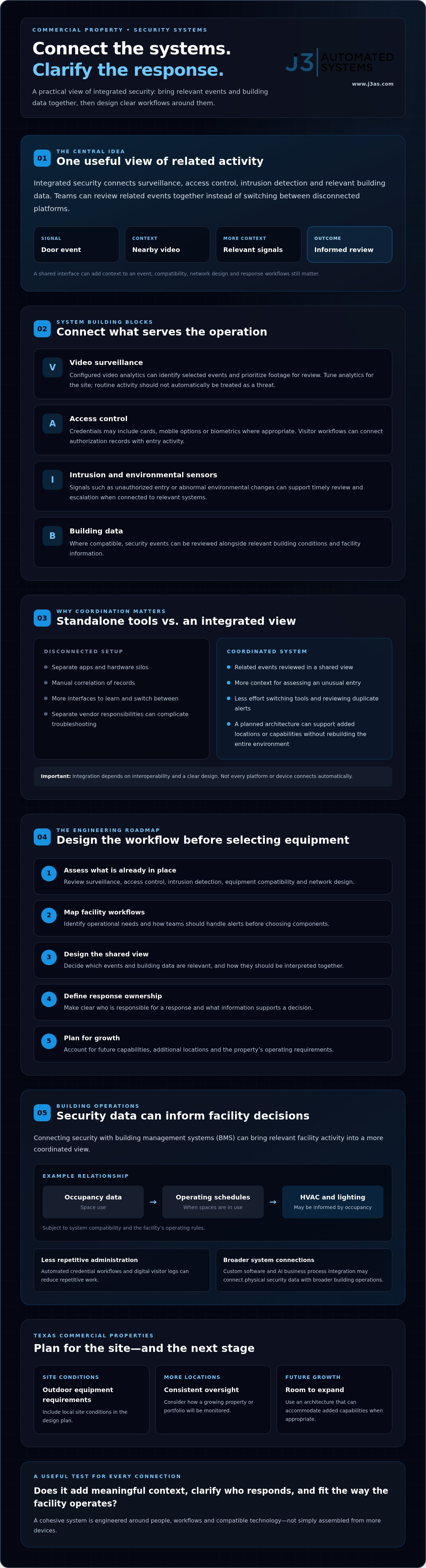
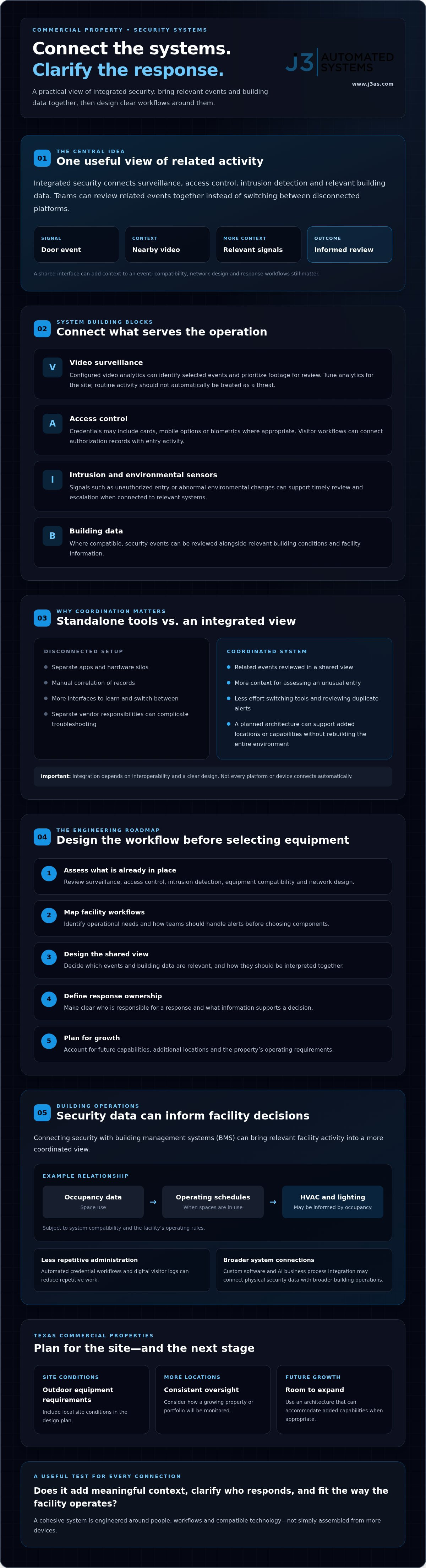
An integrated security system connects surveillance, access control, intrusion detection, and relevant building data so teams can interpret events in context. Rather than reviewing a camera feed, access log, and alarm panel separately, staff can use a shared interface to bring related information together. Software such as Physical Security Information Management (PSIM) can help coordinate data from different security applications and devices. How well the system works also depends on compatible equipment, network design, and clearly defined response workflows.
This approach makes security part of a wider intelligent-building environment instead of a collection of reactive devices. For example, a door event can be reviewed alongside nearby video and other relevant signals, giving a facility manager more context when deciding whether follow-up is needed. A shared view can also reduce the effort of switching between tools, reviewing duplicate alerts, and reconstructing an incident afterward.
Integrated vs. Standalone Security Models
Standalone systems may be simpler to acquire initially, but separate apps and hardware silos can add work over time. Staff may need to learn multiple interfaces, correlate records manually, and coordinate with different vendors when something fails. Integration is useful when systems share meaningful events. For instance, pairing an access-control event with nearby video can give staff more context for assessing an unusual entry than either record provides on its own.
Compare more than the initial hardware cost. Consider the time and effort needed to operate, maintain, and expand the system. A planned architecture can make it easier to add locations or capabilities without rebuilding the entire environment. That depends on interoperability and a clear design, not on an assumption that every platform or device will connect automatically.
The Core Pillars of a Unified System
Choose components to meet defined operational needs, rather than accumulating features that work in isolation. Depending on the property and system compatibility, a unified design may bring together:
- Intelligent video surveillance: Video analytics can identify configured events and prioritize footage for review, giving cameras a role beyond recording. Select and tune analytics for the site so routine activity or unusual movement is not automatically treated as a threat.
- Access control: Credentials may include cards, mobile options, or biometrics where appropriate. Visitor workflows can connect authorization records with entry activity, giving staff a clearer account of who accessed a space and when.
- Intrusion and environmental sensors: Sensors can report conditions such as unauthorized entry or abnormal environmental changes. Connected to relevant systems, these signals can support timely review and escalation.
For integrated security systems for commercial properties, the key engineering questions are how each event should be interpreted, who owns the response, and what information belongs in the shared view. Clear operational rules turn connected technology into a manageable building system.
The Benefits of Engineering Intelligence into Your Facility
Security is more useful when it informs facility operations as well as responses to alerts. Integrated security systems for commercial properties can connect access events and visitor records with building data, giving facility teams a clearer picture across a site or multiple locations. Automated credential workflows and digital visitor logs can reduce repetitive administration. A consistent view also helps managers compare events without switching between disconnected tools.
Connecting security with building management systems (BMS) can support a more coordinated view of facility activity. For example, occupancy data may help inform HVAC and lighting schedules in spaces that are in use, subject to system compatibility and the facility’s operating rules. Security events can also be reviewed alongside relevant building conditions. Explore how commercial building management systems in Texas fit into a broader intelligent-building strategy.
Operational ROI and Cost Mitigation
Operational ROI is the value a facility gains from improved workflows, reduced manual effort, and better use of building resources compared with the investment required to engineer and operate an integrated system. It goes beyond equipment costs. For example, it may include staff time spent reviewing alerts, managing credentials, and reconciling records.
Multi-sensor verification can give teams more context before they respond to an event. Carefully designed and tested detection rules may also help limit nuisance alerts, but they cannot guarantee that false alarms or related penalties will be avoided. Similarly, connecting occupancy information with HVAC and lighting controls can support more deliberate energy use. Results depend on schedules, system configuration, and how the building is used.
Verified protection protocols and clear records may help a business explain its risk controls during an insurer’s review. Premium decisions remain with the insurer, so no system should be treated as a promise of lower rates.
Risk Management and Compliance
Requirements vary by business, the data it handles, and its location. Instead of assuming one set of “2026 Texas standards” applies to every property, identify relevant privacy, security, and building obligations with qualified advisers. Where applicable, plan for data minimization, defined access permissions, and documented retention practices.
For finance, healthcare, and other high-security environments, structured event logs can make it easier to review who accessed a space and when. Resilient networking, controlled system access, and planned updates also matter because connected physical systems introduce cyber risks alongside operational benefits. As managed IT and cybersecurity advisors like Trinity Networx, LLC frequently note, securing connected infrastructure requires rigorous network monitoring, credential management, and proactive support. CISA’s guidance on critical infrastructure security and resilience offers a broader framework for considering continuity and risk.
For properties in the San Antonio and Austin corridors, a project-based engineering approach can align security, BMS, and software workflows under one accountable design and commissioning process. Consider integrated building engineering when planning how those systems should work together.
The Engineering Roadmap: Design vs. Mere Installation
A device can be installed correctly and still fail to support the way a commercial property operates. Hardware-first projects often begin with a product list. Engineering-first projects begin by mapping people, spaces, workflows, and response decisions. That distinction matters in complex or mixed-use environments, where different parts of one building may have different access rules, visitor processes, and operational needs.
For integrated security systems for commercial properties, discovery should come before equipment selection. Document where employees and visitors encounter delays, how credentials are issued and removed, which alerts require action, and what facility teams need to see across locations. These details become the design criteria. Without them, an off-the-shelf configuration may leave workflow gaps or create another silo instead of resolving existing friction.
Map the Workflows Before the Technology
Start with the physical layout and the digital processes around it. Trace a visitor’s arrival from check-in to authorization, or an employee’s access change from approval to credential update. In mixed-use properties, assess how commercial and residential areas share entrances, networks, and building operations, then define appropriate boundaries. Plan a resilient network backbone for the connected systems and expected data loads. Custom software or internal tools may also help link security events with administrative workflows when existing platforms do not meet the need.
Procurement, Integration, and Commissioning
Once requirements are clear, evaluate equipment and platforms for compatibility, supportability, and fit with the site architecture. Video systems with high-resolution streams require network capacity planned around the intended cameras, recording approach, and simultaneous use. A label such as “4K-ready” alone does not establish that the network can perform reliably.
Commissioning tests the system in its actual environment. Verify device communication, permissions, event handling, and user workflows. Calibrate analytics against site conditions, including changing light, reflections, and routine movement, so configured detection rules are useful rather than a source of avoidable alerts. This is where the design is tested in operation and issues can be identified before handoff.
For a broader view of how planning shapes protection, see commercial security system design in Texas. The most accountable project structure aligns design, procurement, installation, and commissioning under one coordinated roadmap. A single responsible team can carry the original requirements through each stage, document decisions, and establish a foundation that can adapt as the property changes.
Regional Considerations for Texas Commercial Properties
Texas properties place specific demands on security design. Outdoor equipment in San Antonio and Austin must contend with heat, humidity, sun exposure, and changing weather. Facilities across the I-35 corridor may also need a consistent operating view as locations are added. Integrated security systems for commercial properties should account for these conditions at the design stage, rather than treating regional needs as installation details.
Weather-Hardened Infrastructure
Standard hardware may fail in the Texas climate if its operating limits, placement, and protection are not suited to local exposure. For outdoor cameras and access-control devices, check manufacturer-rated temperature and environmental limits, enclosure ventilation or thermal management, sun exposure, and mounting locations. Route and protect low-voltage wiring appropriately, especially where moisture, heat, or physical exposure could compromise connections. Select equipment for actual site conditions and system requirements, not from a generic checklist.
Network resilience deserves attention beyond urban sites, too. Rural or rapidly developing areas may have different connectivity options and infrastructure constraints. Assess available network paths, expected bandwidth, and how security operations should continue if a connection is interrupted. For businesses expanding along I-35, a centralized interface can support consistent oversight, while each location’s design still reflects its building layout and network conditions.
Local Compliance and Accountable Support
Texas does not use one statewide building code for every municipality; local jurisdictions adopt and amend model codes. Fire alarm systems also have distinct life-safety requirements. The Texas State Fire Marshal’s Office licenses and enforces fire alarm regulations, which must comply with NFPA 72; annual inspections are required for most commercial properties. Confirm current requirements with the relevant authority and qualified professionals before coordinating security with life-safety systems.
A project partner familiar with the San Antonio and Austin commercial corridors can help align site discovery, installation planning, and commissioning with each property’s conditions. Don’t assume remote monitoring or AI-driven diagnostics are included in a system. Define which capabilities are needed, how alerts are handled, and who is responsible for follow-up. Mixed-use developments may also benefit from a carefully designed network backbone. See how high performance residential networking can inform connectivity planning across residential and commercial spaces.
For projects in San Antonio, New Braunfels, Seguin, Bandera, Boerne, Austin, and San Marcos, bring climate exposure, local code review, connectivity, and multi-site operations into the same engineering conversation. Review integrated security and building systems planning as part of a coordinated design, procurement, and commissioning roadmap.
The J3 Approach: Engineering Accountable Automation
Security works best as part of a broader intelligent-building strategy. J3 Automated Systems approaches commercial technology as a connected roadmap, aligning security, building management, networking, and software with the way a facility operates. The goal is not to automate every decision. It is to make relevant information easier to interpret, define ownership for automated actions, and reduce the work of moving between disconnected systems.
For integrated security systems for commercial properties, this can mean connecting physical security data with carefully designed business workflows. Learn how AI business process automation can support repeatable tasks while keeping decisions traceable to an accountable person or policy. Any automation should be scoped to the available data, required permissions, and response approved by the organization.
From Security Data to Business Intelligence
Occupancy information may help facility teams understand how spaces are used and coordinate HVAC or lighting schedules through compatible building systems. That information can support planning and help identify opportunities to reduce utility waste, but outcomes depend on data quality, system configuration, and operating practices.
For organizations managing several properties, a custom web app or internal dashboard can bring selected information into a more coherent view. For example, an interface could present authorized access activity and relevant building status across locations, subject to system compatibility and carefully defined user permissions. Explore how custom web apps in San Antonio can support operational oversight without forcing every team into the same off-the-shelf workflow.
Build a Roadmap Before Automating
A considered project begins with discovery: clarify current systems, business processes, pain points, data access, and the outcomes the organization wants to measure. From there, a project team can map a phased transition from legacy tools to a bespoke digital backbone, identifying what can be integrated, what may need replacement, and how commissioning will verify the design. J3’s project-based engineering and installation model brings design, procurement, and commissioning under one accountable team.
To explore a commercial integration project, discuss a commercial automation discovery session with J3 Automated Systems. A focused discussion can help establish the facility’s priorities, existing technology, and a practical next step toward a more connected building.
Build a More Connected Path Forward
Effective integrated security systems for commercial properties depend on more than connected devices. They need a clear engineering plan, workflows designed around the property, and thoughtful coordination between security, networking, and building management systems. When these elements work together, teams can move from managing disconnected tools toward a more coherent view of facility operations.
Plan before selecting technology, account for the conditions at each Texas site, and define who is responsible for carrying the design through commissioning. J3 Automated Systems brings one accountable team to design, procurement, and commissioning, with services spanning AI and BMS integration and a focus on commercial projects across Texas.
For a project-based approach tailored to your facility, contact J3 Automated Systems to discuss your commercial automation project. Start with an assessment of the systems you have, the workflows you need to support, and the next step toward a more connected building.
Frequently Asked Questions
What is the difference between integrated and unified security systems?
The terms often overlap, but “integrated” usually describes connected systems that exchange data or trigger coordinated actions, while “unified” often emphasizes presenting those functions through one interface. A platform can look unified without every component communicating meaningfully. When evaluating integrated security systems for commercial properties, check both the shared dashboard and the connections between video, access control, alarms, and building systems. Confirm which events prompt action and who is responsible for responding.
Can I integrate my existing legacy cameras into a new commercial system?
Possibly, but compatibility depends on the cameras’ capabilities, condition, connection protocols, and the target system’s requirements. An engineering assessment can determine whether existing cameras provide the needed video and features, or whether selective replacement is more practical. Check image quality, network performance, recording needs, and support status. A phased approach may preserve usable equipment while transitioning the system, but do not assume every legacy device will integrate fully.
How does integrated security improve building energy efficiency?
Integration can let occupancy information inform building controls, such as adjusting HVAC or lighting schedules in spaces that are not in use. For example, access or occupancy signals might help facility teams review whether a meeting area’s operating schedule matches actual use. This requires compatible building management systems and carefully designed control rules. Security data alone does not guarantee energy savings, so compare utility and operating patterns before and after changes.
What are the 2026 Texas requirements for commercial surveillance data storage?
There isn’t a single surveillance-retention period established here that applies to every Texas commercial property. Requirements can depend on the type of information collected, its use, the business, and other applicable rules. The Texas Data Privacy and Security Act includes provisions concerning consumer personal data, but its application to a particular surveillance program should be assessed with qualified legal guidance. Define a documented retention schedule, limit collection, and review privacy notices and access permissions.
How does AI improve commercial access control and visitor management?
AI can help process routine information, flag patterns for review, or connect approved workflows, but it should support rather than replace clearly assigned human decisions. In visitor management, a custom workflow might help organize submitted information or route an authorization request to the right person. Set access permissions, review outputs, and document how exceptions are handled. AI integration should be designed around the property’s processes, data practices, and accountability requirements.
Is cloud-based or on-premise security better for high-security Texas facilities?
Neither architecture is automatically better. The choice depends on security requirements, network resilience, data governance, staffing, and how the facility needs to operate during a connection interruption. Cloud services may support centralized administration, while on-premise components can keep some processing within the site. Many designs combine approaches. Evaluate system access controls, update practices, recovery procedures, and vendor dependencies before selecting an architecture for a high-security facility.
What is the typical ROI for an integrated commercial building management system?
There’s no reliable typical ROI figure that applies across properties. Results depend on the facility’s baseline energy use, operating hours, staffing workflows, system scope, and how well the controls are commissioned. Establish measures before implementation, such as time spent managing credentials, alert review workload, and energy use by schedule. Then compare those measures over an appropriate period. This creates a property-specific view of operational value without relying on unsupported savings promises.
How does integrated security handle emergency response and fire alarm triggers?
An integrated system can present approved security and building information together, but it shouldn’t compromise a fire alarm’s required life-safety operation. Any connection should use compatible, properly designed interfaces and clearly defined response procedures. In Texas, fire alarm systems are subject to applicable state and local requirements, including NFPA 72; confirm current obligations with the relevant authorities and qualified professionals. For facilities in San Antonio, Austin, New Braunfels, Seguin, Bandera, Boerne, or San Marcos, check local code adoption.