Custom Software vs. Off-the-Shelf SaaS: How to Choose in 2026

The fastest software choice can become the slowest way to work. When weighing custom software vs off the shelf saas, a familiar subscription may seem simpler than a tailored build. But duplicate entry, awkward handoffs, and workarounds can quietly turn convenience into friction.
It’s reasonable to favor software that’s ready to use, just as it’s reasonable to consider the time and effort involved in maintaining custom development. The better choice depends on how closely each option fits your workflows, connects with existing systems, and supports the way your business needs to operate over time.
This guide compares SaaS, custom software, and a deliberate combination of both. You’ll see how to assess workflow fit, integration, ongoing ownership, and long-term needs, then turn the decision into a clear implementation plan. The goal isn’t to build everything or subscribe to every tool. It’s to create a more coherent operation, with software shaped around the work that matters.
Key Takeaways
- Separate SaaS as a delivery model from off-the-shelf software designed for broad use. The distinction clarifies what you’re actually comparing.
- Assess custom software vs off the shelf saas by workflow fit, integration, flexibility, and ongoing ownership, not just by the initial price.
- Consider four paths: adopt SaaS, configure it, build custom software, or combine custom tools with SaaS.
- Map workflows, define essential requirements, assess options, evaluate integration, and assign ownership before choosing a direction.
- Use discovery and process mapping to shape requirements for custom web apps or internal tools.
Custom software vs. off-the-shelf SaaS: what is the difference?
Off-the-shelf software is built for a broad group of users, while custom software is designed around defined business needs. SaaS, or software as a service, describes how software is delivered: users access it through a subscription rather than managing the underlying application themselves. These terms describe different things, so they aren’t always opposites. An off-the-shelf product can be delivered as SaaS, and a business can configure or connect SaaS tools without commissioning a new application.
That distinction makes the custom software vs off the shelf saas decision more precise. The question isn’t simply whether to buy or build. It’s whether existing capabilities can support the required workflow, with configuration and integration where needed, or whether the workflow calls for software designed specifically around it.
What does off-the-shelf SaaS provide?
A SaaS product typically gives customers access to a shared software platform through a subscription. Its vendor develops and maintains the product for a broad user base, while subscribers use the features available under their plan. This can make a standard tool a practical fit for familiar processes, such as organizing tasks or managing routine records, and help a team get started without developing an application from the ground up.
Configuration adjusts existing options to suit a company’s needs. A team might set up fields, permissions, or workflow rules already supported by the software. Integration connects that tool with other systems so information can move between them. Neither step necessarily creates bespoke functionality. If a process depends on a rule the product doesn’t support, staff may still need manual steps or workarounds. Distinguish adapting the tool from changing how the tool itself works.
What makes software custom-built?
Custom software is developed around specific workflows, rules, users, and business objectives. It can be a web application or internal tool shaped to a defined operational need rather than a shared product’s standard feature set. Custom software is an application designed around an organization’s defined requirements, not a promise that a tailored solution is automatically better. Its value depends on whether those requirements justify the design, development, and ownership involved.
Consider a recurring spreadsheet-based handoff: one team updates a file, another re-enters the information into a separate system, and someone follows up when a field is missing. A custom tool could be designed to support the handoff’s specific steps and rules. The work begins before development, however. Teams need to map the process, define requirements, and plan how the application will be implemented and maintained.
Custom doesn’t mean isolated, either. A tailored application may work alongside existing SaaS, with integration connecting the parts of the workflow that need to share information. The useful comparison is about fit and boundaries: which needs are served well by standard features, and where does the business process call for a more deliberate design?
Compare the real trade-offs: fit, integration, cost, and control
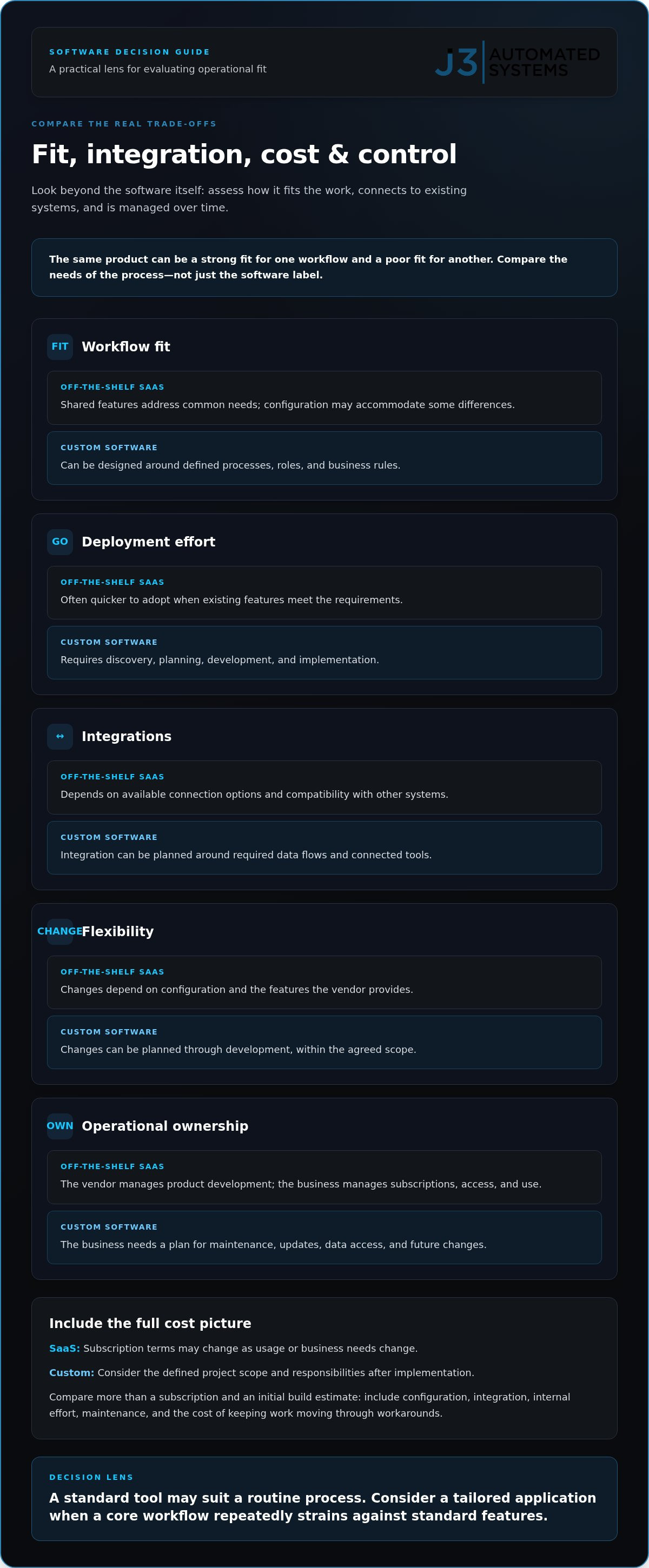
A useful comparison looks beyond the software itself to the work surrounding it: how closely the tool matches a process, how it connects to existing systems, and who is responsible for changes over time. The same product can be a strong fit for one workflow and a poor fit for another.
| Consideration | Off-the-shelf SaaS | Custom software |
|---|---|---|
| Workflow fit | Uses shared features designed for common needs; configuration may accommodate some differences. | Can be designed around defined processes, roles, and business rules. |
| Deployment effort | Often quicker to adopt when existing features meet requirements. | Requires discovery, planning, development, and implementation. |
| Integrations | Depends on the product’s available connection options and compatibility with other systems. | Integration can be planned around the required data flows and connected tools. |
| Flexibility | Changes depend on configuration and features the vendor provides. | Changes can be planned through development, within the agreed scope. |
| Operational ownership | The vendor manages product development; the business manages subscriptions, access, and use. | The business needs a plan for maintenance, updates, data access, and future changes. |
Cost needs the same broader lens. A SaaS subscription is shaped by its terms and may change as the business’s usage or needs change. Custom software involves a defined project scope, along with responsibilities after implementation. Comparing only a subscription with an initial build estimate leaves out configuration, integration, internal effort, maintenance, and the cost of keeping a process running through workarounds.
The better option depends on total operational fit, not the label alone. A standard tool may serve a routine process with little adjustment, while a tailored application may be worth considering when a core workflow repeatedly strains against standard features.
How does workflow fit affect the decision?
Look for recurring workarounds, duplicate entry, manual approvals, and handoffs between disconnected tools. Then separate preferences, such as a different screen layout, from constraints that delay or disrupt an important process. Map each step, user, system, and transfer of information. This can reveal whether configuration could resolve the friction or whether the underlying workflow needs a different design.
What do integration and ownership change?
Existing tools, data flows, and user roles shape the complexity of either route. SaaS can create dependencies on a vendor’s product and connection options; custom software puts more responsibility on the business to plan for its future operation. For both, define who can access data, how security is handled, who owns maintenance, and how changes are approved.
For workflows that need a more tailored digital structure, custom web applications and internal tools can be developed from mapped requirements rather than assumed needs.
SaaS, custom software, or both: compare four practical paths
The choice isn’t limited to buying a standard tool or replacing it with a custom application. A business can adopt SaaS as it is, configure its existing features, build a specific tool, or combine custom software with products that already serve other needs. The right path depends on how well each option supports the mapped workflow and what the organization can own over time.
| Path | Suitable when | Trade-off and ownership |
|---|---|---|
| Adopt SaaS | A common, stable process fits the product’s standard workflow. | Can provide a direct route to using a ready-made tool, but the process must work within its existing capabilities. The business manages subscriptions, access, and day-to-day use. |
| Configure SaaS | Existing settings can accommodate important requirements without changing the product itself. | Configuration can improve fit while preserving the standard platform, but changes remain within the options the product provides. |
| Build custom software | A specific workflow or business rule remains poorly served by available tools. | Development can be shaped around defined needs, while the business must plan for implementation, maintenance, and future changes. |
| Combine custom tools with SaaS | Standard tools serve some functions well, but a distinct workflow needs a closer fit. | Retains useful subscriptions and adds tailored software where needed. Integration and clear responsibility for each system are essential. |
Custom development isn’t automatically the right response to every workaround. A minor preference may not justify a new application, and a configuration change could address friction without changing the broader system. Ask whether a workaround signals a meaningful gap in an important process, and whether a standard tool can resolve it cleanly.
When can off-the-shelf SaaS be enough?
A standard product can be a sensible fit for a common, stable process that doesn’t rely on unusual rules or handoffs. If a team needs a tool promptly and its core requirements align with available workflows, adopting SaaS may provide a faster starting point than planning a custom build. Judge fit against required tasks and connections, not the length of a feature list. For example, check that the tool supports the approvals and information transfers the process actually requires.
When might custom or hybrid software make sense?
Consider a closer fit assessment when recurring friction affects a distinctive or important workflow. For example, a bespoke internal tool might support one specialized handoff while the organization retains SaaS for other functions. In complex administrative areas like enterprise payroll and tax onboarding, teams can explore SmartTax W-4 to see how targeted workflow automation bridges specific gaps. That avoids rebuilding what already works. The appropriate approach depends on mapped requirements, integration needs, and a realistic plan for operating the resulting system.
In practice, custom software vs off the shelf saas is less a contest between two categories than a decision about where standard capabilities end and a tailored workflow begins. When navigating major enterprise platform evaluations, partnering with advisory specialists like HRIS Audit can provide client-side leadership to ensure software decisions truly fit organizational needs. Keep the useful parts of the existing environment; address only the gaps supported by evidence from the process.
Use this decision framework to choose your software path
A software decision should begin with a documented process problem. That keeps the discussion grounded in what people need to do, where work stalls, and what a solution must support, rather than starting with a preferred product or development approach. Use these steps to turn the problem into a decision and an implementation direction.
- Map the workflow. Record who performs each step, what information they use, where handoffs occur, what exceptions arise, and what the process produces. Describe friction in observable terms, such as entering the same details twice or waiting for an approval before work can continue. A clear map gives teams a shared picture of the process.
- Define requirements and success. Separate essential requirements from convenience features. An essential requirement may be a necessary approval or a reliable transfer of information; a preferred screen layout may be helpful but not critical. Set practical measures before comparing options, such as reducing repeated entry or making handoff status visible to the people responsible.
- Assess the available paths. Compare those requirements against existing SaaS features, configuration options, and possible integrations. Mark each requirement as met, partly met, or unmet. This makes gaps visible without treating every unmet preference as a reason to build. If a core process remains unsupported, consider whether a custom tool or hybrid approach addresses that specific need.
- Evaluate integration. Trace which information needs to move between systems, who needs access, and which tools must remain connected. Include exceptions: a process may work for the usual case but fail when information is incomplete or needs review. For Texas businesses coordinating teams across offices, facilities, or field operations, make sure the workflow map reflects how work actually moves between roles and locations.
- Assign ownership. Decide who will manage user access, support, maintenance, and future change. With SaaS, account for the vendor’s product and subscription terms; with custom software, establish responsibility for its continued operation. For a hybrid system, assign an owner to each part and clarify how changes to one system affect connected workflows.
Map the process and define success
Use the map to distinguish a minor preference from a constraint that materially affects an important process. For instance, a formatting preference may be tolerable, while repeated re-entry that creates delays warrants closer examination. Define what improvement would look like before selecting a tool or commissioning development, so the decision can be assessed against the original need.
Assess scope, integration, and long-term responsibility
The final comparison should show which requirements configuration can meet, what integrations are needed, and what work remains outside standard features. J3’s discovery and process-mapping work can help shape that assessment before custom development begins. Discuss your software workflow with J3 to start turning the process problem into defined requirements.
How J3 turns custom software decisions into an engineered solution
A sound software decision starts with the operation, not a preselected technology. J3 Automated Systems begins with discovery and process mapping to understand how work moves, where information enters, which people and systems are involved, and where friction appears. That foundation helps distinguish a software gap from a process-design issue, so the response can be shaped around documented needs rather than assumptions.
This is the practical value of treating custom software vs off the shelf saas as an engineering decision. The aim isn’t to replace every standard tool. It’s to determine which workflows existing products can support, where integration matters, and whether a bespoke web application or internal tool is appropriate for a specific operational need.
From operational friction to a defined software scope
Discovery makes the problem concrete. A process map can capture users, handoffs, information, exceptions, and the outcome each step must produce. That view may reveal that a recurring delay comes from unclear responsibilities rather than missing software. If the gap is technical, mapping helps define what the tool needs to support and what should remain part of the existing workflow.
J3 uses those findings to shape requirements before development begins. The scope can account for the people who will use a tool, the systems it needs to connect with, and the operational improvement the business is seeking. For a closer look at the engineering considerations involved, explore custom web app development in San Antonio.
Requirements then inform the engineering and implementation approach. A bespoke application is not a generic answer applied to every business problem; its proposed functionality should follow the mapped workflow. This creates a clearer basis for decisions about development, integration, and how the solution will be maintained as needs evolve.
Connect bespoke tools with wider business automation
Custom software can sit within a broader automation roadmap alongside existing SaaS tools and other business systems. A tailored internal tool might address one persistent handoff while established products continue to serve other functions. Consider the systems together, but remember that a software project doesn’t automatically require changes to physical automation or every connected process.
AI integration may also be relevant when it supports a mapped business workflow, such as a repetitive administrative task. The process should define the role for AI, the information involved, and how the work fits with the surrounding operation. Learn more about AI business process automation as one option within that wider systems perspective.
J3 brings discovery, process mapping, custom development, and AI integration together to translate operational needs into an implementation path. For organizations in San Antonio, New Braunfels, Seguin, Bandera, Boerne, Austin, and San Marcos, start with the workflow that creates the most friction and define what a better process needs to accomplish.
Give your next software decision a clear starting point
The decision around custom software vs off the shelf saas becomes useful when it moves from debate to a defined next step. Choose one workflow where friction is visible, identify the operational result it needs to support, and decide what must be understood before changing tools. That creates a measured starting point rather than committing prematurely to a platform or build.
From there, plan the work in sequence: clarify the requirement, determine how existing systems fit, and assign ownership for implementation and ongoing changes. A deliberate roadmap can preserve effective tools while making room for focused improvements, so decisions respond to business priorities rather than software labels. It also gives your team a shared basis for deciding what to address first.
J3 Automated Systems designs tailored software and automation roadmaps around operational needs. Discuss a tailored software and automation roadmap with J3 and identify a practical next step for your workflow.
With the problem clearly framed, your team can move forward with greater confidence and build a more coherent system over time.
Frequently Asked Questions
Can off-the-shelf SaaS be customized enough for a business?
Yes, SaaS can often be tailored through configuration, but only within the settings and workflows the product supports. Configuration might involve adjusting fields, permissions, or approval steps; custom development changes or adds software behavior beyond those options. Compare the configured process with documented requirements, including less frequent exceptions, before deciding whether it fits. A polished setup can still leave a critical step unresolved if the product doesn’t support it. This distinction matters in a custom software vs off the shelf saas evaluation.
Is custom software more secure than off-the-shelf SaaS?
Not automatically. Security depends on architecture, implementation, access controls, data handling, and ongoing operations, not whether software is custom or delivered as SaaS. SaaS depends partly on the vendor’s operating environment and product practices; custom software requires clear responsibility for its design, updates, and access management. Define security requirements, data access roles, and operational ownership during evaluation, then assess each option against those needs without assuming either has a guaranteed advantage.
What happens to business data if a SaaS contract ends?
Data handling after a SaaS contract ends depends on the product and agreement, including whether data can be exported, in what format, and how retention or deletion is handled. Review those terms before adoption and plan how records would move into another system if needed. Custom software doesn’t eliminate transition work: access and migration still depend on its data design, documentation, and the people assigned to operate it.
Can custom software integrate with existing SaaS tools?
Yes, custom software can be designed to connect with SaaS tools when the systems, requirements, and information flows are understood. The available method depends on the products involved and how they exchange data. Before defining the work, specify which records need to move, what event should trigger a transfer, how often it should occur, and which roles use the information. This turns “integrate the tools” into a scope that can be evaluated.
How long does custom software development take?
No single timeline applies to every custom software project. Duration depends on scope, workflow complexity, integrations, decision-making, and implementation requirements, including how many existing processes need to be understood. Discovery and process mapping clarify what needs to be built, what must connect, and which decisions remain open. That work helps define a realistic sequence before development starts, rather than relying on a generic estimate that may not reflect the project’s actual shape.
Does custom software require ongoing maintenance?
Yes, custom software needs an ownership plan beyond initial development. Depending on its role, that plan may cover monitoring, user support, updates, issue handling, and how future changes are reviewed and implemented. SaaS also involves ongoing operational work: the vendor manages product development, while the business administers its use and access. Compare responsibilities explicitly, so essential tasks have an owner instead of being assumed to happen automatically.
Can a small business justify custom software?
Yes, a small business can justify custom software if a specific workflow is important enough and recurring friction or integration needs warrant a tailored approach. Company size alone doesn’t settle the question. Map the work, assess the effort involved in current workarounds, and compare configuration with custom and hybrid paths, including who will maintain the result. For businesses in San Antonio, New Braunfels, Seguin, Bandera, Boerne, Austin, or San Marcos, the same process-first assessment applies.