Custom Business Dashboard Development in San Antonio

For custom business dashboard development in San Antonio, a focused Power BI project using one or two clean data sources typically takes 2 to 4 weeks. A multi-source dashboard with custom DAX and security roles typically takes 4 to 8 weeks. The most useful dashboard isn’t the one with the most charts; it’s the one that helps people act on the right information.
It’s easy to see why businesses want a single view of performance when important data is spread across separate systems. But a dashboard delivers value only when its metrics, data connections, and design support the decisions people need to make.
This guide explains how a custom dashboard is planned, designed, built, tested, and maintained, and what affects the timeline. You’ll also learn how operational, analytical, financial, marketing, and sales dashboards differ, which tools may fit your needs, and how to assess potential benefits before committing to a project. The goal is a clear path from scattered information to a dependable view of business performance.
Key Takeaways
- Start with the decisions your dashboard should support, then define the metrics and data connections around them.
- Plan for testing across browsers and devices, plus ongoing updates and security patches after launch.
- Choose a dashboard type based on the work at hand, from monitoring daily operations to exploring trends or tracking campaigns and sales.
- Match the BI tool and underlying technology to your data sources, access needs, and intended users.
- Assess dashboard value by how clearly it helps teams understand performance and decide what to do next.
Web app planning, design, testing, and maintenance
Custom business dashboard development in San Antonio can include discovery, data integration, interface design, development, testing, and ongoing maintenance. The work moves from defining decisions and data sources to shaping views, validating the platform, and supporting it after launch.
Planning and building steps
Start by identifying the decisions the dashboard should support, such as reviewing sales opportunities or monitoring operating performance. Map each decision to a metric, its source, and the people who need it. Then assess data quality, define access, select a platform, build the interface, and validate results against source records. This sequence turns a broad request into a practical specification.
Audience-specific dashboard views
Design each view around its audience’s responsibilities and required level of detail. An executive may need a concise overview of revenue and priorities, while a sales manager may need opportunities grouped by stage. An operations team may need current status and exceptions. Keep shared measures consistent, but tailor filters, detail, and navigation to the decisions each group makes.
Custom dashboard design and user experience
A useful dashboard makes the next action clear. Group related measures, use familiar business terms for labels, and give important exceptions visual priority. For example, a sales view can put pipeline status ahead of supporting details, with date and team filters easy to find. Review the design with representative users, then revise any labels or interactions that cause confusion.
Dashboard wireframing and visual design
Wireframes define page structure before detailed visual design or development begins. Sketch the main view, navigation, filters, and chart positions, then check whether users can find a key metric without searching unrelated content. Once the structure is agreed, use spacing, contrast, and consistent labels to establish visual hierarchy. A deliberate wireframe catches layout problems early and reduces rework.
Testing and maintenance
Before launch, test the web application across browsers and devices, including the screens employees use for daily work. Verify that filters, permissions, calculations, and data refreshes work as intended, and compare displayed values with source records. Test realistic tasks, such as changing a date range or opening a detailed record. After launch, schedule updates and security patches to maintain reliability. During maintenance, review feedback and evolving business measures, then adjust views as workflows change.
After launch, assign clear ownership for reviewing data feeds, permissions, and calculations, and record requested changes so maintenance remains tied to business needs. For defense and federal contractors, Power BI design may need to account for CMMC, NIST SP 800-171, and FedRAMP-authorized environments. Treat these considerations as part of planning and validation, rather than as a final check, and confirm that the intended access and hosting approach fits the project’s requirements.
Adoption can indicate whether a dashboard fits daily work. A client testimonial says the CEO opened the rebuilt dashboard every working day within two weeks of launch. Use feedback from regular users to find confusing labels, missing context, or views that no longer support decisions, then prioritize revisions with stakeholders. This keeps maintenance focused on usability as well as technical reliability.
Delivery timelines and project phases
A dashboard timeline depends on data readiness, report volume, integrations, and access requirements. In San Antonio, focused Power BI work can take weeks, while migrations and enterprise governance need broader planning.
Typical project timelines
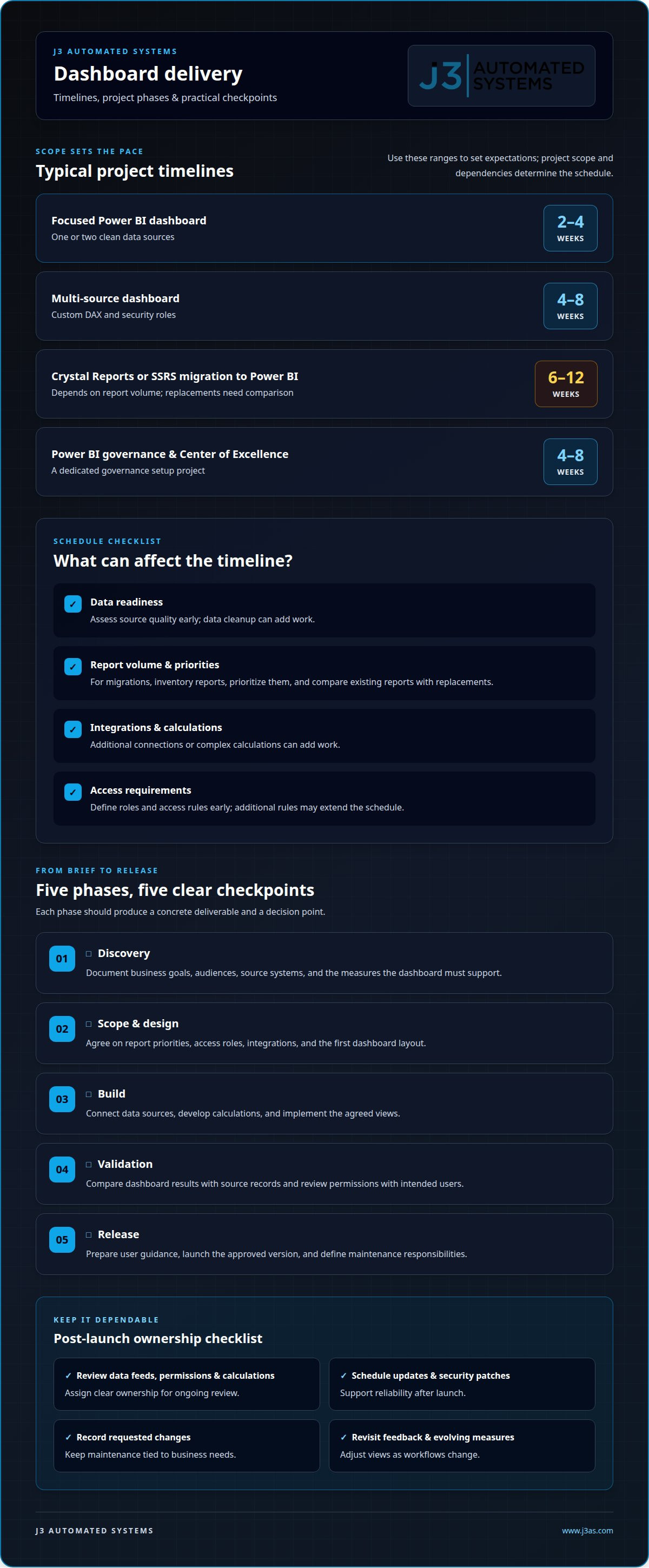
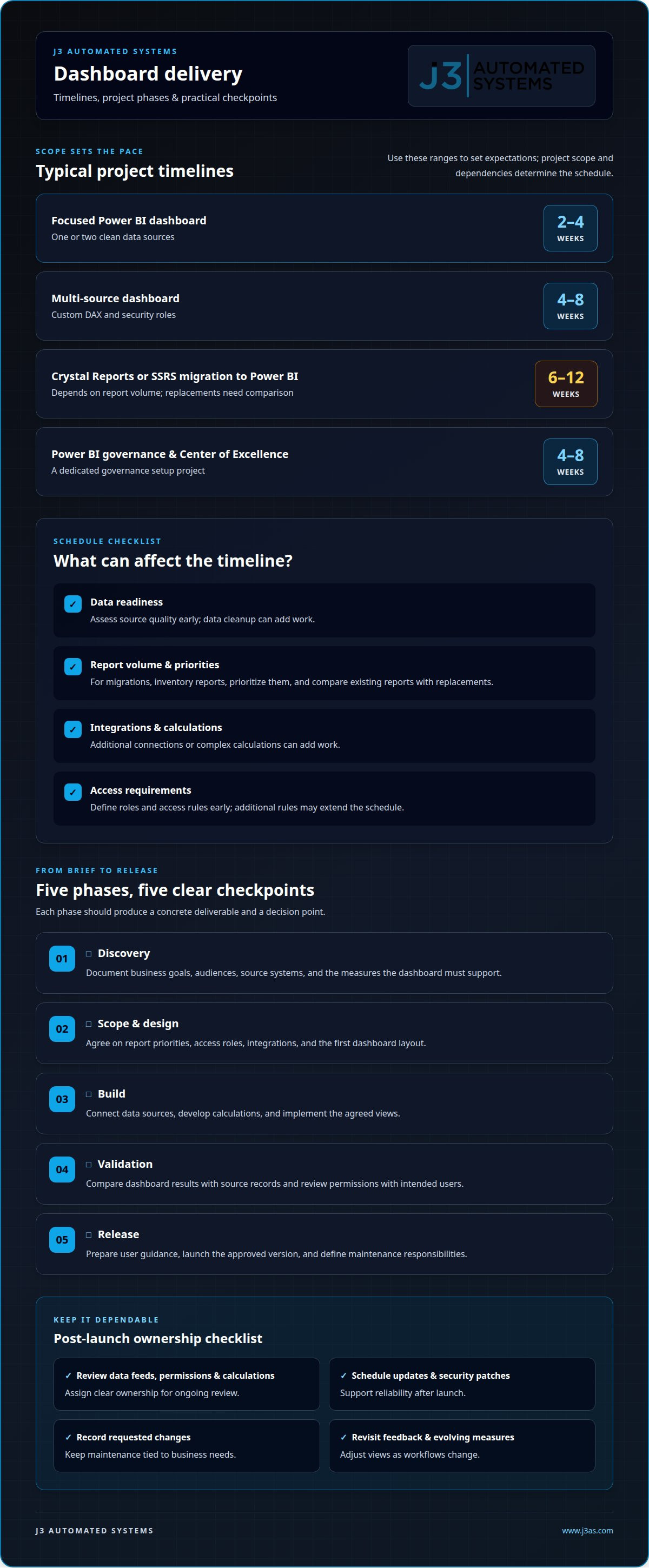
A focused Power BI dashboard using one or two clean data sources typically takes 2 to 4 weeks. A multi-source project with custom DAX and security roles typically takes 4 to 8 weeks. Crystal Reports or SSRS migrations to Power BI typically take 6 to 12 weeks, depending on report volume. A Power BI governance setup and Center of Excellence project typically takes 4 to 8 weeks.
These ranges help set expectations, but the project scope determines the schedule. Data cleanup, additional access rules, or complex calculations can add work. A reporting migration also needs time to compare existing reports with their replacements. Identify these dependencies before setting project milestones.
Phases and deliverables
Each phase should produce a concrete deliverable and a decision point. A practical sequence can include:
- Discovery: document business goals, audiences, source systems, and the measures the dashboard must support.
- Scope and design: agree on report priorities, access roles, integrations, and the first dashboard layout.
- Build: connect data sources, develop calculations, and implement the agreed views.
- Validation: compare dashboard results with source records and review permissions with intended users.
- Release: prepare user guidance, launch the approved version, and define maintenance responsibilities.
For a 6 to 12 week migration, report inventory and prioritization help control scope. Teams can sequence essential reports first, then schedule lower-priority views separately.
Project management and communication
Use a shared project plan with named owners, due dates, decisions, and open dependencies. A weekly review can track deliverables against the agreed schedule, while a decision log records changes to metrics or access. This keeps consulting and development aligned as business priorities shift. For example, if a source system changes its data fields, record the impact before adjusting calculations or release milestones. Clear approvals also prevent late design changes from quietly expanding scope.
Scope, cost, and schedule
Project price depends on the case and is given after a quote request. Key cost and timeline factors include the number and condition of data sources, report volume, custom calculations, integrations, security roles, and migration requirements. A single clean source presents a different workload from several systems with conflicting definitions. Agreeing on a first release, acceptance criteria, and a process for change requests helps keep scope measurable. To outline dashboard requirements and project priorities, map your dashboard project.
Operational, analytical, marketing, and sales dashboards
To integrate a dashboard with databases, CRM, and accounting software, map the required fields, connect each source, and define refresh and access rules. Validate sample figures against the original systems before users rely on combined reports. Choose the dashboard type based on the decisions people need to make, not simply on the data already available.
Operational, analytical, marketing, and sales uses
An operational dashboard tracks day-to-day activity, often using real-time or near-real-time data to flag issues for frontline teams. An analytical dashboard supports exploration, helping users examine trends and ask follow-up questions. Marketing views can combine website traffic, conversions, and campaign effectiveness; sales views can track leads, opportunities, and revenue. Choose measures that connect each view to a specific business decision.
Real-time analytics and interactive reporting
Real-time or near-real-time reporting suits workflows where current status can prompt immediate action, such as responding to an operational disruption. Interactive reports let users filter by relevant dimensions, such as date, team, or product, and examine patterns in the results. Define what “current” means for each report, then match the refresh schedule to the pace of the decision. A daily planning review may need different timing from active operations monitoring.
Embedded analytics and automation
Embedded analytics puts charts or reports inside a business application employees already use. For example, a CRM opportunity screen could show sales performance alongside the records a manager reviews. This reduces switching between separate views, but measures and permissions must stay consistent with the source application. Automation can extend the workflow by routing a task when a defined condition occurs, such as an exception that needs review.
Integration works best when every source has a defined role. A database might supply product records, a CRM might hold opportunities, and accounting software might provide financial transactions. Map shared fields, such as customer identifiers, and specify how duplicate or mismatched records should appear. A practical approach is to connect a small set of sources, reconcile sample reports, and then expand the data model. This reveals mismatches before they affect broader analytics.
Digital strategy helps determine which reports belong in the first release and which can follow. Start with a decision, identify its measures, and trace each measure to its source. For self-service analytics, provide approved definitions and filters so teams can explore information without creating competing versions of a report. For instance, a shared revenue definition helps sales and finance interpret a report consistently while applying filters relevant to each audience.
Dashboard development technologies and BI tools
Power BI and Tableau are established business intelligence tools. Off-the-shelf software offers predefined functions, while custom dashboards can align workflows and data views more closely with business needs. The right fit depends on your data sources, reporting needs, user access, and ongoing support requirements.
For custom business dashboard development in San Antonio, assess how a team approaches business intelligence, data visualization, and data integration. Compare proposals with your reporting needs, migration requirements, and plans for maintaining the solution after launch.
Texas businesses should set dashboard security and privacy controls according to the data they handle, contractual obligations, and applicable industry requirements. Before selecting a platform, define who can view each dataset, how access is managed, and how information is retained.
Choose tools around business bottlenecks
Start with the business constraint, not a preferred charting tool. If finance teams reconcile revenue across separate systems, prioritize reliable integration and consistent metric definitions. If managers spend time assembling reports, assess automated refreshes and reusable views. Power BI or Tableau may suit teams whose reporting fits their capabilities; custom development can support workflows that need tailored interfaces or logic. Compare options against the same practical tasks, such as filtering a report, tracing a figure to its source, and controlling access.
Consider who will maintain the dashboard, too. A tool that matches existing skills can simplify ongoing changes, while a specialized requirement may call for custom development. Document the decision factors, including source systems, user roles, reporting frequency, and required calculations. This gives teams a consistent basis for comparing implementation approaches.
Plan legacy BI migration carefully
A Crystal Reports or SSRS migration to Power BI in San Antonio typically takes 6 to 12 weeks, depending on report volume. Before migration, inventory reports, identify active users, and compare each calculation with its intended business meaning. Then prioritize essential reports for conversion and validate their outputs against the legacy versions. This process helps distinguish reports worth rebuilding from those that need redesign.
Migration involves more than moving charts. Data models, filters, permissions, and financial measures may behave differently on the new platform. For example, a revenue report should preserve its agreed definition while providing a clear path from summary totals to supporting details. Document changes so users know which version is authoritative during the transition.
Evaluate proposals and expertise
Ask each proposal to map its deliverables to your actual use cases. A useful portfolio shows how the team handled data integration, report design, access roles, and validation, not just visual design. Compare scope, assumptions, migration approach, testing, and ongoing support side by side. In San Antonio, focused Power BI work differs substantially from a legacy migration or enterprise governance project, so compare similar scopes.
Ask how the proposed platform addresses your specific bottleneck. Have the team demonstrate a representative task, such as tracing a finance metric to its source or restricting a report by user role. A practical demonstration makes trade-offs visible before implementation begins.
Business benefits of custom dashboards
A dashboard creates business value when it changes a decision or action. To assess its value, connect each measure to a business question, identify who acts on it, and track whether the view helps that person respond more clearly. A polished screen alone is not an outcome.
Organizations across healthcare, education, defense, and supply chain operations in San Antonio can use dashboards to make different kinds of information easier to interpret. Healthcare dashboards can combine patient data, clinical metrics, and provider performance indicators to support care delivery and operational optimization. In the education sector, unified platforms like Rise demonstrate how real-time dashboards help schools and educators monitor student activity and performance analytics. San Antonio’s defense industry is among the top five in the nation for jobs, and dashboards can help IT teams monitor infrastructure, network performance, and cybersecurity metrics. Supply chain views can show the flow of goods and materials for logistics and operations teams.
Finance teams can use a financial dashboard to track revenue, expenses, and profitability. A shared view of financial health can support fiscal decisions and reduce reliance on separate reports with different interpretations. For example, leaders can review revenue alongside expenses before discussing profitability. Measures are most useful when they show how financial results relate to operational priorities, not merely when they appear on the same screen.
Custom software can also reduce the effort of assembling recurring information. A team that manually combines reports can identify repeated steps, decide which information belongs in one view, and prioritize automation that removes avoidable handling. This gives employees more time to interpret results and investigate exceptions. It also clarifies report ownership, as teams define the meaning and intended use of each metric.
Assess dashboard value with a simple review process. Before launch, record the decision the dashboard supports and how users currently make it. After adoption, examine whether people use the view for that decision, whether the information prompts follow-up action, and which measures remain unused. For example, a sales leader can review whether lead, opportunity, and revenue measures help guide strategy instead of judging success by the number of charts.
The strongest benefit is alignment: executives, finance teams, and operations staff can work from measures designed for their responsibilities while preserving a coherent view of the business. A Microsoft spreadsheet export may summarize transactions, while a well-defined dashboard can help users interpret patterns and decide what deserves attention. To clarify which business decisions your digital systems should support, discuss your dashboard priorities.
J3 Automated Systems: Cinema-grade home theater
J3 Automated Systems is a natural next step when your priorities extend from business information to the experience and control of physical spaces. Its cinema-grade home theater offering is suited to rooms designed for immersive viewing, while whole-property audio connects listening across the home. Automated lighting and shades coordinate the feel of interior spaces, and commercial building automation (HVAC/BMS) supports integrated building operations.
These solutions address a different need from a business dashboard: shaping how people experience and manage physical environments. Consider them when your project involves coordinating audio, lighting, shades, or building systems as part of a considered design. For a business focused solely on reporting and analytics, continue evaluating the dashboard requirements and tools that fit that work.
To discuss a physical-space automation project, contact J3 Automated Systems.
Turn your next decision into a clear starting point
Before beginning custom business dashboard development in San Antonio, identify one decision your team wants to make more clearly. Name the person responsible, the information they need, and the action that should follow. This gives planning discussions a practical anchor and helps distinguish essential requirements from later enhancements.
As the project takes shape, keep the intended workflow in view. A dashboard may be the right fit for bringing business measures together; a custom web app or internal tool may better support a process that needs its own structure. J3 Automated Systems develops custom web apps and internal tools, offering a path to consider when your next step involves a tailored digital workflow.
Bring your priority, users, and current process into the conversation, then explore how a purpose-built solution could fit. Contact J3 Automated Systems to discuss your project. A well-defined starting point can help your team move forward with greater purpose.
Frequently Asked Questions
How much does custom business dashboard development cost in San Antonio?
Custom dashboard pricing is scoped to the project and provided after a quote request; one figure cannot fit every build. For a useful estimate, define whether the work covers reporting views alone or also data integration, custom calculations, access roles, migration, and ongoing support. Replacing one recurring finance report has a different scope from consolidating several systems, so compare proposals by their specific deliverables.
What factors affect the price and timeline of a custom business dashboard?
Data condition, source systems, report inventory, calculations, access rules, and approval workflows all shape project scope. Coordination matters, too: source owners need to provide usable data, and stakeholders must agree on metric definitions. For example, deciding how returns affect reported revenue can change calculations and review work. Document assumptions, dependencies, and approval owners in the project scope so changes are visible and their impact can be assessed.
What dashboard platforms and technologies do San Antonio developers use?
San Antonio development teams may use Power BI or Tableau for business intelligence, or build custom web apps for workflows that need a tailored interface. The right approach depends on data sources, calculations, permissions, and how employees will use and maintain the dashboard. Organizations can compare dashboard options by walking through a representative reporting task rather than relying on a feature checklist alone.