Commercial Security Infrastructure Design: Engineering Intelligent Protection in 2026
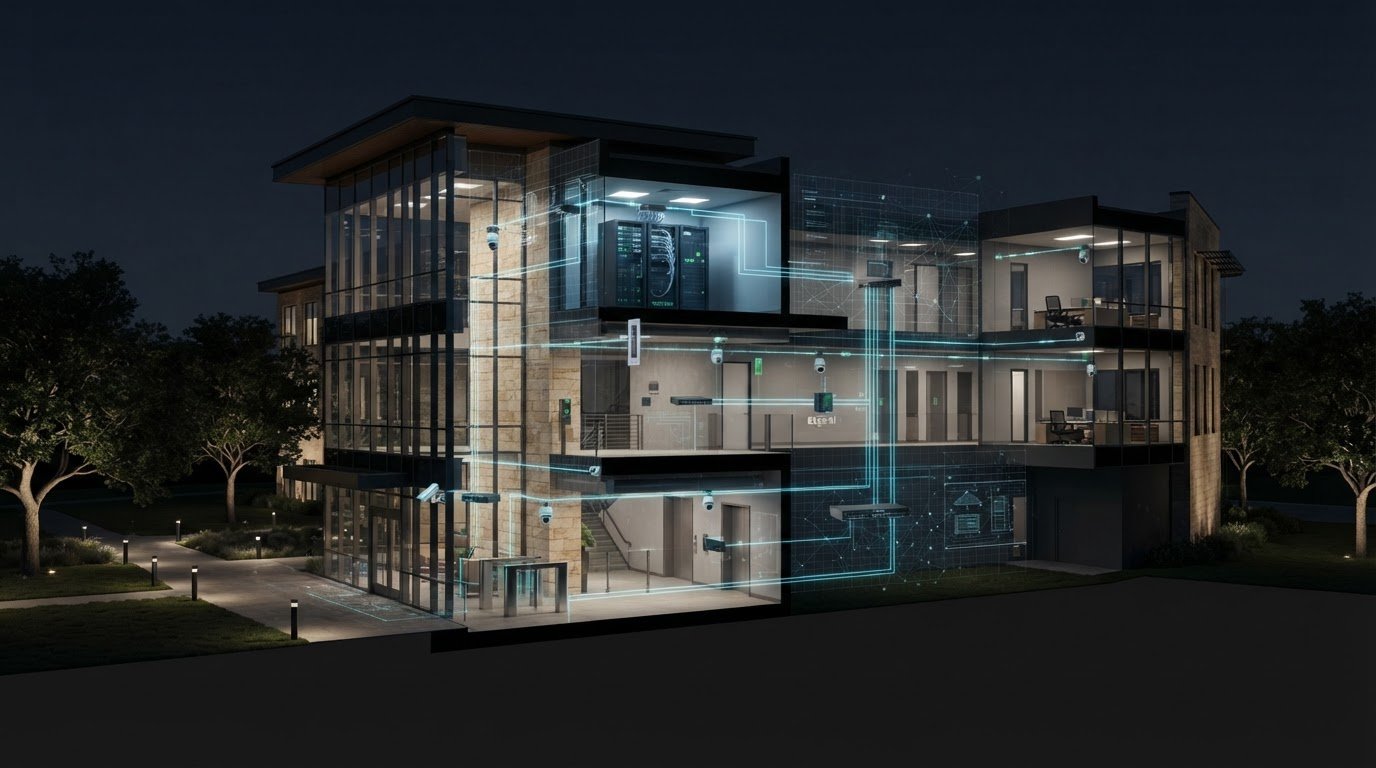
What if your security cameras, access systems, alarms, and building controls worked as one coordinated layer instead of a collection of disconnected tools? That’s the goal of thoughtful commercial security infrastructure design: a clearer view of activity, fewer avoidable alerts, and a network planned to support video and future analytics.
When systems don’t communicate, outdated technology triggers false alarms, or video demands raise bandwidth questions, adding more devices alone won’t solve the problem. A resilient design starts with the connections between physical security, networking, and building intelligence. It also plans how those systems will operate together and accommodate change.
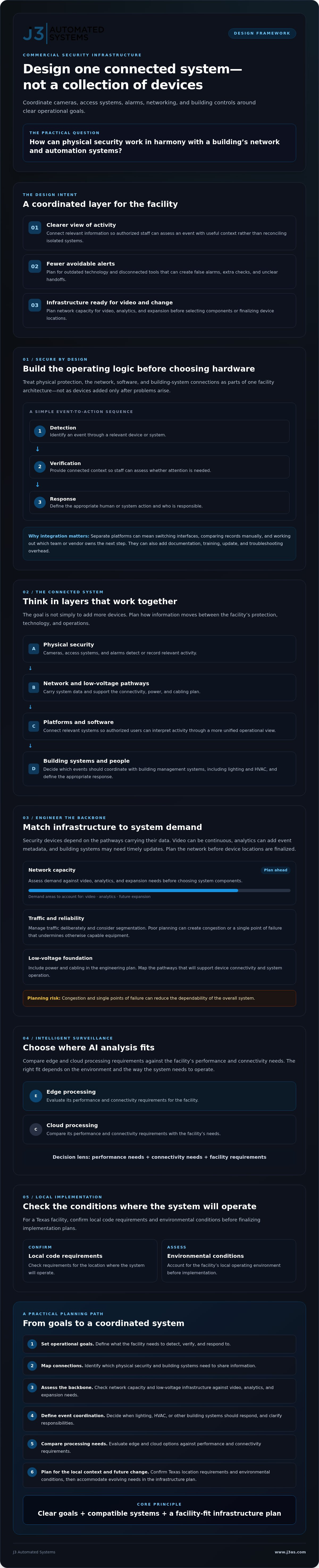
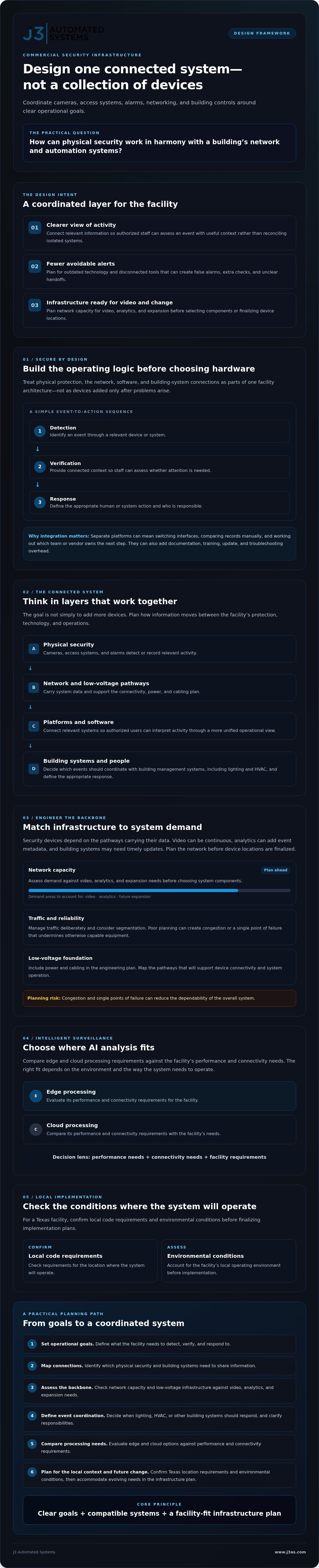
This guide explains how to plan a connected environment, from network capacity and platform integration to AI processing and future upgrades. The central question is practical: how can physical security work in harmony with a building’s network and automation systems? The answer starts with clear operational goals, compatible systems, and an infrastructure plan that fits the facility.
Key Takeaways
- Plan commercial security infrastructure design as part of a facility’s architecture, rather than adding protection after systems are in place.
- Assess network capacity and low-voltage infrastructure against video, analytics, and expansion needs before selecting system components.
- Identify which security events should coordinate with building systems, including lighting and HVAC, and define the appropriate response.
- Compare edge and cloud processing requirements to decide where AI analysis best fits the facility’s performance and connectivity needs.
- Confirm local code requirements and environmental conditions for the Texas location where the system will operate before finalizing implementation plans.
The Shift to Secure by Design: Why Infrastructure Matters More Than Hardware
A camera or access reader can address a specific need, but neither creates a complete security strategy on its own. Secure by Design means planning a facility’s physical protection, network, software, and building-system connections as parts of one architecture. Rather than adding devices only after problems arise, teams consider how information will move, who will act on it, and how the environment can adapt as requirements change.
This makes commercial security infrastructure design a facilities and operations decision, not just a hardware selection exercise. The aim is to make protective systems work in context: an event should be detected, assessed, and routed into an appropriate response, with clear responsibilities for people and technology.
Defining Commercial Security Infrastructure Design
Security infrastructure combines physical devices, software, and networking so a facility can detect events, verify what is happening, and coordinate a response. Standalone systems operate independently, often requiring staff to switch interfaces or reconcile separate records. An integrated ecosystem connects relevant systems so authorized users can interpret activity through a more unified operational view.
Three pillars give that ecosystem a practical structure:
- Detection: Identify an event through a relevant device or system.
- Verification: Give staff enough connected context to assess whether the event needs attention.
- Response: Establish the appropriate human or system action, with responsibilities defined in advance.
These principles build on established physical security measures, such as controlling access and creating layers of protection. Secure by Design extends that thinking to the wiring pathways, network architecture, system interfaces, and operating procedures that make those measures function together.
The Cost of Fragmentation in Large-Scale Facilities
Disconnected systems create extra work when clarity matters most. If an alert, camera view, and building event appear in separate platforms, staff may have to switch tools, compare information manually, or work out which vendor owns the next step. That coordination can slow assessment and complicate the handoff from detection to response.
Fragmentation also adds a less visible maintenance burden. Separate vendors and interfaces can mean separate documentation, training, updates, troubleshooting processes, and integration decisions. Each new system may solve an immediate need while creating another dependency to manage over its lifecycle.
A unified automation roadmap helps facilities teams set priorities before selecting components. Define operational goals, map the systems that need to share information, and plan for future changes. A single accountable team for engineering and implementation can coordinate decisions across disciplines instead of leaving the facility to bridge disconnected project scopes. That creates a more deliberate foundation for networking, building automation, and intelligent software.
The Anatomy of a Resilient Security Backbone: Networking and Low Voltage
Security devices are only as dependable as the pathways carrying their data. Cameras may generate continuous video, analytics tools may add event metadata, and building systems may need timely updates. If the network is poorly planned, congestion or a single point of failure can undermine otherwise capable equipment. In commercial security infrastructure design, network capacity, segmentation, power, and cabling belong in the engineering plan before device locations are finalized.
The principles behind high performance residential networking also apply in commercial settings: map demand, manage traffic deliberately, and plan for reliable coverage. The scale and operational requirements differ, but both environments depend on a network engineered around the systems it must support. CISA’s guidance on physical security best practices reinforces the value of treating protection as a planned program, not a device-by-device purchase.
Engineering the Invisible Backbone
Resilient networking means designing connectivity so essential security data can move reliably during routine demand and recover appropriately when a component or connection fails. Start by identifying where video is recorded and analyzed, how users access it, and which systems need to exchange information.
VLAN segmentation separates security traffic logically from other network activity. It can help limit unnecessary access between systems and reduce competition from unrelated traffic. Segmentation requires sound configuration and ongoing management, and it does not replace broader security practices. Capacity planning should account for resolution, frame rates, concurrent streams, retention workflows, and AI metadata. Model expected traffic rather than guessing at bandwidth, and leave room for operational growth.
Resilience also depends on critical network nodes, such as switches and recording or processing equipment. Identify essential components, assess how a failure would affect coverage, and plan suitable redundancy and backup power for those points. The right approach depends on the facility’s priorities and existing infrastructure.
Low-Voltage Design for Scalability
Structured cabling should inform hardware choices, not follow them. A cabling plan maps device locations, pathways, equipment-room connections, and capacity for later expansion. That makes it easier to check whether the layout can support current needs and future additions without improvised routes.
Specify cabling based on required performance, distance, environment, and the devices it must serve. Cat6A may suit some applications, while other project requirements may call for different options. Confirm the design rather than assuming one cable type fits every site. Low-voltage planning also supports network-connected devices that use Power over Ethernet, where compatible equipment can receive power and data over a single cable.
Commissioning is essential. Validate configurations, confirm traffic separation, test coverage and connectivity, and document the completed design so future changes don’t become guesswork. For organizations planning integrated networking and building systems, networking and automation engineering can help align these decisions within one project scope.
Convergence: Integrating Security with Building Management Systems (BMS)
Security can better support building operations when events inform the systems around them. With compatible integrations, an access event or occupancy signal may help coordinate lighting and HVAC schedules, while an alarm can trigger a defined lighting response. The goal is not to make every system control every other system. It is to create purposeful connections that support safety, comfort, and energy management without adding unnecessary manual work.
For Texas facilities, commercial building management systems in Texas provide a framework for considering how automation fits a building’s operational needs. Integration should start with clear event rules, system compatibility, and safeguards for critical building functions.
Security as a Data Source for Building Intelligence
Occupancy sensors can inform security workflows and building management. For example, detected presence may help flag activity in a restricted area while also informing lighting or HVAC schedules. Use sensor data thoughtfully: define which events matter, who can access them, and how long information is retained under the organization’s policies.
Event-driven automation links a defined trigger to a planned action. If an alarm occurs, a configured system might illuminate selected areas to improve visibility for staff assessing the event. In an emergency, any lighting response must complement, not replace, required life-safety systems and procedures. Clear rules help prevent an automation designed for convenience from causing confusion during a critical moment.
A centralized dashboard can bring selected security events and building status into one interface, depending on system compatibility and integration design. Automated reports can summarize recurring events, equipment conditions, or patterns that need review. This gives facilities managers a clearer starting point for decisions and reduces the effort of gathering information from separate systems. In larger facilities and mission-critical operations centers, specialized video wall and display management systems from activu.com help teams aggregate and visualize multiple data streams to improve real-time situational awareness.
Smart Access Control vs. Traditional Locks
Traditional keys and localized keycard systems can provide straightforward access, but managing permissions may require physical key changes or updates at individual systems. Cloud-managed access can let authorized administrators adjust credentials remotely, subject to connectivity, platform design, and organizational policy. Mobile credentials and biometric verification are options to assess, not automatic requirements. Consider user access, privacy, fallback procedures, and compatibility before choosing them.
Lighting and shades can contribute to perimeter deterrence when coordinated with schedules and occupancy information. For instance, a configured lighting scene may make selected areas visibly occupied, while shades can balance privacy and visibility. Automated lighting and shade control should fit the broader building strategy, with responses tailored to the site rather than applied uniformly.
To assess the business case, compare the effort currently spent coordinating systems, reviewing events, and managing schedules with the expected operational value of integration. A well-scoped project can clarify where automation may reduce repetitive work or inform energy decisions. A coordinated engineering approach can keep security and building objectives aligned.
Intelligent Surveillance: Moving from Observation to AI-Driven Prevention
Traditional motion detection reacts to movement. Intelligent analytics can classify objects and patterns to help distinguish routine activity from events that merit review. AI cannot determine a person’s intent. It can analyze observable behavior, such as a person entering a restricted area or remaining in a defined zone, and flag it for human assessment. Used carefully, this can help reduce avoidable alarms without treating an automated alert as proof of a threat.
In commercial security infrastructure design, AI is most useful when it supports a clear operational workflow, not when it simply adds another screen. Before choosing where analysis takes place, define what triggers an alert, who reviews it, and what information needs to be recorded.
AI and Behavioral Analytics
Edge processing analyzes video close to the camera or local equipment. This can support timely decisions and limit how much footage travels across a network. Cloud processing can provide centralized resources for analysis and access, but depends on connectivity and must be assessed for data handling, latency, and ongoing operational needs. Some designs use both. The right choice depends on the facility’s network, response requirements, and privacy policies.
AI can also connect detection to administrative tasks. For example, a reviewed incident could create a structured record with a timestamp, location, and assigned follow-up. Thoughtful AI business process automation can reduce repetitive documentation while keeping staff responsible for validation and decisions. Set rules for access, retention, and human review so analytics remain proportionate to the security purpose.
Bespoke Security Software and Dashboards
A facility’s workflows may not fit neatly into standard interfaces. Custom web app development in San Antonio can support purpose-built views that present relevant information for different roles. An executive dashboard might summarize incident trends and response status, while an internal dispatch tool could show staff an event’s location, priority, and next step. The aim is clarity, not more notifications.
Privacy-first design should guide analytics and software: collect only what serves a defined purpose, restrict access by role, establish retention practices, and periodically review whether each analytic rule remains appropriate. These choices help balance operational awareness with respect for individuals.
For organizations assessing how AI and custom tools could fit their security workflows, explore J3’s AI and custom software integration as part of a coordinated system design.
Engineering Security for Texas: Local Context and Implementation
Commercial security infrastructure design in Texas must account for more than device placement. A facility in San Antonio or Austin may need to consider exposed equipment, high outdoor temperatures, long distances between buildings, and operational demands that vary across a campus. Local conditions shape where systems belong, how they connect, and what needs to happen when conditions change.
Code requirements depend on the project, building, and jurisdiction. Before finalizing a design, confirm applicable adopted codes and requirements with the relevant local authority and qualified project professionals. Avoid relying on a generic checklist: the right questions may differ for a renovation, a new facility, or a site with multiple buildings.
Texas-Specific Environmental Considerations
Outdoor cameras, network enclosures, and other exposed equipment need to suit their installation environment. Review manufacturer ratings for operating temperatures and exposure, then consider placement, shade, ventilation, and thermal management. A protected location may reduce direct exposure, but it still needs to preserve the intended view and access for maintenance.
Large properties and commercial campuses create a different planning challenge from a compact building. Map gates, building entrances, parking areas, service routes, and distances between critical locations. This helps determine where coverage is needed and where network pathways or local equipment may be required. Match equipment to the site’s exposure, including heat and other regional weather conditions, rather than assuming one device specification suits every location. To explore modern sensor hardware designed for building and outdoor environments, visit smartdetect AG.
A single accountable team can coordinate decisions that might otherwise fall between security, networking, and building systems. J3 Automated Systems provides engineering and implementation for commercial clients in San Antonio, New Braunfels, Seguin, Bandera, Boerne, Austin, and San Marcos. Its guide to commercial security system design in Texas offers a starting point for understanding the local design conversation.
Begin with discovery, not a hardware list. Map business processes, site zones, user roles, response expectations, and the systems that need to share information. Use that picture to shape the network, equipment locations, integration requirements, and implementation sequence. This keeps the design tied to how the facility operates.
Commissioning should verify that the installed system performs as intended. Confirm device coverage, test relevant workflows, validate user access, and document configurations. A considered handover gives facility staff operating guidance and a record of the system’s design. This turns engineering decisions into a usable environment and provides a stronger foundation for future changes.
Build a More Connected Security Roadmap
Resilient protection begins with architecture, not a hardware list. Strong commercial security infrastructure design aligns the network, physical security, building systems, and intelligent tools so teams can interpret events and plan for future needs. Bandwidth, integration, privacy, and Texas site conditions all influence how well that design performs.
For high-end Texas facilities, J3 Automated Systems brings engineering and implementation together through a single accountable team. Its approach can connect physical security with BMS, resilient networking, and AI integration, helping coordinate complex systems from planning through commissioning.
If your facility is assessing upgrades or planning a new environment, start with the workflows and outcomes that matter most, then map the systems needed to support them. Partner with J3 to engineer your commercial security roadmap and take a considered next step toward a more integrated, adaptable facility.
Frequently Asked Questions
What is the difference between a security system and security infrastructure design?
A security system is the set of devices and software used to monitor or control a site, while security infrastructure design plans how those components work together. It considers network capacity, cabling, system integration, user workflows, and future expansion before equipment is selected. This broader approach helps a facility avoid isolated tools and creates a foundation for coordinated detection, verification, and response.
How does integrated security reduce commercial operating costs in Texas?
Integrated security may reduce some operational effort by connecting relevant systems, streamlining event review, and automating routine reporting or responses. For example, occupancy information may help inform lighting or HVAC schedules when systems are compatible and configured appropriately. Savings aren’t automatic, and results depend on the facility and project scope. Texas businesses can assess potential value by comparing current manual tasks and energy practices with expected changes.
Can existing commercial buildings be retrofitted for intelligent security infrastructure?
Yes, existing commercial buildings can often be assessed for security upgrades, though the right approach depends on current cabling, network capacity, equipment, and building conditions. Start by mapping device locations, operational needs, system compatibility, and areas where coverage or connectivity is limited. A phased retrofit may help prioritize essential improvements while accounting for future integration. Confirm applicable local requirements with qualified project professionals before implementation.
What role does AI play in reducing false alarms for business surveillance?
AI analytics can classify objects and patterns, helping distinguish activity that may warrant review from routine movement. For example, configured analytics may flag a person entering a defined restricted area rather than alerting on every movement in view. This can help reduce avoidable notifications, but performance depends on camera placement, settings, and site conditions. Treat alerts as prompts for human assessment, not definitive conclusions about intent.
Why is enterprise-grade networking required for modern commercial security?
Modern security devices rely on networks to carry video, event data, and system communications. A well-engineered network plans for expected traffic, separates security data where appropriate, and considers how essential services will respond to connectivity or equipment failures. Without sufficient capacity and careful configuration, video may compete with other traffic or integrations may become unreliable. Network design should account for current devices and planned growth before deployment.
How do I choose between cloud-based and on-premise security management?
Choose based on your facility’s connectivity, data policies, response needs, staffing, and system requirements. Cloud management may support centralized access across locations, while on-premise systems keep more processing or storage at the site. Each option has trade-offs involving connectivity, administration, data handling, and resilience. Compare how each would perform during an internet disruption, who controls access, and what ongoing maintenance the organization can support.
What are the benefits of integrating security with my Building Management System (BMS)?
Integrating security with a BMS can let selected events inform building operations. For instance, occupancy data may help guide lighting or HVAC schedules, while a configured alarm response could activate selected lighting to support visibility. Integration can also bring relevant system status into a more unified view. Define permissions, response rules, and safeguards carefully, and ensure automated actions complement established life-safety procedures.
How does J3 Automated Systems handle the engineering of complex converged systems?
J3 Automated Systems provides end-to-end engineering and installation through a single accountable team. The process starts with discovery and mapping of business processes, facility needs, and system relationships, then informs design, implementation, tuning, and commissioning. J3 serves commercial clients in San Antonio, New Braunfels, Seguin, Bandera, Boerne, Austin, and San Marcos. Its work can bring together building automation, resilient networking, security, custom tools, and AI integration where appropriate.