Upgrading Outdated Smart Home Systems: A Practical Modernization Guide
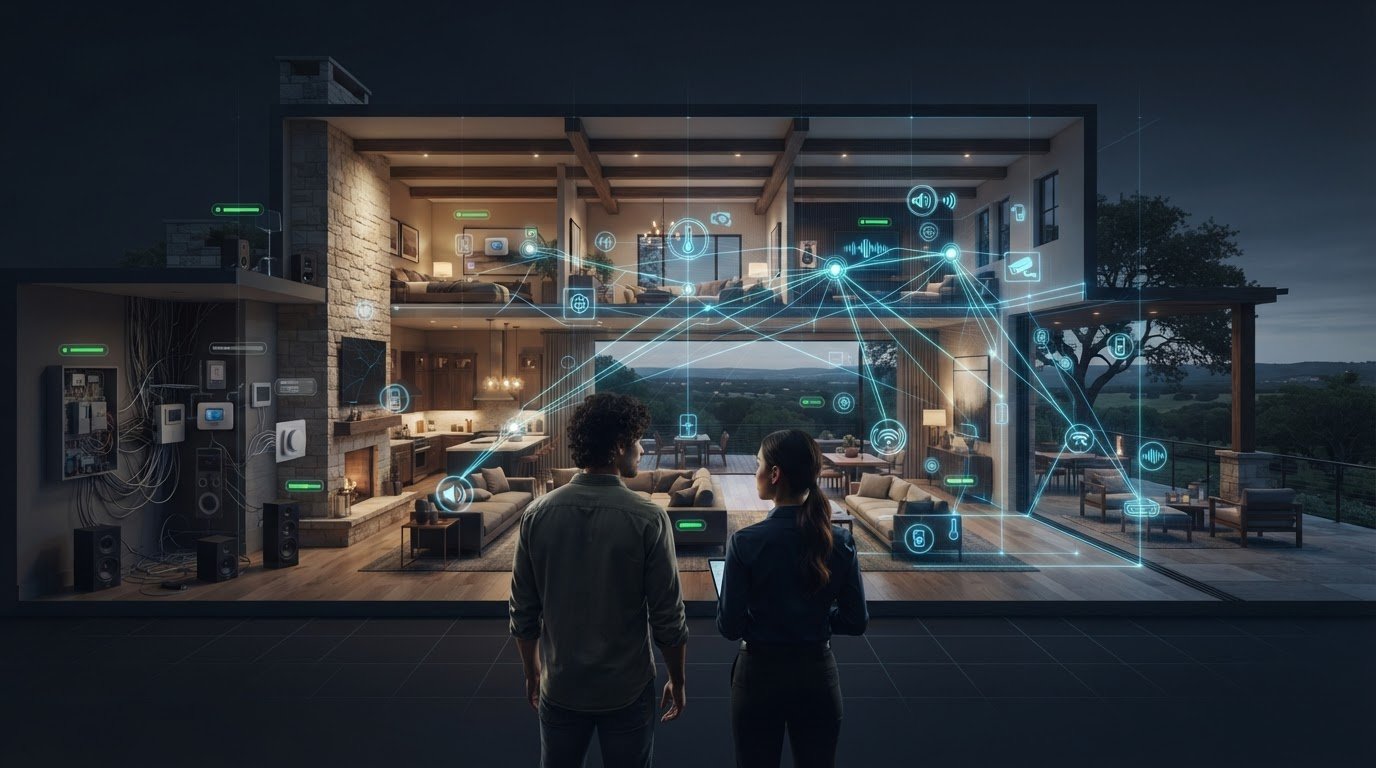
Replacing the device that fails most often may not solve the problem. When controls, lighting, audio, and networking have grown out of sync, the friction may lie in the system architecture, not in a single component. That’s why upgrading outdated smart home systems starts with understanding how the parts work together.
If devices no longer respond reliably or you’re unsure what can be retained, a major modernization can feel difficult to scope. It doesn’t have to mean replacing everything at once. A clear assessment can show where targeted replacements make sense and where a more integrated approach could create a more cohesive result.
This guide explains how to identify sources of friction, compare incremental upgrades with system-wide modernization, and map a phased plan around your property and priorities. You’ll also see why the network, controls, and commissioning matter as much as the devices themselves. With a coordinated roadmap, you can make deliberate improvements while preserving what still serves the home.
Key Takeaways
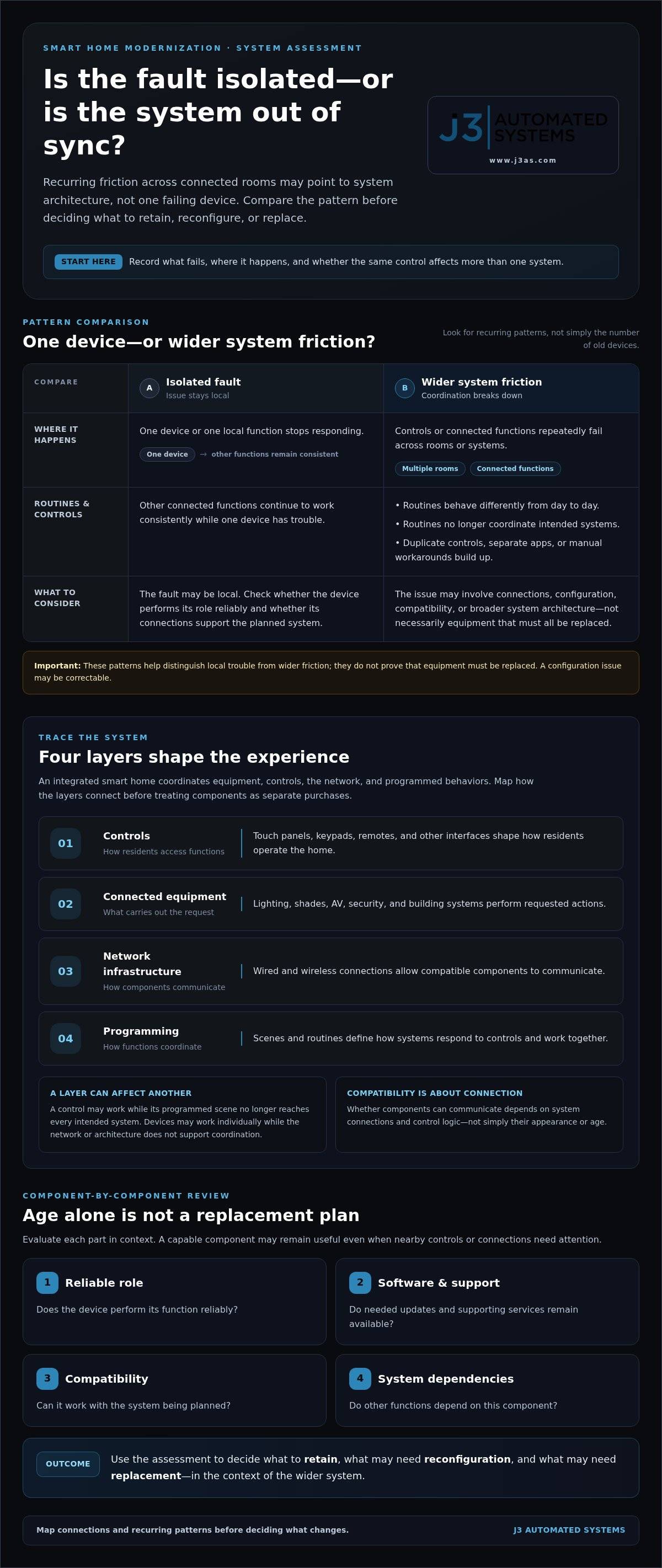
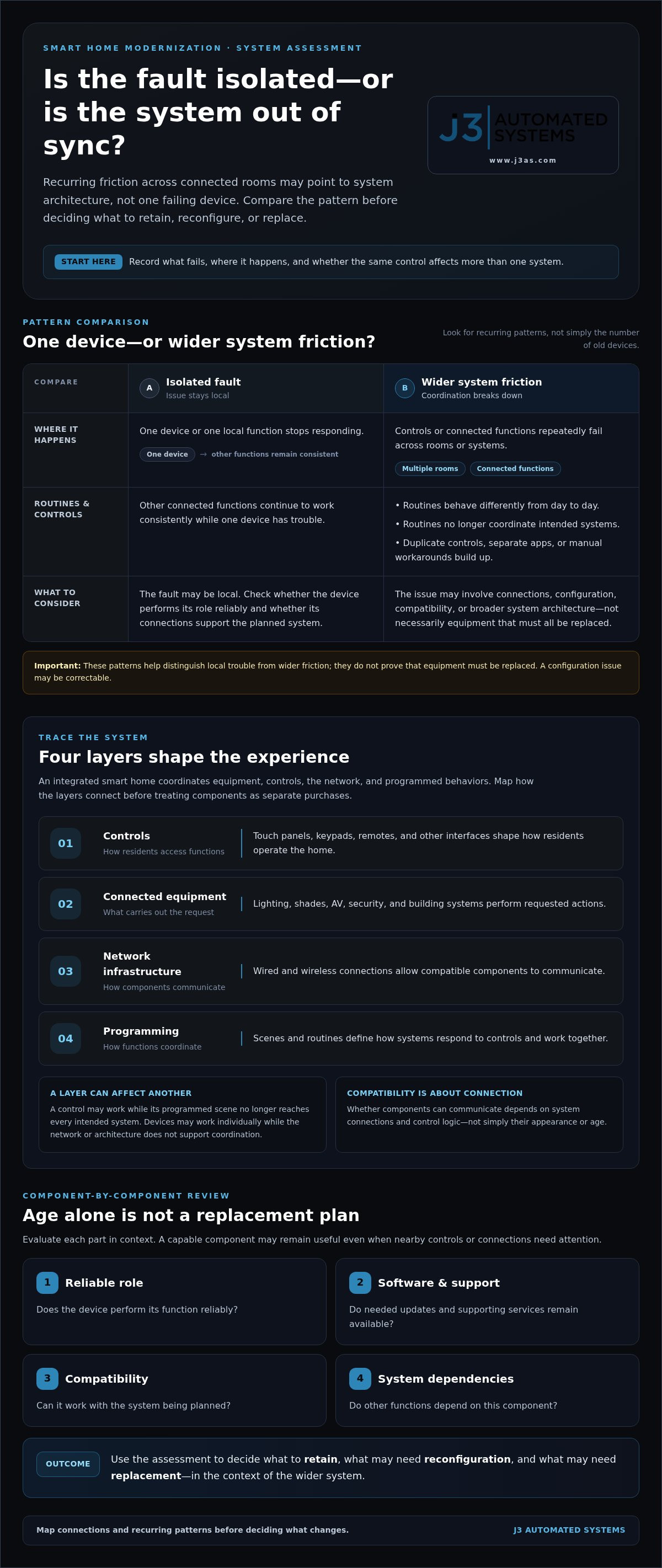
- Look for recurring control failures, inconsistent routines, and device conflicts across rooms to distinguish system-wide friction from an isolated fault.
- When upgrading outdated smart home systems, assess how legacy components connect before deciding what to retain or replace.
- Compare selective replacements, phased work, and coordinated modernization based on your priorities and daily routines.
- Build a practical project scope by documenting issues, prioritizing outcomes, mapping systems, sequencing phases, and commissioning the result.
- J3 Automated Systems coordinates design, installation, tuning, and commissioning for Texas properties, including in San Antonio, Austin, and surrounding communities.
When Is an Outdated Smart Home System Ready for an Upgrade?
Unreliable controls, routines that behave differently from day to day, and devices that no longer cooperate can make a smart home feel less convenient than it should. One failed light or speaker, however, doesn’t necessarily mean the entire system needs replacing. Look for whether the issue stays isolated or recurs across connected rooms and functions.
Start by recording what fails, where it happens, and whether the same control affects more than one system. If a single device stops responding while other connected functions work consistently, the fault may be local. If lighting, audio, shades, or other controls repeatedly lose coordination, the issue may involve how the system is connected or programmed. A useful overview of the history and components of smart home systems can help clarify how devices, controls, and connections fit together.
Which signs point to a system-level problem?
Look for patterns rather than counting old devices. A control that fails in several rooms, routines that stop coordinating different systems, or repeated workarounds may point to broader friction. Separate apps or duplicate controls for functions that used to work together can also indicate fragmented operation. These symptoms don’t prove that equipment must be replaced: a configuration issue may be correctable, while a compatibility or integration limitation may call for a larger change.
- Controls fail repeatedly across multiple rooms or connected functions.
- Routines run inconsistently or no longer coordinate the intended systems.
- You rely on duplicate controls, separate apps, or manual workarounds.
- A problem returns after a setting or configuration is adjusted.
Use the checklist to identify recurring patterns, not to make a replacement decision on its own. Note whether the issue follows one device, one control, a particular room, or several connected systems. This record can help distinguish a single point of failure from friction across the wider system.
When is a working device still worth keeping?
A device’s age alone isn’t a reason to remove it. Consider whether it performs its role reliably, whether its software and support remain available, whether it can work with the planned system, and whether other functions depend on it. A capable component may remain useful in a modernization, even if nearby controls or connections need attention. Evaluate each part in context instead of replacing it simply because newer options exist.
Software support deserves particular attention. If a device no longer receives needed updates or its supporting platform has changed, its ongoing role may become less practical, but that doesn’t automatically make it unusable. Weigh its current function against compatibility and the needs of the wider system. For homeowners upgrading outdated smart home systems, this assessment creates a clearer basis for deciding what to retain, reconfigure, or replace rather than treating every aging component as a separate problem.
How an Integrated Smart Home System Works, and Why Legacy Parts Matter
An integrated smart home is more than a collection of connected devices. It brings together the equipment residents use, the controls they operate, the network that carries communication, and the programmed behaviors that coordinate everything. A lighting control, for example, may be part of a scene that also adjusts shades and audio. Whether those parts can continue working together depends on their connections and configuration, not simply how old they look.
System integration is the coordination of devices, controls, networks, and programmed behaviors so they operate as one purposeful environment.
What parts of a smart home may need modernization?
A useful assessment looks beyond visible equipment. Trace how each layer supports the experience, from the control in a resident’s hand to the devices and connections that carry out a command.
- Controls: Touch panels, keypads, remotes, and other interfaces shape how residents access functions.
- Connected equipment: Lighting, shades, AV, security, and building systems perform the requested actions.
- Network infrastructure: Wired and wireless connections allow compatible components to communicate.
- Programming: Scenes and routines define how systems respond to controls and work together.
A weakness in one layer can affect several others. A control may work, for instance, while the programmed scene no longer reaches every intended system. Or individual devices may function reliably on their own, yet the network or system architecture may not support coordinated operation. Mapping these relationships helps establish what to retain, reconfigure, or replace instead of treating each component as an isolated purchase.
Why compatibility matters more than adding new devices
A new device can solve a specific need, but adding it without considering the wider system may create another interface or separate routine for residents to manage. Coordinated controls can bring lighting, shades, AV, security, and networking into a more consistent experience across rooms. Compatibility depends on whether components can communicate through the system’s connections and control logic, not whether they share a finish or appear to be from the same era.
Network design is part of that foundation. If connections are inconsistent, commands and routines that depend on communication between systems may feel unreliable, even when the equipment itself remains functional. A well-planned high-performance residential network supports the wider automation design rather than acting as an afterthought.
For homeowners upgrading outdated smart home systems, the goal is not to add the greatest number of new devices. It’s to create a coherent plan for the equipment, controls, network, and programming as a whole. J3 Automated Systems maps and engineers tailored automation roadmaps, then installs, tunes, and commissions integrated systems. Explore J3’s integrated automation approach as you consider how the parts of your property can work together.
Replace Devices, Upgrade in Phases, or Modernize the Whole System?
There isn’t one upgrade path for every property. A focused replacement can resolve an isolated failure, while recurring friction across rooms may call for a phased plan or coordinated modernization. The right scope depends on what the assessment reveals, which systems depend on one another, and how much continuity you want to preserve during the work. Retaining functioning equipment can make sense when it remains compatible with the intended design.
| Approach | Scope | Continuity | Coordination needs | Suitable conditions |
|---|---|---|---|---|
| Selective replacement | One device or limited function | Usually keeps most of the existing setup in place | Check compatibility and control behavior | An isolated failure; the wider system still works cohesively |
| Phased modernization | Planned improvements in stages | Preserves parts of the system while work progresses | Sequence phases around dependencies and priorities | Several systems need attention, but work is best organized over time |
| Coordinated system-wide upgrade | Broader redesign of connected systems | Requires planning for transitions across the property | Coordinate controls, equipment, network, and programming | Widespread integration limits make isolated fixes inadequate |
When selective replacement may be the right fit
If one component fails while connected systems continue to operate as intended, a targeted replacement may be appropriate. Check compatibility and control behavior first: a new device should fit the existing system’s connections and programmed routines. Replacing a single component can address that fault, but it won’t resolve separate coordination issues elsewhere in the home.
When phased or coordinated modernization makes more sense
Recurring issues across rooms or systems can point to dependencies that a series of independent swaps won’t address. Phasing lets you organize work around priorities, such as improving a key control experience before extending changes to connected areas. Sequence matters: controls, network, and system programming may need to align with equipment changes. For projects where AV is central, consider cinema-grade home theater design as part of the wider system plan.
Use the comparison as a starting point, not a fixed formula. A property may benefit from selective changes in one area and a broader redesign in another. The project assessment should establish which working components can be retained, whether they need reconfiguration, and where replacement is necessary to support the intended operation. This is the practical distinction between upgrading outdated smart home systems component by component and modernizing the architecture that connects them.
J3 Automated Systems maps existing systems and engineers tailored roadmaps for residential properties, then carries the work through installation, tuning, and commissioning. A coordinated plan keeps the chosen scope aligned with the property’s priorities and system dependencies. Explore integrated automation planning with J3.
How to Plan a Smart Home Modernization Without Losing Sight of Daily Use
A sound modernization plan begins with how people use the property, then connects those routines to the technology that supports them. Before defining equipment or installation stages, capture what works, what interrupts daily life, and what you want the home to do differently. This keeps the scope grounded in real priorities rather than a list of devices to replace.
Build a modernization brief around how the property is used
Record existing equipment and controls, recurring problems, and the rooms or systems involved. Note tasks that feel frustrating, such as adjusting several controls to prepare a room or repeating a lighting change in multiple spaces. Separate essential outcomes from optional enhancements. Include household routines, accessibility needs, and planned property changes so the design reflects how the home is used now and how that may evolve.
With that brief in hand, follow a clear sequence:
- Document issues. Describe what happens, where it occurs, and how often. Include controls, connected equipment, and routines, not just the device that first drew attention.
- Prioritize outcomes. Decide what matters most. Comfort may center on easier daily adjustments; entertainment may focus on room experience; lighting may emphasize convenient scenes; security may prioritize dependable, understandable controls. For a property with operational needs, building automation may take precedence.
- Map systems. Trace how controls, network connections, lighting, shades, AV, security, and other relevant systems relate. This reveals dependencies that could affect the sequence or scope of work.
- Plan phases. Group work by priority and dependency. For example, coordinate underlying connections and controls before building routines that rely on them. Set clear boundaries for each phase and identify how existing functions will be maintained during the transition.
- Commission. Test and tune the completed configuration against the intended routines. Confirm that controls trigger the expected behavior and coordinated systems work together as designed.
Plan installation, integration, and commissioning as one process
Design decisions shape installation, and installation must support the system configuration that follows. Treating these as separate efforts can leave controls, equipment, or programmed behavior out of alignment. For lighting and shades, define the desired room scenes and how residents will access them. Where entertainment is part of those routines, consider how whole-property audio fits into the overall experience. Commissioning then tests and tunes those coordinated behaviors in the finished environment.
For homeowners upgrading outdated smart home systems, this five-step method turns a broad project into a defined roadmap. J3 Automated Systems maps existing systems, engineers tailored plans, and carries them through installation, system tuning, and commissioning. Explore J3’s integrated automation approach to plan a modernization around your property and daily routines.
How J3 Modernizes Smart Home Systems Across Texas Properties
J3 Automated Systems designs, engineers, installs, and commissions tailored automation for residential and commercial properties across Texas. For homeowners upgrading outdated smart home systems, the work begins with the property as it operates today: its existing controls, connected systems, and the routines residents want to support. That context shapes a roadmap around the home rather than a generic package of equipment.
In San Antonio and nearby communities, including New Braunfels, Seguin, Boerne, and Austin, J3 brings related systems into one coordinated project. Lighting and shades, AV, security, and networking can all inform the design. Their integration depends on the existing architecture and project requirements, so a thoughtful plan identifies how components relate instead of assuming every device will work with every other device.
What a coordinated J3 modernization project addresses
One accountable team maps the current system, engineers a tailored roadmap, then carries the plan through installation, tuning, and commissioning. This sequence connects design decisions to the finished experience. For example, a room’s lighting, shades, and AV requirements can be considered together when defining how controls should support the way residents use the space. The project scope reflects the property’s needs and the role of its existing equipment.
Hardware installation is one part of delivery, not the entire modernization. System tuning aligns configured controls and behaviors with the intended design. Commissioning evaluates the completed system’s operation against the project plan. This end-to-end approach keeps engineering, installation, and system performance connected.
- Map: Document existing systems, controls, and project priorities.
- Engineer: Develop a roadmap tailored to the property and intended use.
- Install: Implement the designed changes and equipment.
- Tune and commission: Configure and evaluate system behavior against the project plan.
Start a smart home modernization conversation in Texas
To prepare for a project discussion, describe the frustrations you encounter and the outcomes you want. Note which rooms are affected, which systems are involved, what routines matter most, and what you hope to retain. This gives the planning conversation a practical starting point: define the scope, understand the property’s existing systems, and shape a tailored automation roadmap.
J3 serves San Antonio and communities across the region, including San Marcos and Bandera. If your home’s technology feels fragmented, a considered modernization can begin with a clear account of what isn’t working and what daily life should feel like instead. Start planning your smart home modernization with J3.
Shape a Smarter Next Chapter for Your Home
The next step doesn’t need to begin with a decision to replace everything. Start with a clear picture of what you want your home to do more naturally: which routines should feel simpler, which spaces need attention, and what existing technology still serves you well. That perspective turns upgrading outdated smart home systems from a list of fixes into a considered plan for how the property should work.
With a defined scope, J3 can develop a tailored automation roadmap and guide the project from engineering through installation, tuning, and commissioning. A single accountable team keeps those stages connected, so decisions made during planning carry through to the finished system. For Texas homeowners, including those in San Antonio, Austin, and Boerne, modernization can be shaped around the property rather than a one-size-fits-all solution.
Bring your priorities and questions into the next conversation. Discuss a tailored smart home modernization with J3 and take the first step toward a home that feels more cohesive and intuitive.
Frequently Asked Questions
How do I know if my smart home system is outdated?
A system may need attention when controls fail repeatedly, routines behave inconsistently, or several devices stop working together. Lack of software support can also affect whether a component remains useful, but age alone doesn’t mean it must be replaced. Keep a brief log of the date, room, control used, and result when a problem occurs. For a San Antonio home, that record can help clarify whether a fault is isolated or recurring across the property.
Can I upgrade a smart home system without replacing every device?
Yes. A modernization can retain existing components when they still serve a purpose and fit the planned system. For example, a working control or AV component may remain in place while another part of the system is reconfigured or replaced. Make a simple inventory of equipment, its current role, and any supporting software or controls. That gives the project team useful context for assessing what can stay and what changes are needed.
Can an older home support an integrated smart home system?
An older home can be assessed for integrated automation, but its existing infrastructure shapes the design. Note renovation limits, access constraints, or areas where wiring and network connections are difficult to reach. A room-by-room assessment can help distinguish what may be addressed through system configuration from work that involves physical installation. The plan should reflect the house as it is, rather than assume extensive rewiring or effortless integration.
Is it better to upgrade smart home devices one at a time?
Replacing devices individually can be a sensible response to a single failure if the wider system still operates as intended. Before making a change, consider whether the replacement affects existing controls, scenes, or routines. If other functions already require workarounds, separate purchases may add complexity without addressing the underlying experience. Compare the immediate repair with the direction you want the property’s automation to take over time.
What should a smart home modernization plan include?
A practical plan should capture the property’s current equipment, control points, network arrangements, desired outcomes, and known constraints. Add examples of tasks residents want to simplify, such as adjusting several room settings before settling in for the evening. Distinguish must-have outcomes from optional refinements, then note dependencies that could influence project order. This record gives the scope a clear reference point and helps keep decisions tied to how the home is used.
How much does upgrading an outdated smart home system cost?
There isn’t one reliable price for upgrading outdated smart home systems because scope varies with the property and the work involved. A focused replacement differs from a project that changes several connected systems, controls, or network infrastructure. The equipment retained, installation requirements, and integration work also shape the project. Start by defining the outcomes you want and documenting current constraints; a tailored project scope can then establish what work is involved.
Does upgrading a smart home system require major renovation?
Not always. Some projects focus on selected equipment or system configuration, while others involve more extensive installation. The distinction depends on existing infrastructure, access to the areas involved, and the modernization design. In an older San Antonio property, for example, the assessment should account for renovation plans or areas where installation access is limited. That helps identify practical options without assuming the work will be disruption-free or require a major remodel.
What happens during smart home system commissioning?
Commissioning checks that the installed and configured system behaves in line with the project’s intended use. Testing can follow representative situations, such as using a room control, activating a planned routine, or checking how connected functions respond together. If behavior differs from the design, tuning can address the configuration before handoff. This gives residents a chance to understand how the completed system operates in their property, not just how its devices were installed.