Smart Home Networking and Wi-Fi: Engineering Resilient Connectivity for Luxury Estates
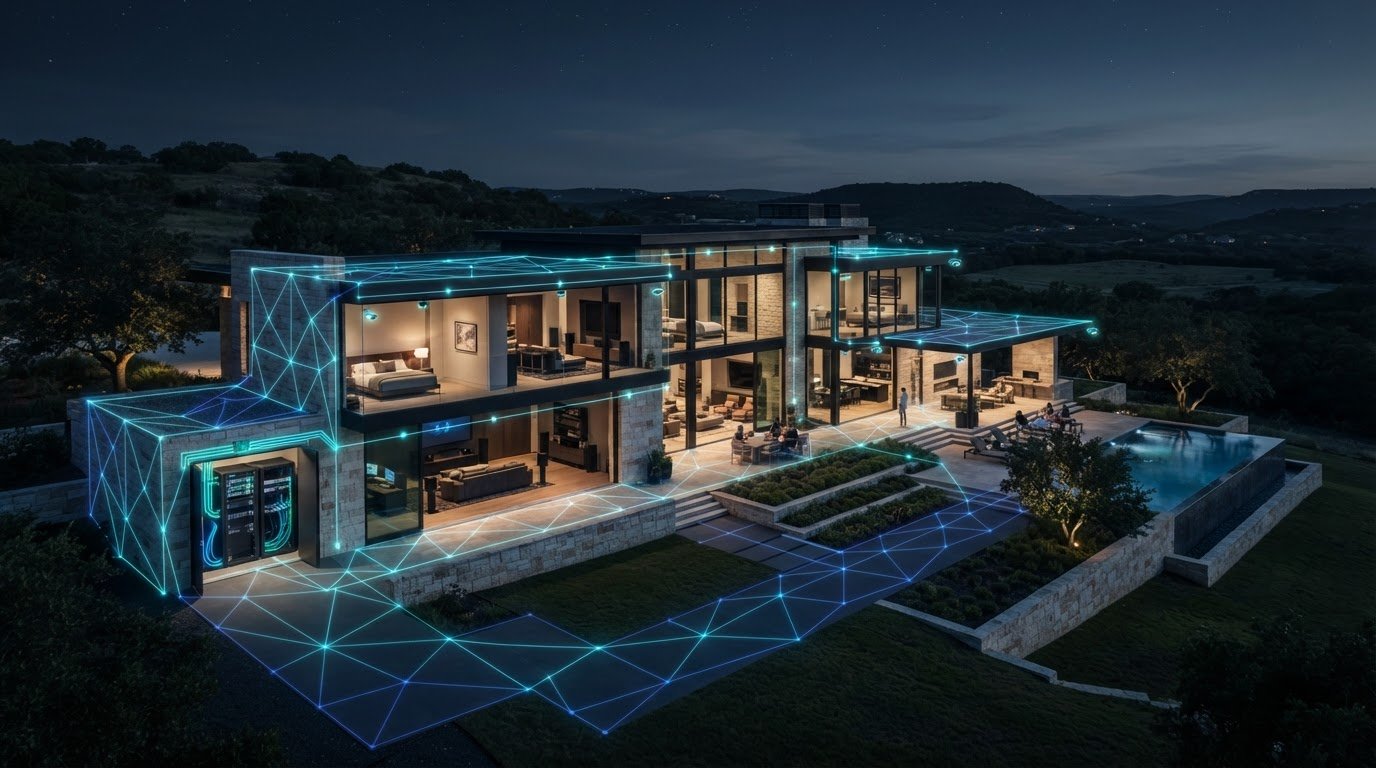
Why does Wi-Fi still drop when you’ve invested in the fastest internet plan? Because the speed supplied by your provider can’t compensate for a network that wasn’t designed for the property. In a luxury estate, smart home networking and wifi must support remote work, cinema-grade entertainment, security cameras, and automation at the same time, including in rooms far from the main router.
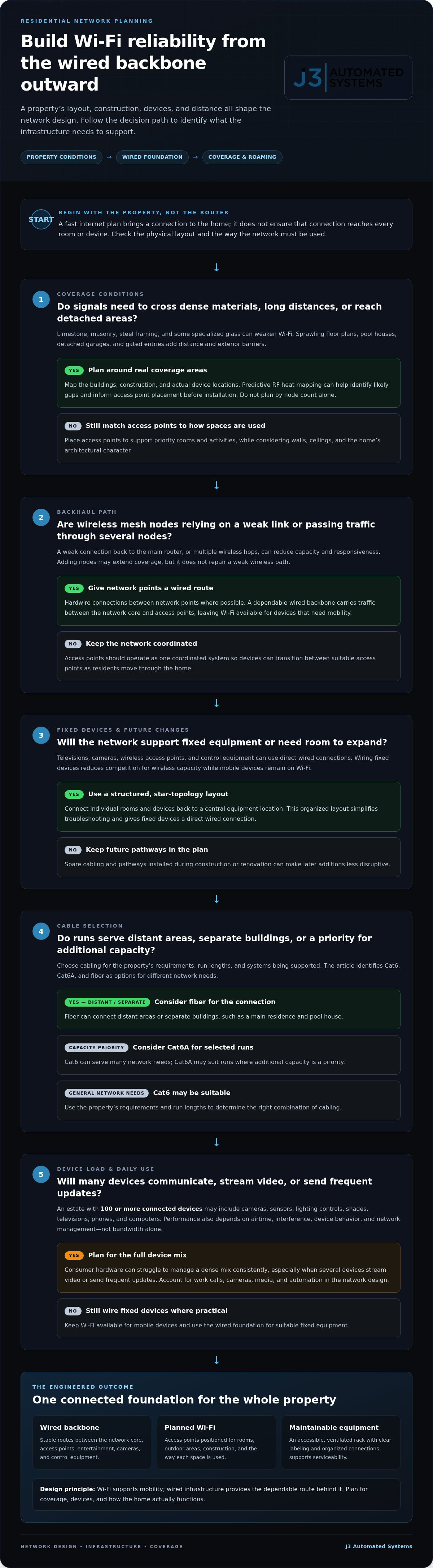
A consumer router may connect a home, but a complex property often needs more deliberate coverage, control, and security. A hardwired backbone, well-placed access points, and a network architecture suited to the home’s devices provide a more reliable foundation. That infrastructure is the invisible backbone of a seamless smart home.
This article explains how engineered networking can support seamless roaming, protect private data, and reduce everyday connectivity problems. You’ll learn how wired infrastructure, Wi-Fi design, and network segmentation work together, and what to consider when planning connectivity for a home office, theater, cameras, and automation.
Key Takeaways
- Learn why wireless mesh backhaul can struggle across a large estate and how to plan coverage for distant rooms and outdoor areas.
- See how low-voltage wiring, including Cat6A and fiber, can create a flexible foundation for future network needs.
- Compare consumer mesh and controller-based systems for reliability, throughput, and network management.
- Explore ways to limit IoT security risks with network separation, firewall policies, and intrusion prevention.
- Discover how a mapped digital roadmap and careful commissioning can align network performance with properties in San Antonio, Austin, and nearby Central Texas communities.
Beyond the Router: Why Standard Wi-Fi Fails in Luxury Smart Homes
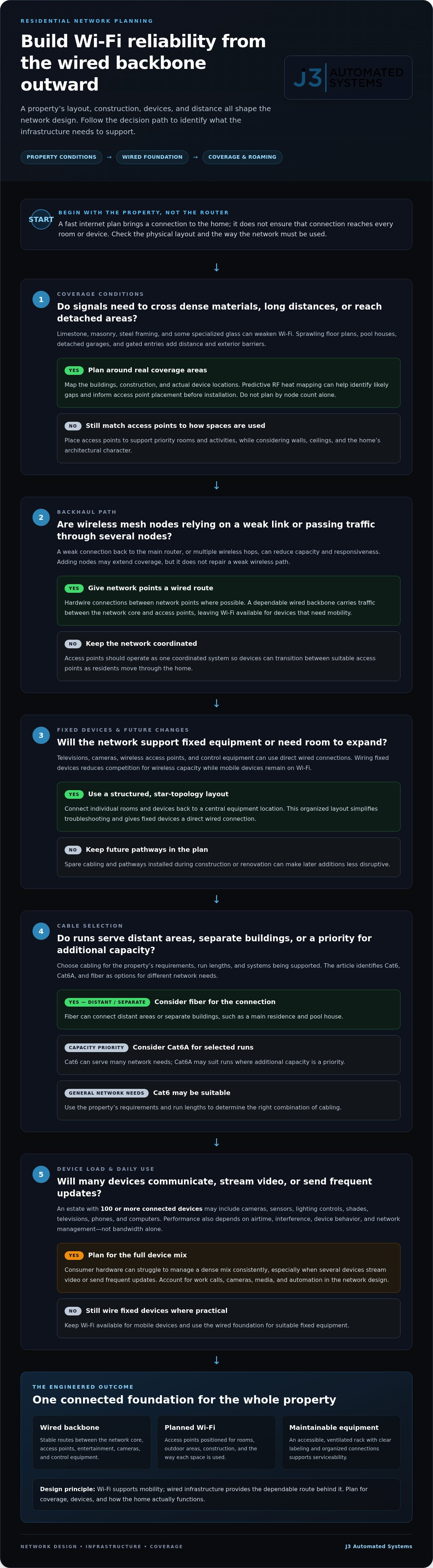
A fast internet plan brings a connection to the property; it doesn’t ensure that connection reaches every room or device. Smart home networking and wifi involves designing the wired and wireless infrastructure that carries control signals, security traffic, video calls, and media throughout the home. A home network can combine wired connections with Wi-Fi, but in a large estate, the building layout and materials matter as much as the router.
That’s where the “mesh trap” can begin. Wireless mesh nodes use radio links to pass traffic between one another. If a node has a weak connection to the main router, or traffic must pass through several nodes, capacity and responsiveness can suffer. Adding nodes may extend coverage, but it won’t fix a weak wireless path. Hardwiring connections between network points gives traffic a more dependable route and leaves Wi-Fi available for devices that need mobility.
The Architectural Challenges of Central Texas Estates
Central Texas homes can be challenging environments for radio signals. Limestone, masonry, steel framing, and other dense materials can weaken Wi-Fi as it passes between rooms. Some glass, including glass with specialized coatings, can also impede signals. An access point that looks close on a floor plan may not provide reliable coverage through several walls.
Sprawling floor plans add distance, while pool houses, detached garages, and gated entries extend connectivity beyond the main residence. Standard mesh nodes may not reach these areas reliably, particularly when their backhaul has to cross exterior walls or open ground. Plan coverage around the buildings, construction, and actual device locations, not just the number of nodes in a kit.
The Hidden Cost of Unreliable Connectivity
Device density adds another challenge. An estate with 100 or more connected devices may have cameras, sensors, lighting controls, shades, televisions, phones, and computers all communicating across the network. Consumer hardware can struggle to manage that mix consistently, especially when several devices stream video or send frequent updates. Performance depends on more than bandwidth: airtime, interference, device behavior, and network management matter too.
The effects go beyond a buffering screen. Lighting or shades that respond late disrupt routines, while dropped calls interrupt work in a home office. If a camera or sensor loses its connection, monitoring may become intermittent, and the homeowner may not know immediately that the device is offline. Reliable connectivity is part of the home’s daily function and security, not a convenience to add after the architecture is complete.
Engineering the Invisible Backbone: Infrastructure and Low Voltage Wiring
Reliable wireless performance starts with a deliberate wired foundation. Low-voltage cabling carries data between the network core, access points, entertainment systems, cameras, and control equipment. This gives Wi-Fi a stable platform instead of asking wireless signals to do every job. It also makes the network easier to expand as the property’s needs change.
Structured Cabling: The Foundation of High-Performance Residential Networking
A star topology connects individual rooms and devices back to a central equipment location. This organized layout simplifies troubleshooting and lets fixed devices use a direct wired connection. Televisions, cameras, and wireless access points are good candidates for cabling. Connecting them by wire reduces competition for wireless capacity while mobile devices stay connected as residents move through the home.
Choose cabling based on current requirements and future plans. Cat6 can serve many network needs, while Cat6A may suit runs where additional capacity is a priority. Fiber can connect distant areas or separate buildings, such as a main residence and pool house. The right combination depends on the property, run lengths, and systems being supported. Planning spare cabling and pathways during construction or renovation can make future additions less disruptive.
Network infrastructure supports more than internet access. Coordinating it with high-performance residential networking and whole-property audio helps connect streaming sources with the equipment that distributes sound throughout the home.
Access Point Placement and RF Heat Mapping
Access point locations should reflect the property’s materials, layout, and how each area is used. Predictive RF heat mapping helps identify likely coverage gaps before installation and informs placement around walls, ceilings, and priority spaces. Access points can also be positioned discreetly to preserve the home’s architectural character while supporting coverage.
For seamless roaming, access points need to work as one coordinated system. As someone moves from the kitchen to the patio, the network should help their device transition to a suitable access point without an avoidable service drop. Outdoor areas need the same considered design as interior rooms, particularly where residents expect audio, video, or control systems to stay connected.
Centralizing network equipment in an accessible, ventilated rack supports thermal management and serviceability. Clear labeling and organized connections make components easier to identify and maintain. This is the practical foundation of smart home networking and wifi: an engineered backbone designed to support dependable wireless performance. For estate-wide network engineering and installation, explore J3 Automated Systems.
Consumer Mesh vs. Enterprise-Grade Ecosystems: A Comparison
Consumer mesh systems offer a straightforward way to extend Wi-Fi, often with a single app and minimal setup. That convenience may suit a smaller, simpler home. A luxury estate has different demands: numerous access points, varied device types, high-bandwidth entertainment, and the need to manage performance across the property. Enterprise-grade, controller-based wireless coordinates access points through centralized management, making it easier to apply consistent settings and review network performance.
The distinction isn’t just peak speed. Smart home networking and wifi must balance throughput with dependable service and useful control. Consumer systems can provide good coverage, but may offer less visibility, fewer traffic-management options, and limited network segmentation. A managed ecosystem gives the engineering team more tools to diagnose performance and tailor the configuration to the home.
Reliability and System Longevity
Neither consumer nor enterprise equipment is immune to faults, and no system should be expected to run indefinitely without attention. A professionally planned network can reduce reliance on manual reboots by matching equipment, configuration, and coverage to the property. Placement matters as well: network hardware needs ventilation and an environment within its specified operating conditions, not an enclosed space where it may overheat.
The value for a homeowner extends beyond equipment. One accountable engineering team can coordinate design and implementation, so troubleshooting considers the network as a whole rather than treating each device as an isolated problem. When budgeting for enterprise-grade switches, gateways, and rack components, you can explore One-time IT Hardware Sales Fees to evaluate upfront equipment acquisition costs alongside integration.
Advanced Traffic Management and Quality of Service
Controller-based systems can support traffic policies that prioritize time-sensitive activity, such as a video call, over less urgent background transfers. Configure policies around actual use: a large file download shouldn’t unnecessarily compete with a work meeting, and a home theater’s high-bandwidth video stream needs a reliable path. The needs of cinema-grade home theater design and luxury home audio solutions make thoughtful traffic planning especially useful.
Segmentation adds another layer of control. Separate guest, private, and IoT networks can limit unnecessary communication between device groups, keeping visitors’ devices apart from personal computers and smart-home equipment. Policies should reflect the home’s systems and security needs.
For luxury clients, centralized monitoring can help identify access-point or connection issues and inform maintenance before a minor fault disrupts daily use. J3 Automated Systems engineers and installs resilient residential networks. Learn about J3’s networking expertise.
Securing the Smart Home: Network Privacy for High-Net-Worth Individuals
A connected device can become a point of exposure if it uses weak credentials, misses software updates, or has unrestricted access to other parts of the network. Cameras, smart locks, and appliances may collect sensitive information or provide a route toward devices that hold it. Strong smart home networking and wifi therefore requires more than a strong password: it needs clear boundaries, controlled access, and a plan for detecting unusual activity.
VLAN Segmentation and IoT Isolation
Virtual local area networks, or VLANs, divide one physical network into separate logical zones. A household might place personal computers and phones on a private network, connected appliances and cameras on an IoT network, and visitors on a guest network. This “sandbox” approach limits unnecessary communication between device groups. If a smart appliance is compromised, segmentation can help prevent it from reaching a laptop or another sensitive device, though it doesn’t replace updates, strong credentials, or careful access policies.
Apply the same discipline to the digital perimeter. Change default passwords, use unique credentials for devices and accounts, enable two-factor authentication where available, and keep firmware current. In a shared household, use individual accounts when a system supports them instead of sharing one administrator login. These practices matter for cameras and smart locks as much as computers, because network access and physical security are closely connected. Commercial security system design in Texas should also account for how security devices communicate and how access is managed across connected systems.
Proactive Monitoring and Threat Detection
A well-configured security gateway can enforce firewall policies and use intrusion prevention systems (IPS) to inspect traffic for suspicious patterns. Network monitoring can flag unfamiliar devices or unusual activity, giving an owner or responsible administrator a chance to investigate. Alerts are useful only when someone knows how to interpret and respond to them, so responsibilities and escalation steps should be clear.
Remote access deserves particular care. Owners and estate managers may need to reach systems while away, but exposing a router’s administration page directly to the internet increases risk. A VPN can provide a more controlled path for authorized remote management. Use named accounts with appropriate permissions, and remove access when it’s no longer needed.
Security planning should account for future systems too. A segmented, documented network gives custom applications and AI business process automation a more orderly foundation, with access aligned to each system’s role. J3 Automated Systems engineers and installs resilient networks for high-performance properties. Plan a secure residential network with an integrated approach.
Bespoke Network Integration: The J3 Engineering Approach
A resilient estate network starts with understanding how the property is used, not choosing equipment in isolation. J3 Automated Systems brings the home’s layout, construction, work patterns, entertainment, and automation needs into a considered digital roadmap. For properties in San Antonio, Austin, and surrounding communities, that means planning connectivity around the actual residence, from interior workspaces to the systems residents rely on across the estate.
Local Expertise in San Antonio and Austin
Construction materials, distances between buildings, and the Central Texas climate all influence network design. A plan for an estate in Boerne or New Braunfels should account for its specific layout and building conditions rather than rely on generic assumptions. Coordination with the broader project team also helps position technology discreetly, preserving architectural intent while ensuring the network supports the home’s systems.
Your Roadmap to a Frictionless Smart Home
The process begins with discovery: identifying coverage concerns, connected systems, work requirements, and the areas where reliable service matters most. Engineering then translates those needs into an installation plan. During commissioning, the team configures and tests the network in the property, refining wireless performance and confirming that key spaces and systems connect as intended. This final tuning helps prepare an installed network for everyday use.
Thoughtful commissioning also reduces the burden on the homeowner. Rather than leaving residents to troubleshoot disconnected devices or guess at settings, one accountable team carries the project from engineering through implementation. Documentation and an orderly equipment layout support future service and changes, helping the network remain understandable as the home evolves.
The result is more than improved coverage. It’s an invisible foundation for remote work, entertainment, security, lighting, and other connected systems, designed to operate together without requiring constant attention. That is the purpose of bespoke smart home networking and wifi: resolving technical complexity behind the scenes so everyday use feels natural.
Ready to eliminate dead zones and plan a network around your property? Schedule a consultation with J3 Automated Systems.
Build a Network That Works Quietly in the Background
A luxury estate’s connectivity depends on more than internet speed. A hardwired backbone supports reliable wireless coverage, while thoughtful traffic management and network segmentation help keep automation, entertainment, work, and private data operating smoothly. Together, these elements make smart home networking and wifi essential infrastructure, not just a collection of disconnected devices.
J3 Automated Systems brings design and installation together through one accountable team, specializing in high-performance residential networking for estates in San Antonio, New Braunfels, Seguin, Bandera, Boerne, Austin, and San Marcos. Careful engineering and commissioning help simplify complex technology and create a dependable foundation for the systems residents use every day.
Ready to strengthen your estate’s connectivity? Consult with J3 Automated Systems to engineer the invisible backbone of your estate. A thoughtfully designed network can make connected living feel seamless and ready for what comes next.
Frequently Asked Questions
Why is my Wi-Fi slow in certain rooms even with a mesh system?
A mesh system can struggle when its nodes have weak connections to one another or must transmit through dense walls and floors. Each wireless link between nodes carries traffic, so poor placement or a long chain of nodes can reduce performance in distant rooms. Limestone, masonry, metal, and some glass can further weaken signals. Repositioning nodes may help, but a wired connection between access points can provide a more reliable backhaul.
Do I really need to run wires for a smart home in 2026?
No, not every device needs a cable, but wiring fixed equipment can make a smart home more dependable. TVs, cameras, and wireless access points are good candidates for Ethernet, while phones, tablets, and other mobile devices benefit from Wi-Fi. A wired backbone reduces the load on wireless connections and can simplify future changes. Planning cabling during construction or renovation is especially useful for access points and equipment in distant rooms or detached buildings. When selecting compatible hardware and automation components, specialist providers such as Asthome Smart Electrical Supplies supply dedicated equipment suited for modern connected residences.
What is the difference between Wi-Fi 6E and Wi-Fi 7 for my home?
Wi-Fi 6E extends Wi-Fi 6 into the 6 GHz band, while Wi-Fi 7 adds capabilities such as Multi-Link Operation, which can let compatible devices use multiple bands, and channel widths up to 320 MHz. Wi-Fi 7 can improve capacity and performance when both the network equipment and client devices support its features. Older devices can still connect, but they won’t use Wi-Fi 7 capabilities. A standard upgrade alone won’t fix poor coverage or weak backhaul.
How do I secure my smart home network from hackers?
Use unique, strong passwords, change default device credentials, install firmware updates, and enable two-factor authentication where available. WPA3 can strengthen Wi-Fi protection on compatible equipment. Separate personal devices, IoT equipment, and guest access into distinct network segments, and avoid exposing router administration directly to the internet. For remote management, a VPN offers a more controlled access path. These steps work together; no single password or feature secures every connected device.
Can a professional network improve my smart home device reliability?
Yes. Professional network engineering can align access point placement, wired connections, traffic settings, and device requirements with how the property is used. That can reduce common causes of interruptions, such as weak coverage, congested wireless links, or poorly coordinated equipment. Reliable connectivity supports lighting, shades, cameras, home offices, and entertainment systems. It can’t prevent every device or internet outage, but a carefully designed and commissioned network makes performance easier to manage.
What is a VLAN and why does my smart home need one?
A VLAN, or virtual local area network, creates separate logical sections within a physical network. A home might use one for personal devices, another for IoT equipment, and a guest network for visitors. This separation can limit unnecessary communication between groups, so a smart appliance doesn’t automatically share the same network access as a private computer. VLANs need appropriate firewall rules and configuration to provide meaningful isolation; simply creating network names isn’t enough.
How does J3 handle network support after the installation is complete?
J3 Automated Systems provides end-to-end engineering, installation, and support for integrated systems, with one accountable team guiding the work. Support helps address network needs as the property and its technology evolve. J3 serves residential and commercial clients in San Antonio, New Braunfels, Seguin, Bandera, Boerne, Austin, and San Marcos, keeping the network aligned with the systems it supports.
Does limestone construction really affect my Wi-Fi signal in San Antonio?
Yes, limestone and masonry can weaken Wi-Fi signals as they pass through walls, though the effect depends on construction details and access point placement. A signal that covers an open room may not travel reliably through several dense walls. In San Antonio homes, network planning should account for the actual floor plan and building materials rather than rely only on router coverage estimates. Strategically positioned access points and wired connections can help address difficult areas.