Integrating Security and Lighting Automation: A Smarter Approach to Connected Spaces
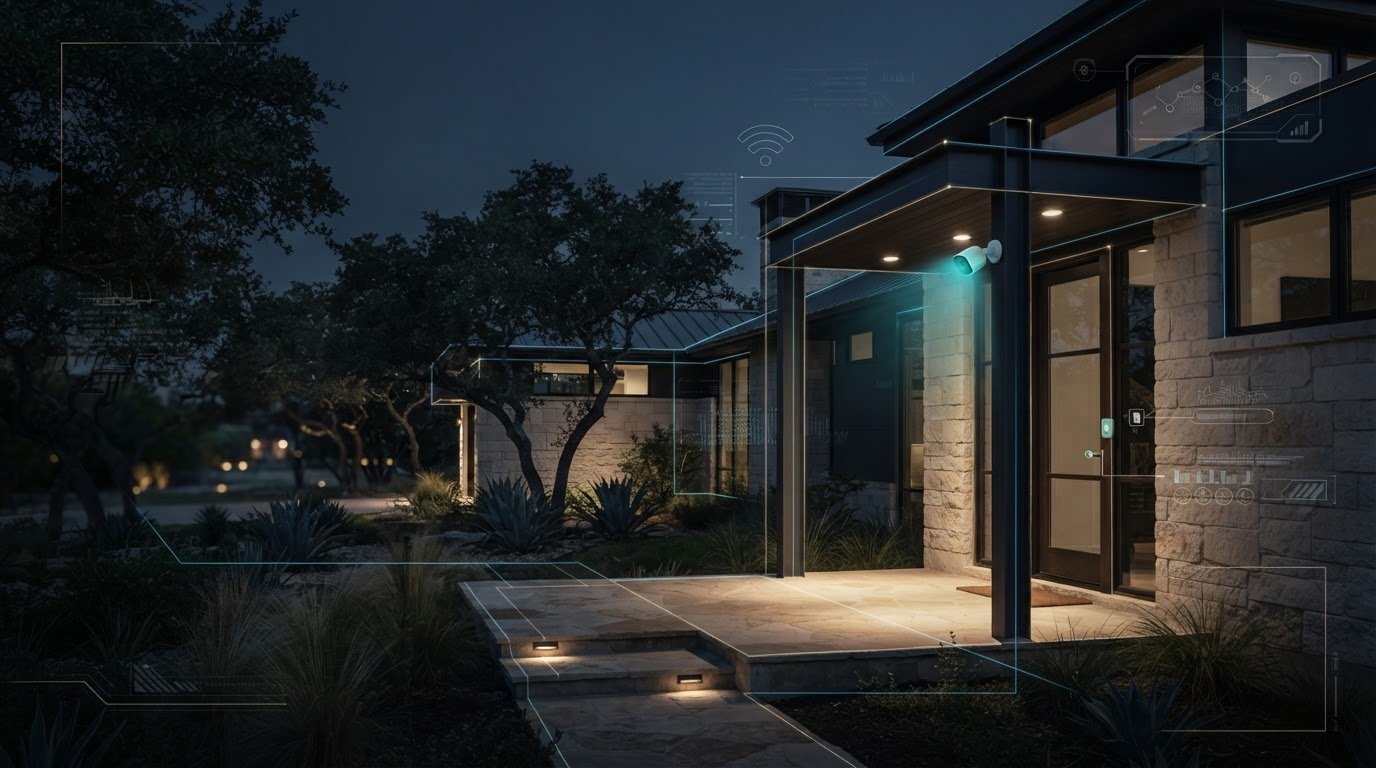
What if a security event could guide the right lights to the right place, without turning every alert into a whole-property response? That balance is central to integrating security and lighting automation. When systems share useful context, a detected event might illuminate an entry or improve visibility near a camera, while each system keeps a clear role.
It’s understandable to want security and lighting to work together, yet still feel unsure which events should trigger a response. Separate apps and workflows can add friction, especially across a large home or commercial property. Integration doesn’t mean making every device depend on every other device. Carefully defined rules keep responses purposeful and predictable.
This article explains how coordinated security and lighting responses work, compares unified control with separate systems, and outlines the decisions that shape a practical plan. You’ll consider where lighting should respond, how occupants use the property, and how the system can scale across distinct spaces. For Texas properties, from San Antonio homes to commercial sites, J3 Automated Systems brings design, installation, integration, and commissioning together in a tailored automation roadmap.
Key Takeaways
- Integration means security events can inform lighting responses, not simply that devices appear in the same app.
- When integrating security and lighting automation, define which events matter and what response each should produce.
- Compare coordinated control with separate operation by considering usability, flexibility, and the complexity of your property’s workflows.
- Plan around the people, spaces, access patterns, and schedules the system needs to serve, whether residential or commercial.
- See how a structured process of mapping, engineering, installation, and commissioning can bring the system together under one accountable team.
What Does Integrating Security and Lighting Automation Actually Mean?
Separate controls can make ordinary routines feel needlessly fragmented: check one interface for security, switch to another to adjust lights, then remember whether each space is set as intended. Integrating security and lighting automation means designing those systems to coordinate around selected events or shared control logic, so a relevant security status can inform a planned lighting response.
Security and lighting integration is the coordinated use of security events and lighting controls to carry out responses defined for a property. The key word is coordinated. Devices appearing in the same app may make them easier to access, but that alone doesn’t mean they exchange information or operate together. A genuine integration establishes a relationship: an input is recognized, a rule determines what should happen, and a configured lighting scene responds when the systems support that workflow.
For example, an authorized arrival could inform a routine that illuminates selected areas near an entry. The response might be limited to those areas rather than turning on every light. This is an example of a possible workflow, not a feature that works across all equipment or installations. The project design, system capabilities, and configured control logic determine what can happen.
What information can security and lighting systems share?
A configured security event may serve as an input for lighting control. Depending on the design and system capabilities, that input could relate to entry status, scheduled occupancy, or a user command. The lighting response can then be defined for a particular space or routine. A lighting control system can include controls for scenes and operation across different environments; integration adds a designed connection between lighting behavior and relevant security information.
Keep the distinction clear: these are possible workflows, not universal functions. A user command might prompt a chosen scene if the system is configured to connect that command with lighting. A scheduled occupancy state could inform a routine if the relevant systems can share that information. Planning determines which events matter, which lights should respond, and what the response should be.
What does integration change for the people using the property?
For residents, the practical difference is fewer disconnected steps between security and lighting tasks. An arrival routine can be planned so an authorized entry status informs a suitable lighting response. A departure routine might coordinate a user action with selected lighting controls, while an after-hours routine can reflect how the household uses the home. Each outcome depends on the configured system, not on the idea of integration alone.
That distinction matters in a San Antonio home with multiple entries, shared spaces, or rooms used at different times. The goal isn’t to automate every light whenever security changes. It’s to make a small number of relevant interactions feel coherent, while preserving clear controls for people in the home. Connect the tasks that benefit from coordination and keep unrelated operations straightforward.
How Security and Lighting Automation Work Together Behind the Scenes
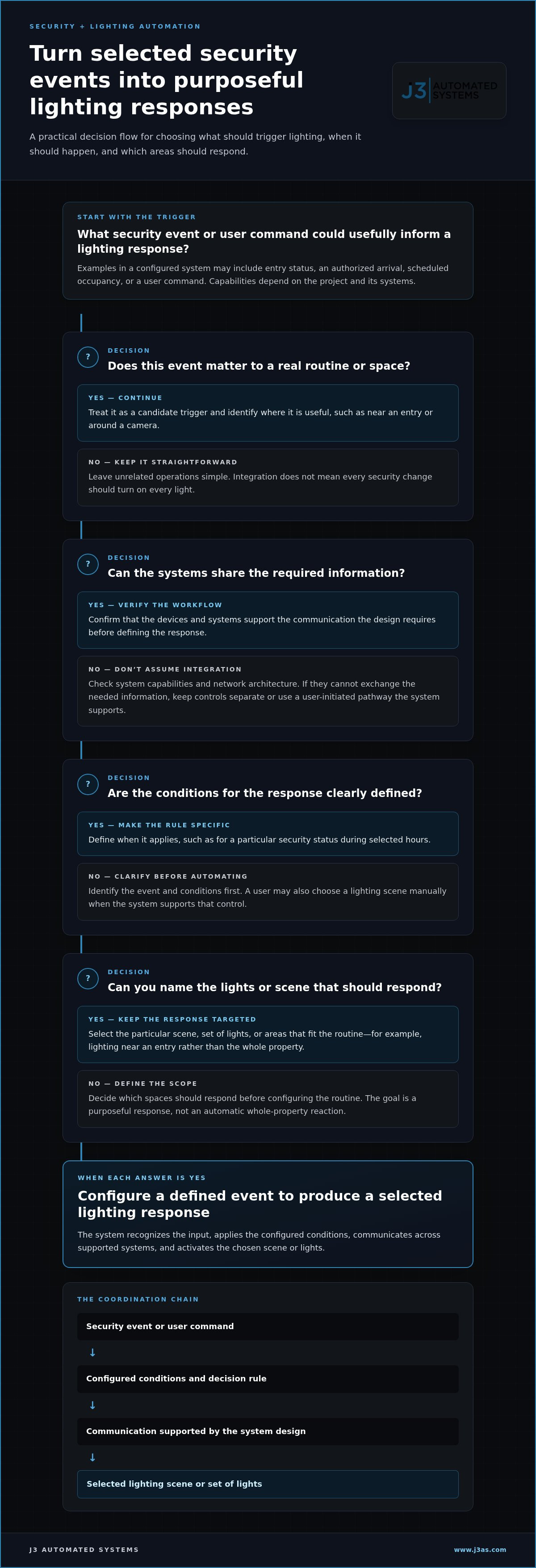
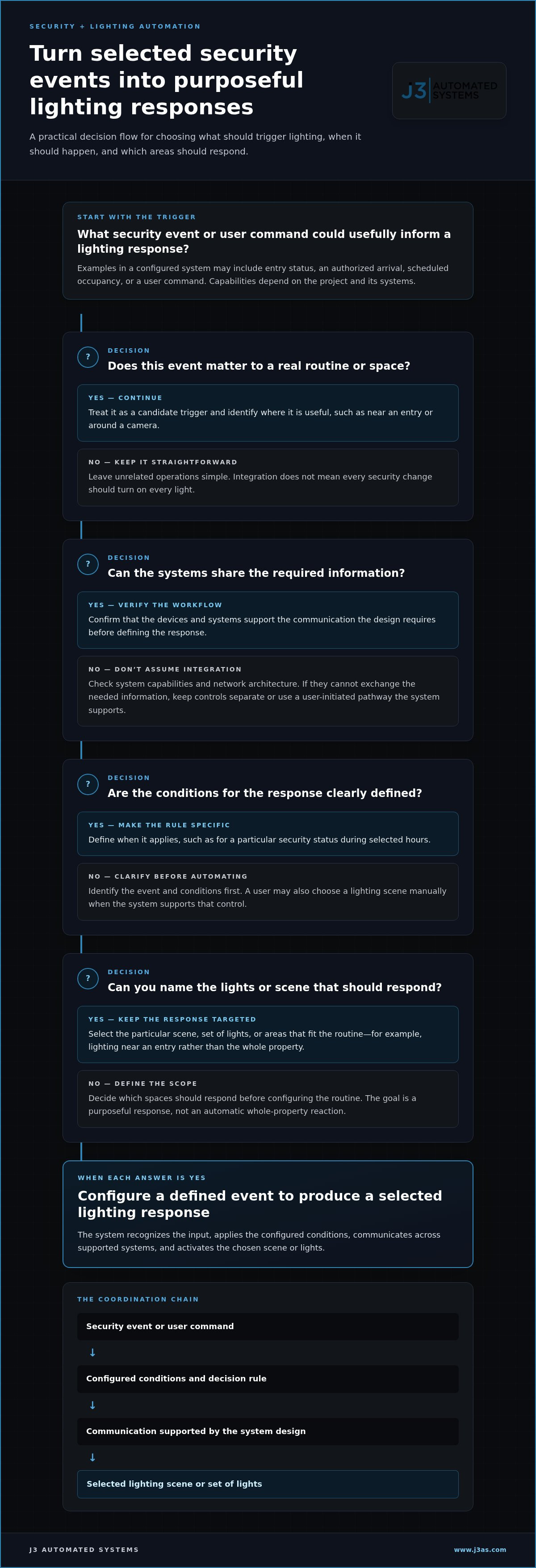
Behind a coordinated response is a chain of decisions, not simply a sensor switching on a lamp. A device supplies an input, system logic evaluates it, and a configured lighting control receives an instruction. Each stage has a distinct role, making it easier to plan, test, and refine how the property behaves.
A sensor or security system provides information, such as a detected event or a change in entry status. A rule defines whether that information should prompt an action and under what conditions. A user can also initiate a command directly. The lighting system then carries out the selected response, such as activating a particular scene or set of lights. In cybersecurity, security automation commonly describes automated responses to digital threats. In a home, the relevant design question is how selected physical security events may inform lighting controls.
From a security event to a lighting response
Designers begin by identifying the event, the conditions that make it relevant, and the intended lighting behavior. For example, a configured routine could respond to a defined security status during selected hours and illuminate particular areas. The exact event, conditions, and response depend on the project and the capabilities of its systems.
A user-initiated command and an automatic routine are different pathways. A resident might choose a lighting scene manually, while a configured rule could initiate a response when its conditions are met. Neither approach works with every camera, sensor, control platform, or light by default. The devices and systems must be able to communicate in the way the design requires.
Simple system flow: security event or user command → configured conditions and decision rule → communication across the system → selected lighting response.
Networking supports that communication. The property’s network architecture can affect how connected systems exchange information, so it belongs in the overall design rather than being treated as an afterthought. For a deeper look at this foundation, see high-performance residential networking.
Why system design and commissioning matter
A planned routine needs to behave as expected in the actual property. During commissioning, the team can test whether the intended event is recognized, whether its conditions are interpreted correctly, and whether the selected lights respond as designed. Testing user controls matters too, so occupants can operate the system without guessing which command or scene to choose.
Clear names and documentation support that experience. A scene labeled for its purpose is easier to understand than an ambiguous control, particularly when several people use the property. Documented logic also gives the system a clearer structure for future adjustments. These details are part of integrating security and lighting automation as a designed whole, not merely connecting devices and assuming the workflow will make sense.
For San Antonio homeowners planning a coordinated system, J3’s integrated automation approach brings design, installation, integration, and commissioning under one accountable team.
Integrated vs. Separate Security and Lighting: Which Approach Fits?
Coordinated control can make selected routines easier to manage, while separate systems can preserve straightforward, independent operation. Neither approach is automatically better. The right fit depends on how people use the property, how much coordination is useful, and whether the design can keep workflows clear.
For a San Antonio home, consider the trade-off between reducing steps and adding rules. Integration may let a planned security event inform a lighting response, but every connection adds a decision to define and maintain. If the routine is poorly chosen, occupants may find it confusing rather than helpful. A separate setup can be simpler when people prefer to control lighting and security independently, or when there is no useful routine that needs both systems.
| Criterion | Integrated approach | Separate approach | Practical implication |
|---|---|---|---|
| Everyday use | Selected tasks can be coordinated through a shared control experience. | Users operate each system independently. | Choose coordination where it removes a real step. |
| Flexibility | Rules connect defined events and responses. | Each system’s operation stays distinct. | Define which actions should remain independent. |
| Planning | Requires clear logic, compatible capabilities, and testing. | Limits cross-system rules to plan and maintain. | Complexity depends on the design, not the label. |
When shared control can simplify everyday routines
Shared control may suit a household whose occupants want selected actions to follow a consistent routine, such as a planned arrival or after-hours sequence. A consistent interface can make those actions easier to operate because users don’t have to remember separate steps for every connected task. The configuration still needs to reflect who lives in the home, how they move through it, and which system capabilities support the workflow.
Start with a genuine point of friction. If people routinely need to coordinate the same lighting and security tasks, a designed connection may help. If the routine is rarely used, adding rules may create needless complexity. Integration should make the intended action clearer, not require occupants to learn a growing set of exceptions.
When distinct controls and boundaries still matter
Security permissions and lighting preferences don’t always belong to the same user role. Someone may need control of everyday lights without authority to change security settings. Retaining distinct permissions lets the design reflect that difference, while clearly labeled manual controls give occupants a direct way to operate lighting without relying on an automated routine.
Defined behavior also matters if a connected system or communication path is unavailable. Resilience is a design consideration: designers can consider which controls should remain distinct and how occupants will operate them. Integration alone doesn’t guarantee continuity, prevent incidents, or improve security. The aim is a deliberate balance between coordinated actions and independent control.
Ultimately, integrating security and lighting automation makes sense when it serves defined user needs. Coordinate the workflows that make daily use more coherent, preserve boundaries where control should remain distinct, and keep the system understandable for the people who rely on it.
How to Plan Security and Lighting Integration for a Texas Property
A successful plan starts with the property and the people who use it, not a shortlist of devices. For a San Antonio home, entry locations, room layouts, household routines, and the intended lighting experience all shape the system design. A commercial property brings different considerations, including who accesses each area and how operating schedules change throughout the day. Use this sequence to turn broad goals into a workable brief for integrating security and lighting automation.
- Identify users. List residents, household staff, guests, or employees who use the property. Note which areas they access and what security or lighting controls each group needs.
- Map spaces. Mark entry points, shared areas, private rooms, exterior approaches, and any spaces with distinct operating needs. Property layout and site conditions influence where controls and coordinated responses make sense.
- Choose relevant events. Identify the security or occupancy information that could support a useful lighting action. For commercial facilities, clarify access patterns and operating schedules. For a home, focus on household routines and how different occupants use the spaces.
- Define responses. Translate goals such as “make arrival easier” into observable behavior: specify which area should respond, under what conditions, and which users can initiate or adjust the routine.
- Coordinate the design. Consider lighting controls and security requirements together, including system communication and the boundaries between user roles. For broader security planning, commercial security system design in Texas offers relevant context. Commercial properties may also need building-wide coordination with HVAC and other systems, as discussed in commercial building management systems in Texas.
- Commission the workflows. Test the agreed events, controls, and lighting responses in the spaces where they’ll be used. Include representative users so the team can assess whether routines are clear in practice and refine the design where needed.
Map users, spaces, and desired responses before choosing workflows
Begin discovery with a simple room-by-room view: who uses each space, what they need to control, and what should happen during normal and after-hours operation. Separate shared spaces from private areas, and note where access or lighting needs differ. This turns broad aims such as convenience into decisions the design team can assess, document, and test.
Coordinate lighting design, security, and building systems
Lighting and security should be considered as connected parts of the property plan, while retaining clear roles and controls. In commercial settings, align proposed workflows with access patterns and operating schedules, then assess relevant connections to building systems. Commissioning should test the agreed behavior with representative users, not only confirm that individual components respond.
Project discovery checklist: Who uses each space? Which areas have distinct access needs? What event should prompt a response? What should the lighting do? Who can control or adjust it? How will the workflow be tested?
J3 Automated Systems brings system design, installation, integration, and commissioning together for tailored Texas projects. Plan an integrated security and lighting system around the people, spaces, and routines it needs to serve.
How J3 Automated Systems Engineers Integrated Security and Lighting
For a high-end home, integration should reflect how the property is actually used, rather than force residents into a preset package of devices and routines. J3 Automated Systems designs, installs, and commissions tailored security and lighting automation for residential and commercial properties across Texas. Bringing the work under one accountable team connects project decisions from the initial property assessment through system testing.
A coordinated project from discovery through commissioning
Discovery establishes the project’s context. J3 maps the property, learns how residents or staff use different spaces, and identifies the routines they want the system to support. Existing systems, access patterns, lighting priorities, and the needs of different users all inform the scope. This helps distinguish essential workflows from ideas that would add complexity without serving a clear purpose.
With that understanding, J3 engineers a tailored system. Security and lighting are considered together, including which events should inform a lighting response, where separate controls should remain, and how the selected systems fit the property. This design-led approach matters in a San Antonio residence with varied entries and shared spaces, as well as in a commercial building with distinct access needs. The property and its users shape the plan.
Installation puts the engineered design into practice. Because system design and installation are part of one project, planning decisions guide how the components are brought together. The goal is a coordinated system rather than a collection of unrelated devices, with the project scope shaped around the property’s requirements.
Commissioning provides a structured opportunity to test and tune the planned behavior. The team can evaluate whether defined events produce the expected lighting response, whether controls are clear for occupants, and whether configured routines match the project intent. Testing helps surface adjustments before the system is treated as complete. It also gives users a chance to understand the controls they’ll use in everyday life.
Start a security and lighting integration conversation
Every property brings a different combination of spaces, existing systems, routines, and priorities. A useful first conversation can begin with a description of the property, how people use it, what systems are in place, and which interactions feel fragmented today. Residential and commercial needs call for different roadmaps, so those details help frame a design around actual use.
J3’s approach is not a one-size-fits-all hardware package. It maps the property, engineers a tailored solution, installs the system, and commissions its planned operation under one accountable team. That end-to-end process gives the project a coherent path from user needs to working controls, with the scope shaped to the property instead of a generic template.
If you’re considering coordinated security and lighting for a San Antonio home or another Texas property, discuss an integrated automation project with J3. Share the property context, existing systems, and priorities you want the roadmap to address.
Make the Next Step a Clearer Plan
Begin with a real routine that feels harder than it should: arriving home, settling in for the evening, or managing access when the property is quiet. Describe what happens now, who needs to act, and what a better experience would look like. That practical starting point turns integrating security and lighting automation from a broad idea into decisions shaped around your property.
From there, consider which actions should work together and which should remain independent. The aim isn’t to automate everything; it’s to create a thoughtful experience that feels natural to the people who use the space. A well-defined project can make controls and system relationships clearer without adding unnecessary steps.
For a tailored roadmap grounded in your property and priorities, discuss an integrated security and lighting project with J3. A considered conversation can help you move from scattered possibilities toward a coordinated plan.
Frequently Asked Questions
Can security cameras trigger automated lighting?
Yes, integrating security and lighting automation can allow a camera-related event to trigger lighting if the camera, control system, and lights are designed to communicate. For example, a defined event near a side entrance might activate a nearby light rather than the entire home. The trigger and response depend on system capabilities and configuration; a camera won’t automatically control every lighting system. Define the event and how occupants can adjust or override the response.
Can existing security and lighting systems be integrated?
Often, but existing equipment can’t be assumed to work together. Integration depends on the systems installed, how they communicate, and whether their controls can be coordinated. An assessment documents the equipment, available interfaces, and desired behaviors before the design is set. This helps determine which elements can be incorporated into the plan and where adjustments may be needed to support the intended workflow.
Does integrating security and lighting require one app?
No. A single app isn’t required for integration, and placing controls in one interface doesn’t necessarily mean the systems share logic. A design can coordinate selected behaviors while retaining separate controls for other tasks. The important consideration is whether occupants can understand and use the controls for their daily routines. The arrangement should account for system capabilities and user permissions, rather than making a shared interface the goal by itself.
What happens to automated lighting if the network goes down?
That depends on how the system is engineered. Some functions may rely on network communication, while other lighting controls may operate locally; behavior varies by equipment and configuration. Before commissioning, define which functions should remain available if communication is interrupted, then test that condition. Don’t assume a security-linked lighting scene will run during an outage unless the design has been built and verified to support it.
Can integrated security and lighting work in both homes and commercial buildings?
Yes. The approach can suit both, but priorities differ. A household may focus on family routines, guest access, and private spaces. A commercial property may need to account for staff roles, visitor movement, shared areas, and operating schedules. Planning around these differences helps shape useful controls for each setting. For example, an employee’s everyday lighting needs may differ from the responsibilities of someone who manages security settings.
How should access permissions work when security and lighting controls are connected?
Set permissions deliberately, since access to lighting shouldn’t automatically grant authority over security settings. A household might allow family members to adjust everyday lights while reserving security changes for designated users. In a business, roles can reflect who uses a space and who administers security. Define these boundaries early, then test each user’s controls during setup so access matches responsibilities without complicating routine tasks.
Is security and lighting integration useful for a property in San Antonio, Texas?
It can be useful when a property has routines where selected lighting actions should relate to security events, such as managing an arrival or an unoccupied period. The value depends on the site layout, occupants, and existing systems, not simply the city. For projects in San Antonio, New Braunfels, Seguin, Bandera, Boerne, Austin, and San Marcos, begin by identifying a specific workflow the system should improve. Talk with J3 Automated Systems about a tailored security and lighting automation plan.