Home cinema design in The Dominion with seamless integration
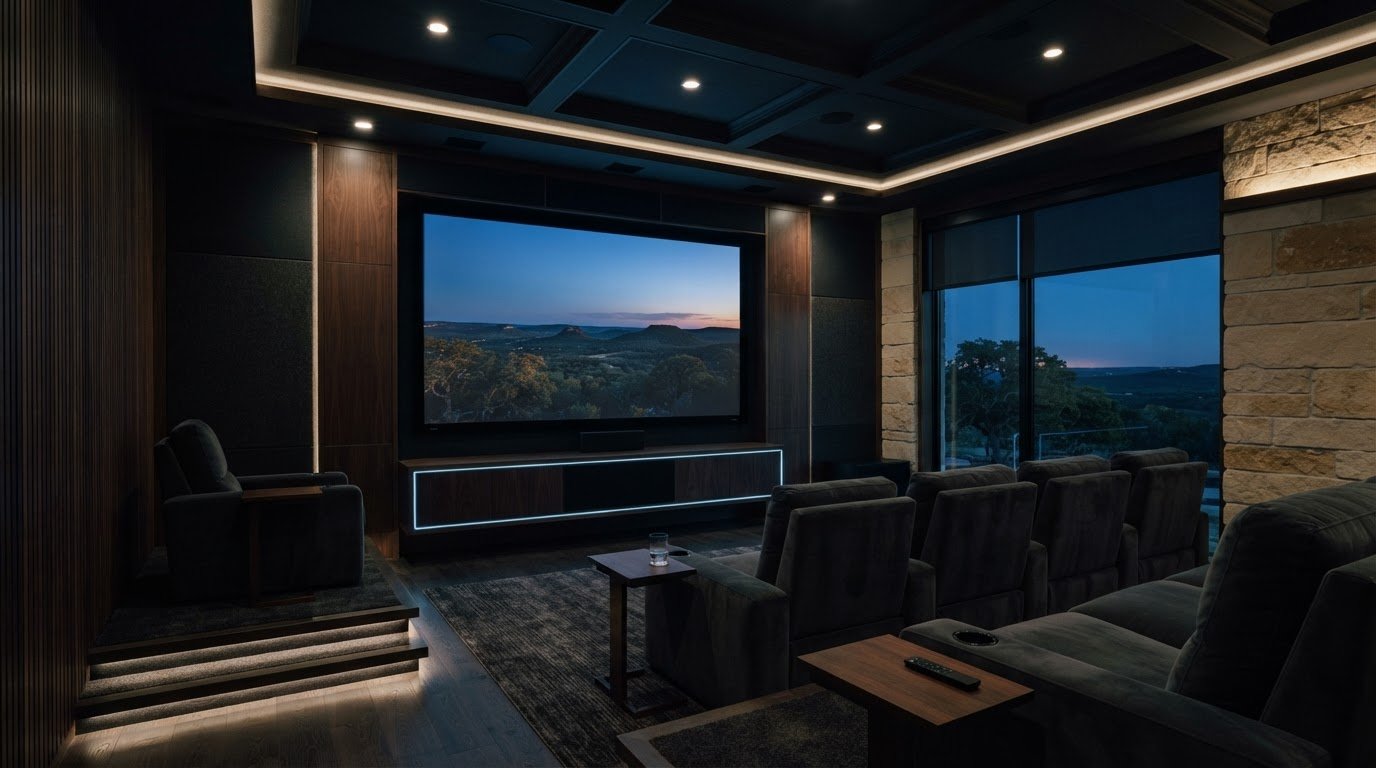
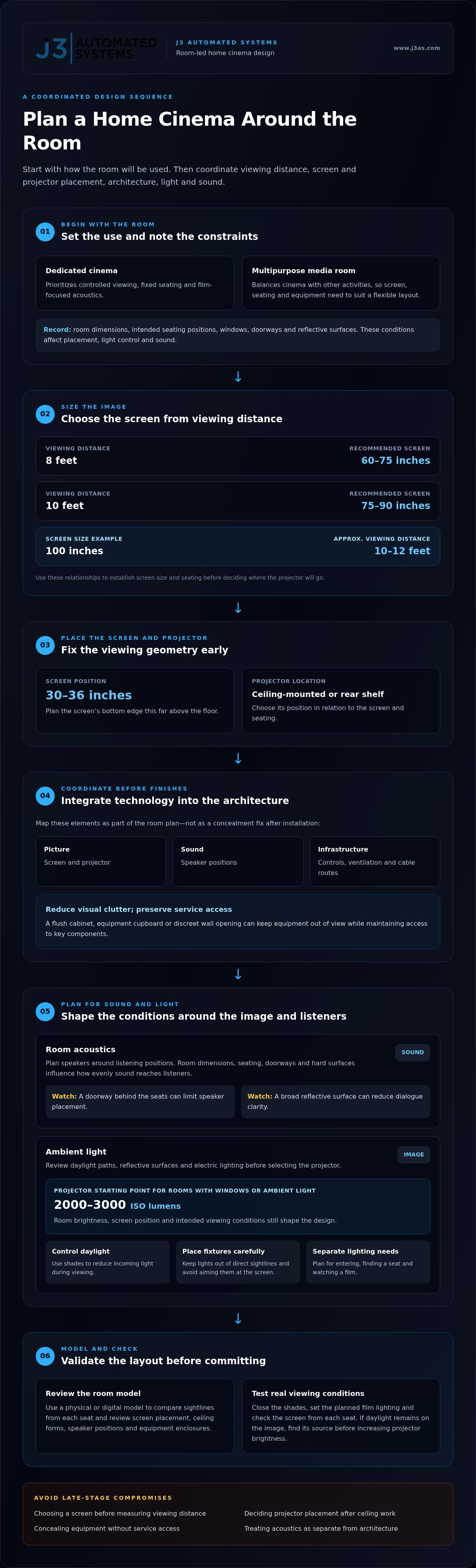
A cinema room succeeds through coordination, not equipment alone. For home cinema design in The Dominion, match the projector and screen to the viewing distance, then shape light control, concealed technology and room acoustics around the space. A 100-inch screen, for example, is generally viewed from roughly 10 to 12 feet.
A striking screen and powerful sound may seem like the main ingredients of home cinema design in The Dominion, but comfort and integration matter just as much. Glare, visible equipment and uneven sound can interrupt the experience, even when each component works well on its own.
This guide explains how projector placement, discreet technology, managed ambient light and acoustic planning work together. You’ll see which room conditions shape each decision and how thoughtful design can make movie nights immersive without letting technology dominate the room.
Key Takeaways
- Set screen size and projector placement around the room’s viewing distance to create a comfortable, well-proportioned image.
- Manage daylight and room lighting together; projector brightness is one factor in preserving picture clarity when ambient light is present.
- Plan equipment locations, wiring routes and controls with the architecture so technology feels integrated rather than visually intrusive.
- Room dimensions, seating positions and reflective surfaces all influence how evenly surround sound reaches listeners.
- A considered consultation and commissioning process connects the design decisions, installation and final system adjustments.
Concealed technology and architectural integration
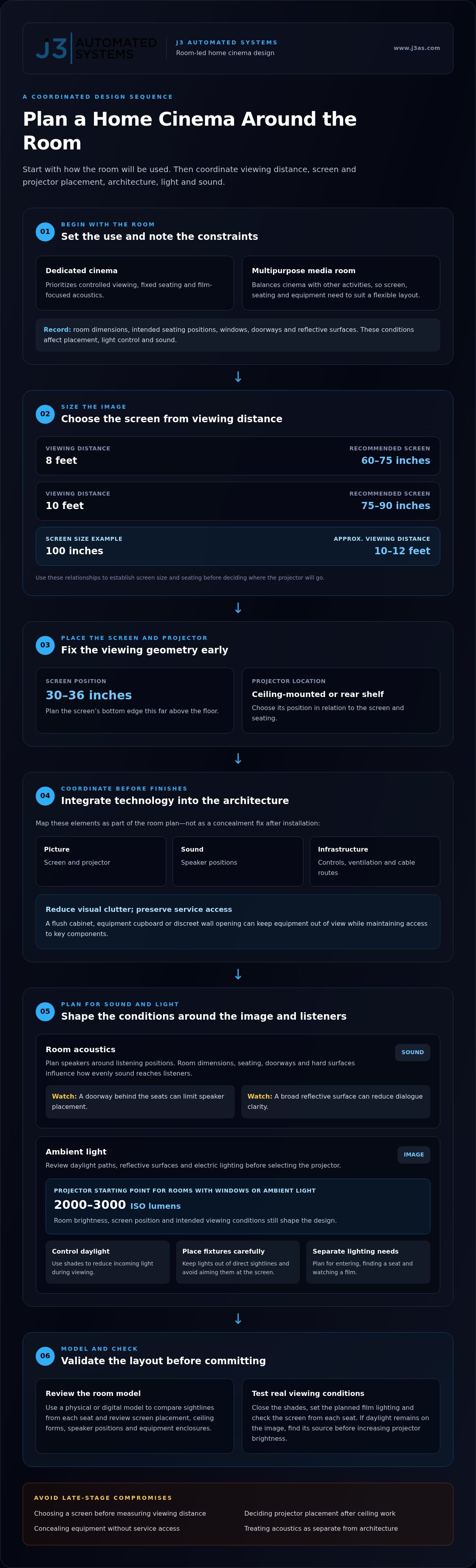
In home cinema design, concealment starts with the room plan, not with hiding equipment after installation. Map the screen, projector, speakers, controls, ventilation and cable routes before choosing finishes. This helps preserve sightlines and keeps equipment accessible for service. A flush cabinet, equipment cupboard or discreet wall opening can reduce visual clutter while maintaining access to key components.
Screen size and seating should inform the architecture. At an 8-foot viewing distance, a screen between 60 and 75 inches is recommended; at 10 feet, the recommendation is 75 to 90 inches. For a 100-inch screen, plan roughly 10 to 12 feet of viewing distance. These relationships help establish projector position, whether ceiling-mounted or housed on a rear shelf. Set the screen’s bottom edge about 30 to 36 inches above the floor.
Acoustic planning needs the same early coordination. Speaker locations, seating, doorways and hard surfaces affect how sound travels through the room. Plan speakers around listening positions, then consider how wall and ceiling finishes shape reflections. For example, a doorway behind the seats can limit speaker placement, while a broad reflective surface can reduce dialogue clarity. Resolve these conditions during layout planning.
A dedicated home cinema prioritizes controlled viewing, fixed seating and film-focused acoustics. A multipurpose media room balances cinema with other activities, so the screen, seating and equipment must suit a flexible layout. Choose based on how you intend to use the room.
For renovation work in The Dominion, identify applicable local building requirements before construction. Include community architectural requirements in your planning, especially for visible exterior changes or work affecting shared property.
Common risks include choosing a screen before measuring viewing distance, deciding on projector placement after ceiling work, and concealing equipment without leaving service access. Another mistake is treating acoustics as separate from architecture. Each can lead to avoidable compromises in image, sound or everyday use.
Frank Ernest Bromige’s cinema architecture, including work designed in 1936-37, offers a reference for studying how architectural character shapes a viewing space. Grade II listed Art Deco architecture can also inspire decisions about geometry, finishes and visual identity. These are design references, not a designation that applies automatically to homes in The Dominion.
Architectural modelling can clarify integration before construction. Build a physical or digital room model showing screen placement, ceiling forms, speaker positions and equipment enclosures. Use it to compare sightlines from each seat and see how a concealed cabinet affects the room. If the space also needs a display area, position it outside the main viewing axis to distinguish décor from cinema functions.
The Acton Dominion Cinema was designed by Frank Ernest Bromige, who lived from 1902-1979. The Acton Dominion Cinema was Grade II listed in England. The Dominion Theatre in London is a Grade II listed building. The Dominion Cinema in Edinburgh is described as an example of Art Deco Streamline Moderne architecture. These examples offer different architectural references for proportion, finishes and visual identity; however, listed status and stylistic character should not be treated as automatic guidance for homes in The Dominion.
Ambient light control
Daylight changes how a projected image reads, so plan for windows before selecting the projector. For rooms with windows or ambient light, a projector producing 2000 to 3000 ISO lumens is recommended. That range provides a useful starting point, but the room’s brightness, screen position and intended viewing conditions still shape the design. A window beside the screen, for example, can create distracting glare even when the projector is bright.
Begin with a simple room review. Note where daylight enters, which surfaces reflect it and how lighting is used during films. A bright wall opposite a window can bounce light toward the screen; a glass door may introduce glare from another angle. Consider these paths together rather than treating each opening as an isolated issue.
- Control daylight: Use shades to reduce incoming light during viewing, especially where windows face the screen.
- Shape electric lighting: Keep fixtures out of the direct sightline and avoid aiming light at the screen.
- Separate functions: Plan distinct lighting conditions for entering the room, finding a seat and watching a film.
Automated lighting and shades can coordinate these adjustments, so a viewing scene can lower room lighting and close shades without separate manual steps. The right configuration depends on window placement, fixture locations and how the household uses the room. Integrated lighting and shade control can make those elements work as one system rather than competing controls.
Choose fixture placement with the image in mind. A ceiling light directly above a glossy screen can reflect into the viewing area; a lamp near the screen may create a bright patch that draws attention away from the film. Recessed or indirect lighting can help keep illumination off the image, while a dim, low-level path light can support movement without washing out the picture.
Test the room under actual viewing conditions. Close the shades, set the lighting to the planned film mode, then check the screen from each seat. If daylight remains visible on the image, identify whether it comes from an uncovered window, a reflective surface or a fixture. Address the source before increasing projector brightness, since added output does not eliminate glare.
For a multipurpose room, preserve useful daylight outside viewing time. Choose shade coverage and lighting controls that suit everyday use as well as film nights. This lets the room stay comfortable during the day, then shift into a controlled cinema environment when viewing begins.
Consultation, modelling, and commissioning
In The Dominion, a home cinema project can include consultation, room modelling, system integration, installation and commissioning. The purpose is to align the room, equipment and controls with how the household will use the theatre.
Consultation and Modelling
Consultation establishes the room’s constraints and priorities before design decisions are fixed. Walk through the intended space, noting its dimensions, doors, windows, ceiling structure, existing finishes and planned seating. Then define whether the room is for films alone or also gaming, music or family use. Each purpose affects the layout and system choices.
A model turns those observations into a coordinated plan. Map the screen, projector, seats, speakers, equipment storage and cable routes together. For example, a ceiling beam may restrict projector placement, while a doorway can shape seating and speaker positions. Review sightlines from every planned seat, along with access to equipment and controls. The model should reveal conflicts while changes can still be made during design.
Use the consultation to set practical priorities. Decide whether the room should preserve its architectural character, keep equipment out of sight or remain flexible for other activities. Record which surfaces, furnishings and lighting must stay. These decisions guide the model and help separate essential features from optional refinements.
Commissioning the Cinema
Commissioning follows installation and turns the planned system into a working experience. It includes checking that sources, display, audio components and controls work together as intended. Test common activities, such as starting a film, switching inputs and adjusting listening levels. A useful handover demonstrates the controls in the room, rather than leaving household members to guess how each function works.
Calibration refines picture and sound for the installed environment. Confirm that the image is correctly framed, then assess dialogue clarity and speaker balance from the primary seats. If a control command fails to trigger the expected action, trace the connection through the system and correct the sequence. Document operating steps and equipment access points so future adjustments don’t require guesswork.
Before sign-off, run through a complete viewing scenario. Start with the room in its normal state, activate cinema mode, play a source, adjust volume, pause playback and return the room to everyday use. This practical sequence can reveal a control mismatch or a component visible from a seat. Resolve those details before the final handover.
Keep the model and final system plan aligned as the project progresses. If a finish, cabinet or seating position changes, update the layout and revisit affected equipment locations. For a home in The Dominion, this disciplined process connects design intent to installation and gives the homeowner a clear view of what the theatre can do and how to operate it.
Room acoustics and surround sound
A luxury cinema pairs a screen and projector suited to the room with surround sound arranged around listeners. Add controlled lighting and acoustic treatments that manage reflections without making the space feel over-treated. The right combination depends on room shape, seating, surfaces and the formats the system will play.
Start with the room’s proportions and listening positions. A space around 15 feet wide and 20 feet long can generally accommodate two seating rows and acoustic spacing. That arrangement still needs clear paths between speakers and listeners. Doors, deep alcoves and large glass surfaces can affect placement, so map them before finalizing speaker locations.
For a primary listening area, position seats to create a consistent soundstage. A suggested acoustic sweet spot sits about two-thirds of the way back in the room. Treat this as a planning reference, then assess actual seats against the room layout. In a two-row arrangement, make sure the rear row doesn’t block sound from reaching listeners in front.
Surround formats should follow the room and intended use. A solid 5.1 system is a practical starting point for a budget-conscious cinema, with speakers arranged to establish front, center and surround channels. Dolby Atmos and DTS:X are additional format references for immersive sound design. Select a system by considering speaker positions, seating coverage and the source material, not by format name alone.
Acoustic treatment helps manage reflections and maintain dialogue clarity. Start by identifying hard, reflective surfaces near the listening area, such as bare side walls or a glass partition. Then consider absorptive or diffusive finishes where they suit the room’s architecture. Avoid treating every surface identically: excessive absorption can make a cinema sound unnaturally subdued, while untreated reflections can blur dialogue and effects.
Low-frequency sound needs particular attention because bass can build unevenly across seats. Test familiar film scenes from each listening position and note where bass feels heavy or weak. Adjust speaker placement and system settings before adding treatment. A calibration pass should balance dialogue, effects and music across the intended seating area, rather than optimizing only one seat.
Modern cinema planning also coordinates audio with video and lighting controls. Set a viewing mode that dims lights without leaving listeners in complete darkness, then check that the screen remains comfortable to watch. During commissioning, play dialogue-led scenes, music and effects-heavy sequences. These examples reveal different weaknesses and help the final setup feel cohesive, rather than impressive only during one demonstration.
Dominion lists Dolby Atmos, DTS:X and SMPTE as technical references for its cinema designs. These references can guide discussions about how a chosen system should serve the room, while the final layout remains tied to listening positions, speaker paths and the balance of dialogue, effects and music. Keep the intended seating area central when reviewing the design, and confirm that each seat receives a coherent presentation. A careful listening check after calibration can show whether changes to placement or settings improve coverage without making one position dominate.
Where is The Dominion located, and what homes or properties are included?
The Dominion is in San Antonio, Texas. For a home cinema project, start with the property’s location and the room selected for the system. A residence within the community may have a dedicated cinema, a converted spare room or a shared media space. Each setting brings different constraints for seating, screen position, equipment placement and construction access.
The Dominion name identifies a place, but not every property or interior. Establish whether the project concerns a primary residence, a guest space or another property used by the household. Then identify the specific room and how it connects to the rest of the home. A cinema above a garage, for example, may have different access and structural conditions from one planned in a ground-floor room.
Property type matters because the building’s existing layout shapes the design. In a newly planned room, screen sightlines, speaker positions, wiring routes and equipment storage can be coordinated with the architecture. In an existing home, doors, windows, ceiling beams and finished surfaces may already set limits. Record those conditions before choosing a layout, then determine which features can be incorporated without compromising how the room is used.
For a remodel, clarify the project boundary before work begins. Note whether the cinema occupies one room or connects to adjacent spaces, such as a lounge or hallway. Identify shared walls, access routes and finishes that need protection. These details help organize installation and keep the cinema’s sound, lighting and controls aligned with the wider property.
Use a simple property review to prepare for design:
- Confirm the San Antonio address and identify the room intended for viewing.
- Record room dimensions, openings, ceiling features and existing finishes.
- Describe the room’s purpose, such as film viewing, family entertainment or mixed use.
- Mark where household members enter, sit and access equipment.
These observations help distinguish a room that can be dedicated to cinema from one that must serve several functions. They also give the design team practical context for planning image, sound and control integration. The Dominion sets the geographic context; the individual home, room and intended use shape the project.
If you’re planning a cinema for a property in The Dominion, discuss your home cinema design in relation to the room’s layout and intended use.
J3 Automated Systems: Cinema-grade home theater
J3 Automated Systems designs cinema-grade home theater systems for homeowners planning a dedicated cinema or refining an existing media room. Its role is to bring the room’s picture, sound and control requirements into one considered system, with equipment and operation shaped around the space.
Where the cinema connects to other rooms, whole-property audio can extend listening beyond the screening space. Automated lighting and shading can also support transitions between everyday use and movie viewing. These elements are useful when you want coordinated control across the room, rather than separate systems competing for attention.
Turn to J3 Automated Systems when you’re ready to translate room plans into an integrated home cinema. Contact J3 Automated Systems to discuss your project.
Shape the experience around your home
The next step is to turn your priorities into a clear design brief. Decide how you want the room to feel, how it will fit into daily life and which architectural details should remain prominent. These choices give the design process direction before equipment and finishes are finalized.
For home cinema design in The Dominion, consider the project as part of the home’s wider experience, not an isolated room. A well-planned cinema can feel intentional within the architecture while making its technology straightforward to use. J3 Automated Systems can help translate those priorities into an integrated plan tailored to the space.
Bring your room details and viewing goals together, then take the next step with J3 Automated Systems. A considered brief is a strong foundation for creating a cinema that feels distinctly yours.
Frequently Asked Questions
What is The Dominion home cinema design?
Home cinema design in The Dominion means planning and integrating a residential viewing space within a home in this San Antonio community. It isn’t a fixed room template; the design responds to the property, household priorities and intended use. The result might be a dedicated cinema or a flexible media room, with technology and finishes coordinated with the home’s layout.
Which home theater designers and installers serve The Dominion?
J3 Automated Systems designs and installs cinema-grade home theater systems for homes in The Dominion. Its work suits homeowners seeking a coordinated system designed around their property and viewing goals. J3 also serves San Antonio, New Braunfels, Seguin, Bandera, Boerne, Austin and San Marcos. For a project in The Dominion, describe the room, how you plan to use it, and how cinema technology should fit the home.
How long does a home cinema installation take, and what are the steps?
The schedule depends on project scope, room readiness and any construction or finish work required. The process moves from consultation and modelling to installation, commissioning and handover. First, define the room’s intended uses and constraints. Then finalize the layout and coordinate equipment with the space. After installation, test system operation, tune picture and sound, and review the controls. A prepared room and one requiring substantial renovation involve different work sequences.
What permits, building codes, or HOA rules apply to home theater renovations in The Dominion?
Before construction, identify applicable local building requirements and review community architectural requirements, especially for visible exterior changes or work affecting shared property.