Custom Software Development in Boerne: App Timelines and Tools
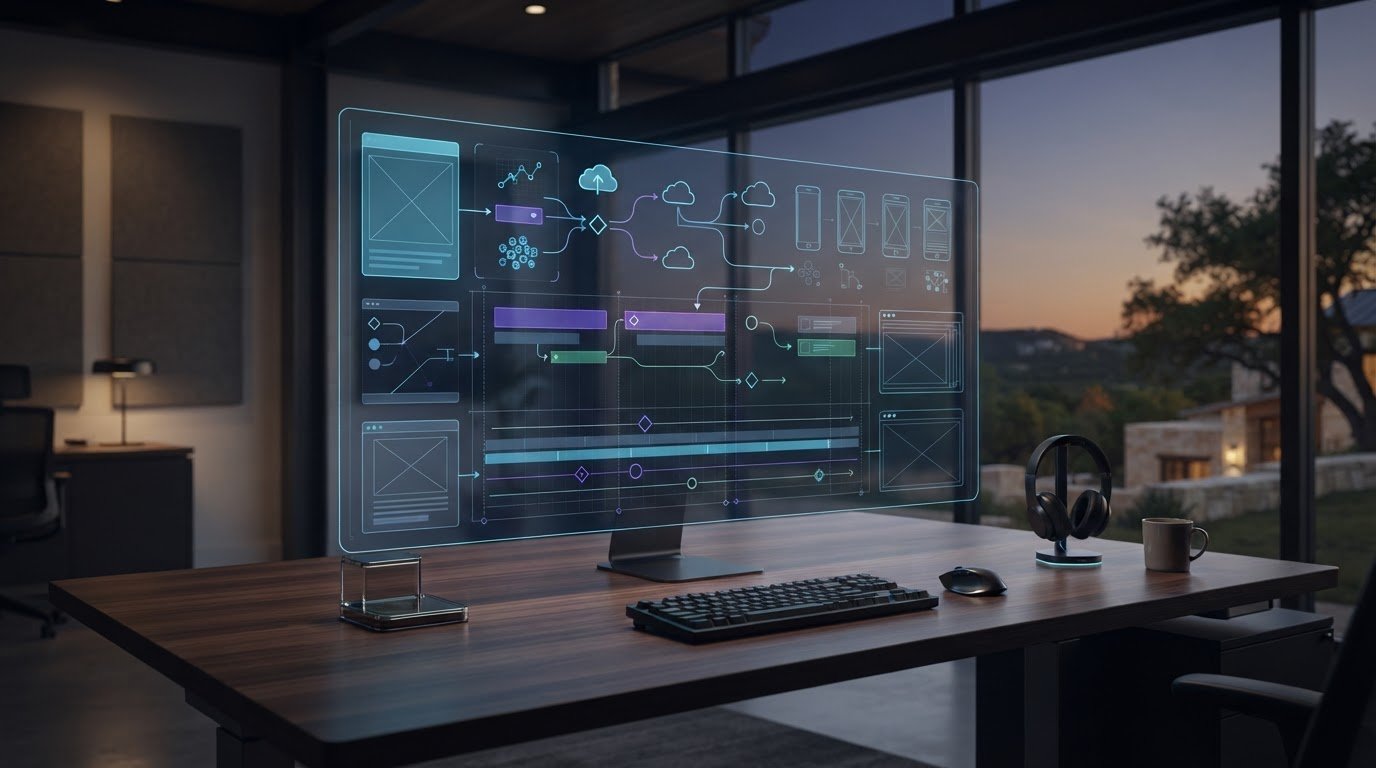
An app’s timeline depends less on the word “app” than on what it needs to do and how it must work with existing systems. For custom software development in Boerne, the schedule is shaped by the required features, integrations, user experience, and testing. A clear, focused scope gives the work a more reliable path from planning to launch.
It’s natural to want a firm delivery date before committing to a project. A useful timeline, however, starts with the operational problem and accounts for the design, development, integration, and refinement needed to solve it without unnecessary complexity.
This article explains what can lengthen or streamline app development, how technology choices and delivery practices shape the process, and how prototyping can clarify priorities early. You’ll also learn how custom software connects with the tools your team already relies on, supporting a coherent workflow instead of adding another isolated system.
Key Takeaways
- Choose web, mobile, cloud, and AI technologies according to the users, workflows, and systems the app must support.
- Build a realistic delivery plan around scope, integration work, testing, and a 20% budget buffer for scope changes.
- A paid discovery or pilot sprint lasting 2-4 weeks can help refine priorities before a full project commitment.
- Map how information moves through your existing tools to identify the integrations that will make a new app fit naturally into daily work.
What Technologies Do You Use in Software Development?
Technology choices shape how an app runs, connects, and evolves. Start with its users, workflows, and required platforms, then choose tools that meet those needs.
Technology Stacks for Web, Mobile, Cloud, and AI
A technology stack combines the languages and tools used to build an application. For a web app, React can build the interface, while Node.js or Python handles server-side work. A mobile app may use native Swift for iOS, Kotlin for Android, or React Native for shared development. Cloud platforms such as Amazon Web Services, Microsoft Azure, and Google Cloud provide hosting and managed services. AI features may use Python and model APIs to classify information or assist with routine tasks.
Frameworks and Supported Platforms
Frameworks provide established structures for building software, while platforms determine where it runs. React, Angular, and Vue are options for browser interfaces; Swift and Kotlin target Apple and Android devices. Identify the required platforms early, including desktop browsers, mobile browsers, iOS, or Android. For example, a customer portal used on office computers and phones needs responsive browser support, while a field app may need dedicated mobile capabilities.
Choosing a Development Stack
Choose a stack by connecting the app’s core tasks to their technical requirements. First, list user roles and workflows. Then identify data sources, integrations, and platform needs. Compare potential tools for maintainability, security requirements, performance, and the team’s ability to support them. A Python service may suit data processing, while a browser-based interface may simplify access for distributed staff. The best fit meets the actual requirements without unnecessary components.
For custom software development in Boerne, technology decisions should reflect the operating environment, not trends alone. A web application can suit teams that need consistent access across devices. A native mobile app may fit when device functions or a tailored mobile experience are central. Cloud hosting can support remote access, while the architecture determines how data and services connect. Each choice affects testing, maintenance, and future changes.
AI belongs in the stack when it addresses a defined task, such as sorting incoming requests or summarizing records. Specify the input, expected output, and human review process first. Then assess how the feature accesses business data and handles errors. A model API can add an AI capability, but the application still needs clear permissions, data handling, and a usable workflow.
Technology choices also shape compatibility. Name the browsers, operating systems, devices, and external services the software must support. For example, documenting Chrome and Safari requirements alongside iOS and Android needs gives developers a concrete test matrix. This clarity helps align architecture, interface design, and quality checks before development begins.
Engineering and delivery practices
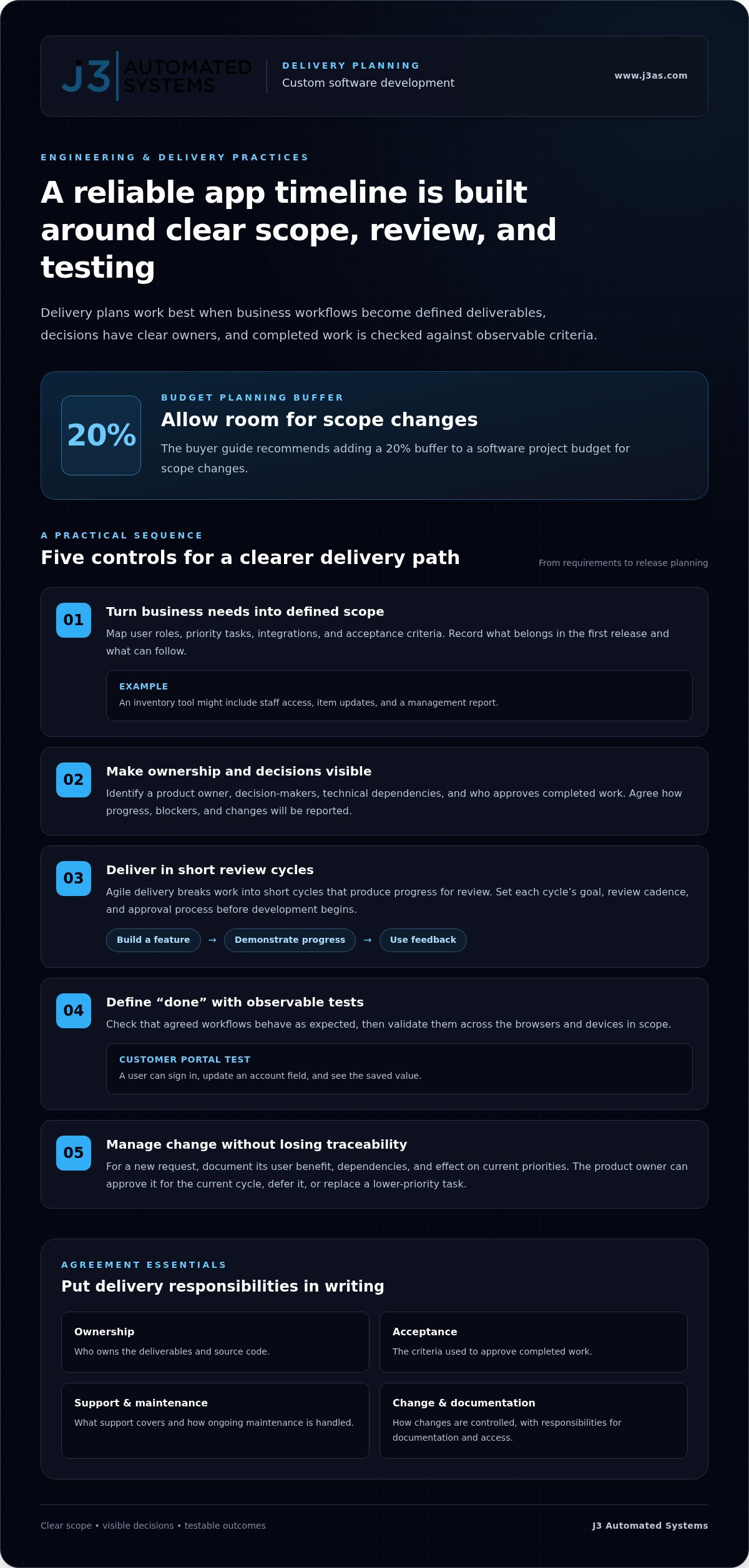
A reliable delivery plan connects defined workflows to tested software in clear stages. A software development contract should state who owns the deliverables and source code, what support covers, and how maintenance is handled. It should also define acceptance criteria, change control, and responsibilities for documentation and access.
Agile Development and Delivery
Agile delivery organizes work into short cycles that produce progress for review. A team might build a login flow, demonstrate it, and use feedback to refine the next feature. Agree on each cycle’s goal, review cadence, and approval process before development begins. This keeps decisions close to the work and helps prevent late surprises in core workflows.
Project Scoping and Delivery
Scoping turns business needs into a defined set of deliverables. Begin by mapping user roles, priority tasks, integrations, and acceptance criteria. For example, an inventory tool might require staff access, item updates, and a management report. Record what belongs in the first release and what can follow. The buyer guide recommends adding a 20% buffer for scope changes to a software project budget.
Before selecting a development company, examine how its consulting process turns requirements into delivery decisions. A useful project plan identifies a product owner, decision-makers, technical dependencies, and the person responsible for approving completed work. It should also explain how the team reports progress, raises blockers, and records changes. These details make project status visible rather than leaving it to informal updates.
Define “done” with observable tests. For a customer portal, that could mean a user can sign in, update an account field, and see the saved value. The team can then validate the workflow across the agreed browsers and devices. Clear acceptance criteria make reviews more efficient because feedback focuses on expected behavior, not personal preference.
Change control protects the schedule without treating every new idea as a problem. When a request comes up, document its user benefit, dependencies, and effect on existing priorities. The product owner can then approve it for the current cycle, defer it, or replace a lower-priority task. This gives the team a consistent way to adapt while keeping delivery decisions traceable.
For custom software development in Boerne, match delivery practices to the project’s operational complexity. A focused internal tool may need a smaller review group than software serving several departments. A well-structured custom software development approach can connect technical milestones with real business workflows, from requirements through release planning.
Prototyping and minimum viable products
A prototype makes an idea tangible before a full application is built. For example, a team can map an approval workflow before automating it.
Product Ideation and Discovery
Discovery turns an operational need into a defined product direction. Document who uses the process, what triggers each task, and where delays occur. For an expense workflow, interview employees and approvers, then map how a receipt moves from submission to review. This helps distinguish essential capabilities from assumptions.
Keep feedback connected to real work. Ask employees to walk through the current process using actual examples, such as a missing receipt or an incorrectly coded expense. Note where they pause, repeat information, or switch between tools. Those observations can reveal requirements a feature wish list may miss.
Next, rank problems by their impact on users and operations. A discovery session might show that staff need clearer status visibility before they need automated reminders. Record the reasoning behind each priority. This gives the product team a traceable basis for deciding what belongs in the first release.
Prototype Development
A prototype demonstrates how selected screens and steps could work together. It may be a clickable interface rather than functioning software. For an expense workflow, it could show receipt upload, category selection, and an approval view. Reviewers can test the sequence and comment on labels, missing steps, or confusing handoffs.
Use the prototype to answer specific questions. Can a new employee find the submission action? Does a manager understand which items need attention? Capture feedback during a structured walkthrough, then revise the screens and workflow. This focused review settles interface decisions before engineers build production logic or connect business data.
A paid discovery or pilot sprint lasting 2-4 weeks can clarify priorities before a full commitment. Define its output in advance, such as a process map, clickable prototype, or tested technical concept. For an AI-assisted task, the pilot might examine sample inputs and human review steps. The purpose is to resolve important uncertainties, not to disguise an unfinished product as a launch-ready system.
A minimum viable product, or MVP, is a usable first release built around a narrow, meaningful outcome. It should complete a real task from beginning to end. For example, an expense MVP might support submission, review, and status visibility, while leaving advanced reporting for later. That boundary keeps the first release focused and testable.
Set success measures before development starts. Track whether users complete the target workflow, where they need assistance, and which requests recur. After release, review those signals with users and decide what to improve next. This creates a disciplined path from concept to a product shaped by observed needs, rather than adding features without a clear purpose.
Software integration with existing tools and platforms
Integration connects a new application with systems that already support daily work. Start by tracing what information must move, where it originates, and who needs access.
API, CRM, and ERP Integrations
An API allows applications to exchange defined requests and responses. For example, a sales tool can send a qualified lead into Salesforce, while an accounting workflow can pass approved invoice details into an ERP. Map each field, direction, and trigger before development. Define what happens when records are incomplete, duplicated, or rejected, so the integration handles exceptions deliberately.
For a CRM or ERP connection, distinguish between reading data and changing it. A scheduling app might retrieve customer details but only update appointment status. That boundary clarifies permissions and helps prevent unintended changes to business records. Document the source of truth for each field, such as whether Salesforce or the new application controls a customer’s current contact information.
Enterprise Integrations and Flexible Architecture
Enterprise integration often involves several departments, systems, and approval paths. Start by diagramming how a request moves from sales to operations, then identify each system involved. A modular architecture can separate the customer portal from billing and reporting components. This helps teams revise one capability without redesigning every connected software solution.
Flexible architecture also requires defining how components communicate. For instance, a shared integration layer can translate order details before they reach inventory and finance platforms. Establish consistent data formats, error handling, and ownership for each connection. These decisions preserve clear responsibility as the application gains departments, workflows, or services.
Scalability and Security in System Integration
Scalability depends on where demand grows. A customer portal may see more users, while a reporting process may handle larger data transfers. Identify those pressure points and design the relevant components to expand independently. Security needs the same care: specify which roles can view or update each data type, then restrict access to what their tasks require.
For example, customer support may need contact details but not payroll records. Use separate permissions for those data sets, and document how the application authenticates connected services. During testing, verify both successful access and rejected requests. This checks the intended boundaries, not just whether a normal workflow works.
Legacy systems can remain part of the design. Suppose an older inventory platform exports a nightly file instead of offering an API. A new application can process the file, validate product identifiers, and report rejected rows for review. Before choosing this approach, document the file format, update schedule, and correction process. Those details determine how reliably the integration supports operations.
Plan integration in a deliberate sequence: inventory systems, map data flows, define permissions, then test realistic cases. Include an error scenario, such as an unavailable CRM or a rejected ERP update. Clear logs and a defined recovery step help staff understand what happened and resume work without duplicating records.
Custom app and software development in Boerne
Boerne businesses can compare software development services in the area by examining the work, delivery approach, and operational fit. Geography matters less than whether a team understands the workflows and systems involved.
Comparing Local, Regional, and National Providers
San Antonio offers a nearby comparison point for Boerne businesses. Its custom software development service listings averaged 10.4 contacts per company, and the median employee-size band was 1-10 employees as of Sep 24, 2026. According to RevenueBase, 20 companies were in the 1-10 employee band, 10 in the 11-50 band, and 3 in the 51-200 band.
These figures describe San Antonio listings, not project quality. A local specialist may be familiar with your operations, while a national agency may bring broader teams or niche expertise. Compare relevant project examples, team structure, communication process, and ability to support your integrations.
Web, Mobile, and Business Application Specialties
Developers serving the Boerne area may specialize in browser-based products, mobile apps, or internal business applications. Match the specialty to the work: a customer portal needs clear account workflows, while a mobile field tool may need to support staff away from desks. Ask how the team handles the required platforms, data flows, and user roles.
For example, a business app that routes service requests needs defined status changes and staff permissions. A web specialist, mobile specialist, or business-systems team may approach that work differently. Review examples that resemble your use case, then assess how the proposed software connects with your existing processes.
Choosing a Boerne Software Developer
Choose a developer by assessing how they turn business needs into working software. Look for clear discovery, documented requirements, realistic testing, and a defined process for approving changes. A useful project example should explain the original problem, the delivered functionality, and how users interact with it.
During initial discussions, describe a key workflow from start to finish. For example, explain how a customer request enters your system, who reviews it, and what happens next. Notice whether the development company asks about exceptions, integrations, and ownership. Those questions show whether planning accounts for the full process.
Project Risks and Hidden Costs
Risks often arise from unclear requirements, overlooked integrations, and ongoing maintenance needs. List the systems, user roles, and unusual cases that the software must handle. The buyer guide recommends including 12-24 months of maintenance in the software project budget, and budgeting 15-20% annually for software updates and security patches.
Also define who owns source code and documentation, what support includes, and how requested changes are priced. A project that connects to an older system may require extra work to map data and handle errors. Review those dependencies before finalizing delivery milestones.
For custom software development in Boerne, compare providers against your workflows and long-term support needs. Discuss your custom software project to explore a solution aligned with your business processes.
J3 Automated Systems: Cinema-grade home theater
J3 Automated Systems designs cinema-grade home theater experiences that bring picture, sound, lighting, and room control into a considered whole. This is a natural next step when you’re planning a dedicated viewing space or want technology across your property to work together with less friction.
For example, a home theater can be part of a broader environment that includes whole-property audio and automated lighting and shades. Commercial spaces may benefit from building automation for HVAC/BMS, where coordinated systems support daily operations. The right arrangement depends on the space, how people use it, and how the systems need to connect.
If you’re planning a theater or integrated environment, contact J3 Automated Systems to discuss your project.
Shape the Next Step Around Your Workflow
A useful next step is to choose a business process that needs a more deliberate digital structure. Define who uses it, what decision or task it supports, and where it should connect with your existing operations. That gives planning conversations a practical starting point and keeps the proposed solution aligned with how your organization works.
For custom software development in Boerne, J3 Automated Systems can help shape custom web apps and internal tools, including AI business process integration. Its work also includes cinema-grade home theater, whole-property audio, and automated lighting and shades, bringing intelligent systems into both business processes and physical spaces.
Whether your priority is a more coherent internal workflow or a thoughtfully integrated environment, begin with the outcome you want to create. Contact J3 Automated Systems to discuss a project direction that fits your needs.
Frequently Asked Questions
How long does it take to build an app?
An app’s timeline depends on its scope, integrations, and review process. A staff directory with a few workflows differs from a customer portal that moves records between business systems. Data migration, access to external platforms, and decision-making speed also affect delivery. Define the first release’s essential tasks and identify who will review each stage to create a practical schedule.
How much does a custom app cost?
Project pricing depends on the scope and is provided after a quote request. Scope, user roles, integrations, data migration, security requirements, and maintenance all affect the work involved. For example, an app that connects to an existing inventory system has different requirements from a standalone request form. A clear feature list and description of current tools help shape a useful project estimate.
Looking for a local team?
J3 Automated Systems serves businesses and residential clients across Texas, including Boerne, San Antonio, New Braunfels, Seguin, Bandera, Austin, and San Marcos. For a business process project, prepare a short description of the task, the people involved, and the systems it touches. Those details give an initial conversation a practical focus and help clarify a suitable next step.
What are the Benefits of Custom Software?
Custom software can be designed around your organization’s workflows instead of forcing staff into a generic process. A tailored internal tool might bring separate approval steps into one interface or present role-specific information in a dashboard. It can also connect selected business systems. Its value comes from addressing a defined operational need; a simple existing tool may suit a basic task better.
Will you work with my existing engineering team?
Yes, your engineering team can contribute technical knowledge during planning and implementation. Its familiarity with current systems, access controls, data structures, and deployment practices can inform design decisions. For example, team members can explain how an internal service handles customer records or what a suitable test environment requires. Agree on decision ownership and handoffs early to keep responsibilities clear.
What custom software development companies serve Boerne, Texas?
J3 Automated Systems provides custom software development for businesses in Boerne and across Texas. Its services include custom web apps and internal tools, plus AI integration into existing business processes. If you’re seeking custom software development in Boerne, outline the task, intended users, and systems it must connect with. This creates a focused starting point for discussing your operational requirements.
What custom software development services are available in Boerne, TX?
Services include custom web apps, internal business tools, dashboards, integrations, and AI integration into existing processes. For example, a dashboard can bring selected operational information together, while an internal tool can support a specific team workflow. For custom software development in Boerne, define the outcome you need first, then identify the capabilities essential to achieving it.
How much does custom software development cost in Boerne, Texas?
Project pricing depends on the scope and is provided after a quote request. Scope, integrations, data migration, user permissions, and maintenance needs shape the work. A portal connected to an existing CRM has different requirements from a standalone internal tool. Describe the business process, current platforms, and expected users to support a project-specific estimate.