AI Workflow Automation in San Antonio: From Manual Processes to Integrated Operations

What if the most useful AI investment isn’t a new tool, but a better-designed process? Repetitive administrative work, scattered business information, and manual handoffs can slow a team down. Automating a flawed workflow can create new risks, too. A practical approach to AI workflow automation San Antonio organizations can use starts by mapping the process, then deciding where AI adds value and where human review should remain.
Automation should work alongside the software and practices your staff already use. The goal isn’t to force every task through AI; it’s to connect the right systems, reduce avoidable friction, and keep people involved where judgment matters. This article explains how to identify a workflow to improve, assess its value and risks, and plan an implementation that fits your operation. It also covers how discovery, process mapping, custom software, and AI integration can come together in a well-engineered system for an organization in San Antonio or elsewhere in the region.
Key Takeaways
- Spot workflow friction in repeated data entry, approval delays, and manual handoffs before selecting an automation approach.
- Understand how triggers, process steps, decisions, and handoffs shape a workflow across connected business applications.
- Compare AI with rules-based automation, and reserve AI for tasks where variable inputs call for it.
- Evaluate AI workflow automation San Antonio opportunities with a practical roadmap and baseline measures such as rework and queue volume.
- See how J3 Automated Systems brings discovery, process mapping, custom development, and implementation together in a tailored engagement.
Why San Antonio businesses are exploring AI workflow automation
A request arrives by email, someone copies its details into a business system, and a colleague forwards it for approval. When information is split across tools, the same facts may be entered more than once, decisions can sit in an inbox, and staff must track each handoff manually. These small points of friction accumulate across routine operations, even when everyone is doing their part.
AI workflow automation is most effective when it addresses a defined process rather than adding technology for its own sake. AI workflow automation uses artificial intelligence within a structured sequence of business tasks to interpret information, support decisions, and move work between steps. The broader idea of What is Workflow Automation? helps distinguish an organized flow of tasks from a collection of disconnected automations.
There is no universal starting point for San Antonio organizations. A process that works well for one team may create little value for another, depending on its systems, workload, approval practices, and tolerance for exceptions. Mapping the work first helps reveal whether the real obstacle is repetitive handling, unclear ownership, or a decision that needs better information.
Which business workflows are candidates for automation?
Look for recurring tasks with identifiable inputs and a clear next step. Document intake might capture information and send a file to the appropriate queue. A workflow might route requests by category or prepare a summary for a reviewer. Updating records after an approved request may also be suitable when the underlying rules are stable.
Separate predictable steps from judgment calls. A system may sort a complete form, while a person reviews missing information or decides how to handle an unusual case. To prioritize, consider how often the task occurs, how long work waits, where errors create exposure, and how much staff attention the process consumes. Repetition alone isn’t enough; the workflow should address a meaningful operational burden.
Why local organizations need a workflow-first assessment
Existing software, data practices, and team habits shape what a workable design looks like. One organization may rely on shared inboxes and manual approvals; another may have structured records but still struggle with duplicate entry. A workflow assessment traces the actual route of information, including informal workarounds, before deciding what to connect or automate.
Changes also need to fit daily operations. Teams need a clear path for handling exceptions, correcting information, and continuing essential work if an automated step needs attention. A carefully scoped design can preserve familiar responsibilities while improving how tasks move between people and systems. This makes automation a deliberate operational improvement, not a disruptive layer added on top.
How AI workflow automation connects tools, data, and human decisions
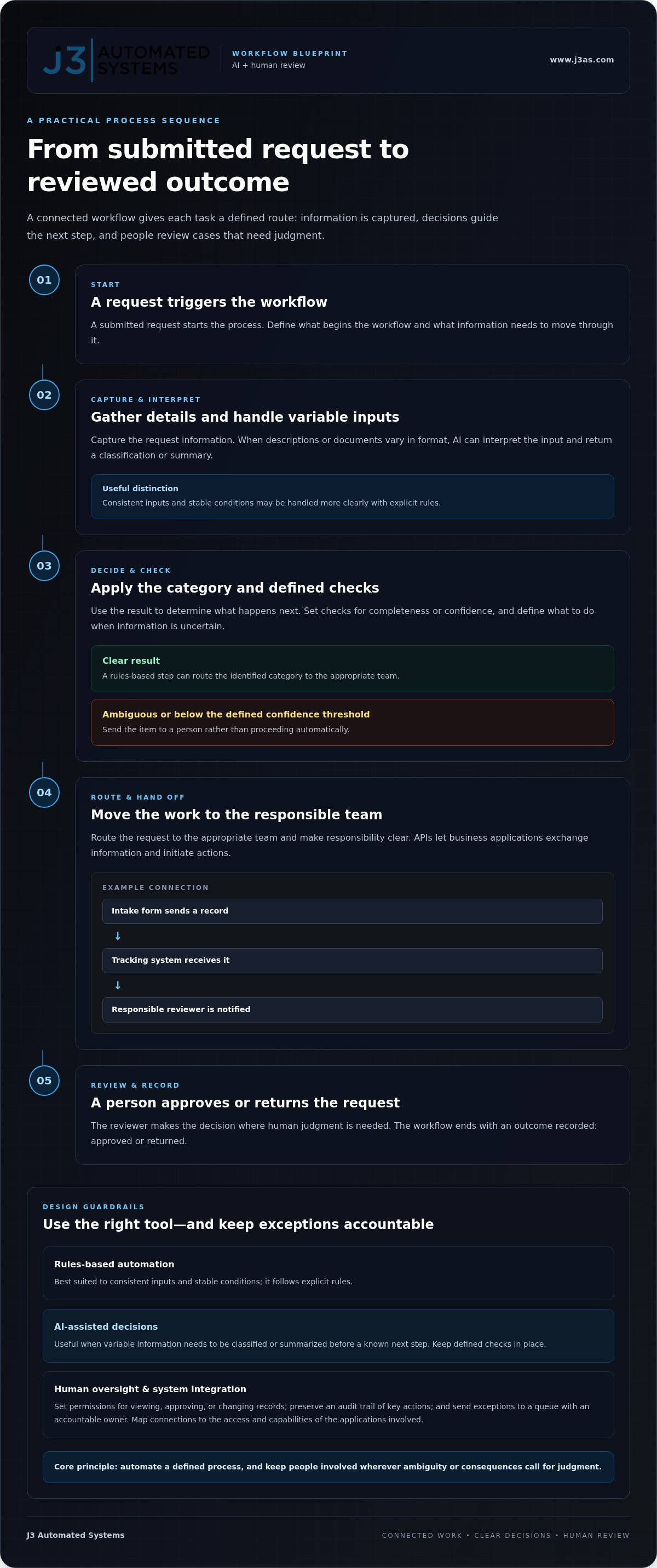
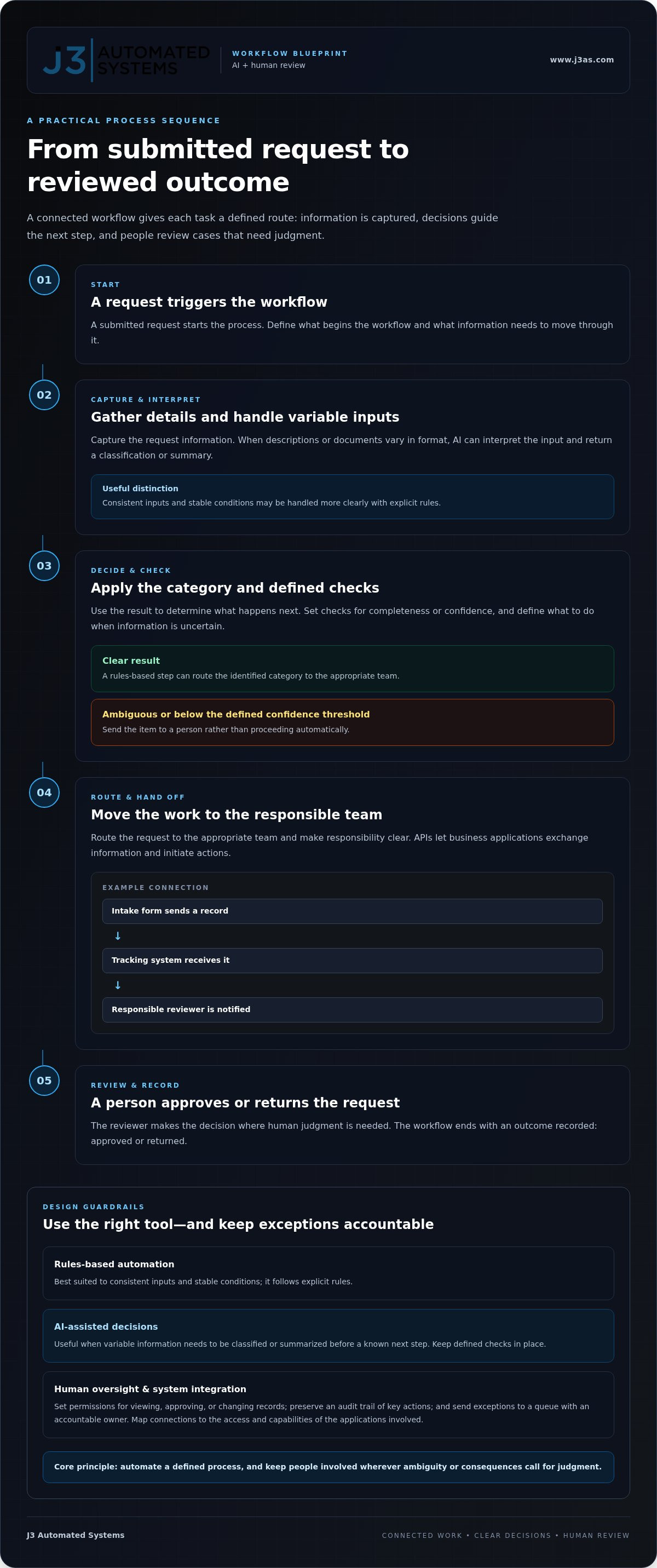
A connected workflow gives each task a defined route: a trigger starts the process, steps transform or move information, decisions determine what happens next, handoffs assign responsibility, and an outcome records completion. For example, a submitted request could trigger information capture, pass through a category decision, route to the appropriate team, and finish when a reviewer approves or returns it.
APIs, or application programming interfaces, let business applications exchange information and initiate actions. A workflow might send a record from an intake form to a tracking system, then notify the person responsible for review. The design depends on each application’s access and capabilities, so map the integration to the systems involved rather than assuming every connection will work the same way. This is why AI business process automation needs careful engineering around data flow and responsibility.
AI can interpret inputs that don’t arrive in a uniform format, such as written descriptions or documents, and return a classification or summary. The workflow can then apply defined actions, such as routing an item or placing it in a review queue. Deterministic automation follows explicit rules; AI-assisted decisions interpret variable information and should remain subject to defined checks.
Where AI adds value beyond rules-based automation
If a process has consistent inputs and stable conditions, an if-then rule may be clearer and easier to maintain than AI. AI is more useful when information varies and must be classified or summarized before a known next step. Define checks for confidence or completeness, along with an escalation path for uncertain results.
Illustrative example: An incoming service request may include a short description worded differently each time. AI could suggest a category and summarize the request, while a rules-based step routes that category to a team. If the description is ambiguous or the classification falls below the workflow’s defined confidence threshold, the system can send it to a person instead of proceeding automatically. This is an example, not a client result.
How human oversight and system integration fit together
Human review belongs at points where ambiguity or consequences warrant judgment, such as approving a sensitive change or resolving conflicting information. Oversight doesn’t need to interrupt every routine action. A well-designed workflow sets clear permissions for who can view, approve, or change records; preserves an audit trail of key actions; and directs exceptions to a queue with an accountable owner.
For AI workflow automation San Antonio organizations can put into practice, integration and oversight should be designed together. Specify what information moves between systems, what the AI may recommend, which actions run automatically, and when a person takes control. Organizations planning that architecture can explore tailored AI workflow engineering.
AI versus rules-based automation: choosing the right approach in San Antonio
Choose an automation method based on the work, not the appeal of a particular technology. If a task follows stable conditions and produces a predictable result, explicit rules may be all it needs. If information arrives in varied formats or language, AI may help interpret it before the workflow applies its next step. A well-designed system can use both.
For organizations evaluating AI workflow automation San Antonio, the distinction matters: complexity should serve the process, not become an end in itself. Compare approaches against the task’s inputs, decision logic, oversight needs, and maintenance demands.
| Consideration | Rules-based automation | AI-assisted workflow |
|---|---|---|
| Input variability | Structured and consistent | Variable or less structured |
| Decision logic | Defined conditions and outcomes | Interpretation, classification, or summary |
| Oversight | Review exceptions and rule changes | Check outputs and escalate uncertainty |
| Maintenance | Update logic when processes change | Review instructions, output quality, and controls |
When rules-based automation is the better fit
Rules work well when inputs are structured, conditions repeat, and the expected outcome is clear. For example, a system can route an approval request according to its department or send a scheduled notification before a known deadline. Because the logic is explicit, teams can test each condition and understand why an action occurred.
That simplicity is a strength. If a task doesn’t require interpretation, adding AI may introduce unnecessary complexity. Keep the rules aligned with the real process, and define what happens when information is missing or a request falls outside the usual pattern.
When an AI-assisted workflow may be appropriate
AI may be useful when a process receives variable documents, natural-language requests, or descriptions that need categorization before routing. It can suggest a summary or classification, while defined workflow rules control what happens next. In knowledge-intensive workflows, specialized solutions like Clarami show how AI workspaces assist professionals in organizing complex research and drafting documentation. Set limits on what AI can initiate and provide a review path when information is unclear.
People should retain final authority when a mistaken output could carry material consequences. For example, AI might organize a request for review, while an authorized staff member decides whether to approve it. Purpose-built interfaces can make those review steps easier to manage; custom web app development in San Antonio can connect workflow logic with the tools and screens staff need.
In practice, the strongest design may combine methods: rules handle clear, repeatable actions, AI assists with variable information, and people resolve consequential exceptions. Map each decision to the simplest reliable method, then test the workflow against ordinary cases and edge cases before expanding its role. J3 Automated Systems provides discovery, custom software development, and AI integration for business processes. Organizations planning an integrated system can explore J3’s business automation engineering.
A practical roadmap for evaluating AI workflow automation
A reliable evaluation turns an automation idea into a testable operating design. Start with the work itself, then examine the information, decisions, safeguards, and people involved. For AI workflow automation San Antonio organizations are considering, this sequence helps teams assess value and risk before making a change part of daily operations.
- Define the process. Name the business outcome and where the workflow begins and ends. Identify its owner, the people involved, and the systems that support each step.
- Map exceptions. Record the usual path alongside incomplete submissions, unusual requests, corrections, and other cases that currently require staff judgment. These exceptions often reveal where automation needs a human handoff.
- Assess the data. Determine what information the process uses, where it comes from, who should access it, and whether it’s consistent enough for the planned task. Treat privacy and security as design requirements, not later additions.
- Design controls. Set permissions, approval points, escalation routes, and a way to review actions. Clarify what the system may do automatically and what requires a person’s decision.
- Pilot the workflow. Test a bounded version using representative cases before expanding its role. A contained pilot can reveal how the design behaves in real operating conditions.
- Refine the design. Compare results with agreed criteria, address gaps, and adjust instructions, rules, integrations, or review steps before deciding whether to extend the workflow.
How to select a first workflow and establish a baseline
Choose a process with recurring effort, visible friction, and consequences that can be contained during testing. Document its owner, systems, decision points, and exception cases, then agree on measures the team can track consistently before and after implementation. Useful baselines include time between handoffs, rework frequency, or the volume of items waiting in a queue. Use measures that reflect the process’s purpose, not just activity counts.
How to pilot, evaluate, and refine the system
A pilot should test ordinary work and the cases most likely to challenge the design. Include unusual inputs, missing information, permission boundaries, and failure handling. Confirm that staff can identify an exception and continue the process if an automated step doesn’t behave as intended.
Invite feedback from the people who perform or supervise the workflow; they can identify friction a technical test may miss. Before expanding, compare observed performance with agreed operational criteria, including baseline measures and the quality of decisions or handoffs. If the system falls short, refine it and test again rather than broadening its reach prematurely. J3 Automated Systems brings discovery, mapping, custom development, and AI integration together to implement tailored workflows. Learn more about AI workflow automation with J3.
J3 Automated Systems: engineering AI workflow automation in San Antonio
Effective automation takes more than selecting an AI capability. It requires understanding how work moves through an organization, which systems hold the necessary information, and where employees need to review or act. J3 Automated Systems engineers AI workflow automation for San Antonio organizations, shaping each system around the business process rather than a generic software template.
J3’s work includes discovery and workflow mapping, custom development, AI integration, and implementation. This sequence connects the operational need to the system design: how information enters, what happens to it, which applications need to exchange data, and how staff interact with the result. One accountable team coordinates those decisions and handoffs, aligning process design, software engineering, and implementation.
What a tailored J3 engagement can address
J3 develops custom internal tools and integrates AI to support repetitive administrative work, including moving and handling information across business processes. The design depends on the workflow: its users, existing applications, data flows, decision points, and exceptions. Rather than forcing the process into a standard template, J3 shapes the software architecture and user experience around the organization’s requirements and operations.
A tool must make sense to the people doing the work, while its connections and controls support the process behind the interface. Discovery and mapping identify what to automate, where AI has a defined role, and which actions remain with staff. Implementation brings those pieces into an integrated system, with engineering decisions coordinated through one team.
How to take the next step in San Antonio
Start with one recurring workflow, described in practical terms. Note what initiates it, who handles each step, which systems are involved, where delays or repeated work occur, and what a better outcome would look like. You don’t need a finished technical specification; a clear account of the current process gives the engineering conversation a grounded starting point.
J3’s team uses that context to shape an approach around the project, connecting workflow requirements to discovery, custom software, AI integration, and implementation. The system is designed to fit the way the organization operates and support a deliberate transition into the new process.
If you’re considering a workflow automation project, share your workflow with J3 Automated Systems to begin a conversation about an engineered approach.
Shape the next step for your operations
An automation project is an opportunity to design not only a more efficient sequence of tasks, but also a more intentional way for people and systems to work together. Picture the future state: what should move without intervention, where should staff retain judgment, and what should a clear handoff look like? Those choices turn a technology discussion into an operational direction.
For organizations in San Antonio, New Braunfels, Seguin, Bandera, Boerne, Austin, and San Marcos, the next step doesn’t have to be a sweeping transformation. A single well-chosen process can provide a foundation for thoughtful improvement while keeping the focus on the people who rely on it. Define the outcome you want, then shape the system around that purpose.
Discuss an AI workflow automation project with J3 Automated Systems and take a considered first step toward more connected operations.
Frequently Asked Questions
What is AI workflow automation?
AI workflow automation uses artificial intelligence as one component in a business process, alongside software rules and human actions. For example, a system might interpret a customer message, prepare a draft response, and place it in a staff member’s queue rather than sending it automatically. For AI workflow automation San Antonio teams are considering, define what the system is authorized to do and which decisions remain with employees.
Which business processes are best suited to AI workflow automation?
Processes involving recurring information handling can be good candidates, particularly when employees spend time sorting incoming material or preparing records for follow-up. A service team, for instance, might use AI to classify requests by topic, then have staff confirm the category before assigning work. Start by checking how frequently the task occurs, how much manual effort it takes, and whether errors or unusual cases can be caught before they affect customers or operations.
Is AI workflow automation suitable for small businesses in San Antonio?
Yes, it can suit a small business if the project addresses a specific operational burden and fits the team’s capacity to manage it. A business needn’t automate an entire department; it might begin with a narrow task, such as organizing incoming inquiries for review. The same principle applies in San Antonio, New Braunfels, Seguin, Bandera, Boerne, Austin, and San Marcos: choose a contained process and keep responsibility clear.
How does AI workflow automation integrate with existing business software?
Integration connects the workflow to relevant applications so information can move between them without unnecessary re-entry. Depending on the systems involved, this may use APIs, approved data exports, or a custom-built connection. Before implementation, identify which records need to move, how fields correspond, and what permissions are required. Test how the workflow responds to missing or duplicated information, and make sure staff can trace where a record came from.
Can AI workflow automation work without removing human review?
Yes. A workflow can use AI to prepare, sort, or suggest information while requiring an employee to review the result before a consequential action. For example, AI might draft a response to a complex inquiry, but a staff member approves it before it reaches a customer. Define who reviews flagged cases, what information they need to make a decision, and how corrections are recorded for later process improvements.
How do businesses measure the results of workflow automation?
Businesses can compare consistent measures before and after implementation, such as average time to complete a task, the number of records returned for correction, or the volume of unresolved items. Pair these operational measures with quality checks: did information reach the right person, and did staff need to intervene appropriately? Track the same definitions throughout the evaluation so a change in measurement doesn’t look like a change in performance.
What is the difference between AI automation and rules-based automation?
Rules-based automation follows explicit conditions, such as sending a notification when a due date arrives. AI automation can interpret less structured material, such as a request written in different language, and produce a suggested category or summary. For specialized language processing and automated voice intake, check out Ubestream - AI Translation Service Provider to see how AI interprets dynamic customer interactions. The distinction isn’t a choice between old and new technology. A workflow can use rules for predictable actions, AI for interpretation, and human review where context or accountability calls for it.